iOS 26.6 Spam Call Blocking and Lawyer Ethics: What to Know
This article evaluates whether Apple's iOS 26 Call Screening and the iOS 26.6 blocked-contacts alert create a material ethics risk for lawyers under ABA Model Rule 1.4, and provides a configuration checklist to mitigate that risk.
- Jurisdiction
- United States
- Court
- ABA (Model Rule 1.4 analysis)
- AI tool named
- iOS 26 Call Screening
- Ruling date
- Jul 30, 2026
- Source document
- View primary court order ↗
- Last verified
- Jul 30, 2026
Lex Machina Review is an independent risk-tracking and reference resource. Nothing on this site is legal advice, and using it does not create an attorney-client relationship. Every record is reviewed against primary sources but may not reflect the most current status of a matter — always verify directly against the cited court order, rule text, or a licensed attorney before relying on it.
Companion explanation — secondary to the source document above
The risky moment is ordinary: a lawyer opens Settings on a work iPhone, turns on Call Screening, and files it mentally under spam control rather than client communication. That is where the ethics problem starts. For lawyers, iOS 26 Call Screening and the iOS 26.6 blocked-contacts alert are not automatically disqualifying, and they are not a reason to throw away a useful screen against robocalls. But if the feature is configured so unknown callers never ring through, the lawyer has created a real ABA Model Rule 1.4 problem in the one place small practices can least afford ambiguity: the intake surface.
The first distinction is not technical trivia. Apple describes call screening as a feature that can screen calls from numbers not in Contacts; when screening is used, the caller is asked for information and the recipient can see a transcript before deciding whether to answer.[1] Hiya describes the same user-facing workflow as a prompt for the caller’s name and reason, with a short transcript displayed before pickup.[2] PCMag’s coverage of the iOS 26.6 update identifies the practical choices that matter: “Never,” “Ask Reason,” and “Silence.”[3]
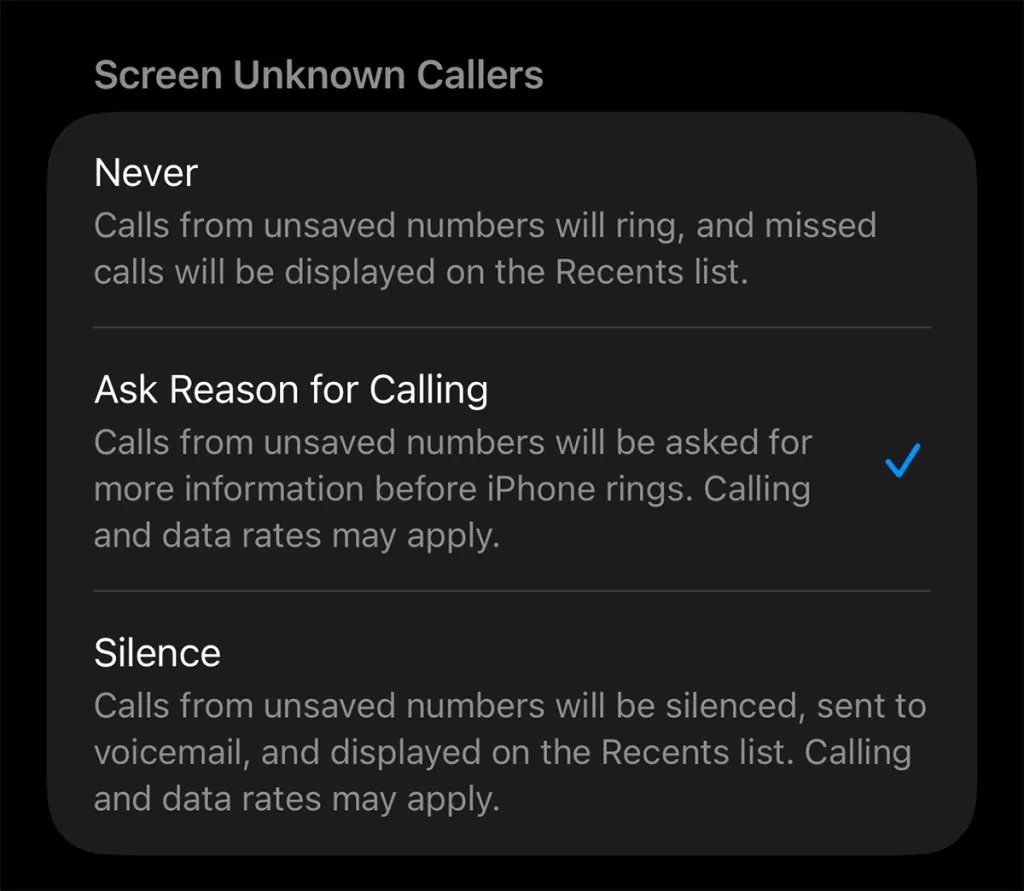
Those choices are materially different. “Never” leaves the old phone behavior in place. “Ask Reason” makes the caller state why they are calling, then gives the lawyer a chance to answer with more context. “Silence” routes unknown callers away without the same interruption. For a lawyer, that last setting is where spam reduction can become a communications failure.
The ethical issue is receipt and response, not whether the feature uses AI
ABA Model Rule 1.4(a) requires a lawyer to keep the client reasonably informed and to promptly comply with reasonable client requests for information.[4] The rule does not say a lawyer must answer every ringing phone. It also does not excuse a workflow that predictably hides reasonable client communications until someone happens to inspect a log.
That is why “Ask Reason” and “Silence” should not be treated as two versions of the same convenience setting. With “Ask Reason,” a frightened client calling from a borrowed phone may still reach the lawyer’s screen. A court clerk using a number that does not appear in Contacts may still generate a prompt. Opposing counsel trying to resolve a deadline dispute may still produce a visible interruption. With “Silence,” the lawyer’s later answer to “when did you know they called?” may depend on whether anyone checked voicemail and missed calls.
No state bar opinion cited in the available materials specifically addresses iOS 26 Call Screening as of July 2026. The better analysis is therefore a synthesis, not a claim of direct authority. ABA Formal Opinion 512 says lawyers using generative AI tools must have a reasonable understanding of the tool’s capabilities and limitations, while Florida Opinion 24-1 similarly treats competence as including attention to risks created by AI-assisted technology.[5][6] Applied to call screening, the relevant failure mode is simple: the phone may reduce nuisance calls by adding friction exactly where law practice sometimes needs low-friction access.
Unknown callers are not all spam callers
The Oklahoma Bar Association’s spam-call guidance is a useful bridge because it starts from the same pressure small firms feel every day. Jim Calloway’s 2025 article advises lawyers on blocking spam and robocalls, but it also acknowledges the awkward professional reality: lawyers “occasionally do have to answer” calls from unknown numbers.[7] That sentence is the whole problem in miniature.
A solo lawyer may use one mobile number for clients, courts, delivery confirmations, mediators, doctors, family, and the daily wash of robocalls. Blocking nuisance numbers is not reckless. It is often the only way to keep the phone usable. But once the phone becomes part of the law office communication system, the settings are no longer merely personal preference. They are part of the firm’s procedure for receiving client information.
The defensible question is not “did the lawyer use Apple’s AI feature?” It is “could a reasonable client still reach the lawyer, and did the lawyer have a reliable process for discovering missed attempts?”
A defensible configuration workflow
The safe approach is a small procedure, not a dramatic technology ban. A lawyer or risk manager should be able to write down what setting was selected, why it was selected, what exceptions were created, who checks the aftermath, and how clients are told to bypass the screen.
| Control | Practical position |
|---|---|
| Call Screening setting | Use Never or Ask Reason; avoid Silence on a lawyer’s primary work number. |
| Client instructions | Tell current clients to save the firm number and explain that calls from saved contacts are less likely to be screened. |
| Firm caller identity | Register firm numbers for branded caller identity where available. |
| Missed-call review | Audit missed calls and voicemail at least weekly, and more often for active litigation or intake-heavy practices. |
| Manual block lists | Review blocked contacts and remove stale or accidental blocks. |
| Documentation | Record the selected setting, review cadence, client notice, and staff responsibility. |
The first control is the most important: do not use “Silence” on a number that functions as the lawyer’s main client, court, or intake line. “Ask Reason” is not frictionless, and some callers will mishandle any prompt. But it preserves an opportunity for the call to reach the lawyer’s attention. “Never” is also defensible if the lawyer decides that any screening friction is unacceptable for that number.
The second control is client-side. Engagement letters, intake emails, and first-call scripts should tell clients to save the firm’s number. This is not a magic exemption from all possible filtering, but it addresses the specific risk created when the phone treats “not in Contacts” as the screening category.
The third control is caller identity. Numeracle’s discussion of iOS 26 branded caller ID points firms toward Apple Business Connect as a way to register business identity for calls where the ecosystem supports it.[8] That is not an ethics safe harbor, and it will not fix every carrier or device behavior. It does, however, reduce the chance that a legitimate firm call looks indistinguishable from the spam economy.
The fourth control is the one that usually matters after something goes wrong: review. Someone has to check missed calls and voicemail on a schedule. In a small firm, that may be the lawyer. In a two-lawyer office, it may be a shared administrative task. The point is not to create a ceremonial policy. The point is to avoid a week-old missed call from a client becoming discoverable evidence of a communication system nobody owned.
The review should include more than voicemail. If the phone logs screened or missed calls separately, the responsible person should know where that record lives. If staff answer return calls, they should know how to identify a screened caller, how to escalate a court or client call, and when to interrupt the lawyer. A good procedure is short enough to follow and specific enough to audit.
The iOS 26.6 blocked-contacts alert exposes a quieter problem
iOS 26.6 did not introduce Call Screening. The AI call screening feature arrived with iOS 26; the July 2026 iOS 26.6 issue that matters here is the blocked-contacts alert.[3] PCMag reported the iOS 26.6 update as adding a warning for users who have accumulated too many blocked contacts.[3] 9to5Mac reported the alert in May 2026 and described it as appearing when the user tries blocking too many contacts.[9] AppleInsider, covering the July 27, 2026 release, likewise treated the alert as part of a modest iOS 26.6 update.[10]
The reported number should be handled carefully. Third-party reporting describes an approximately 20,000-contact device-level block limit, but the available materials do not identify that number as an Apple-published specification.[9][10] The important ethics point does not depend on treating the figure as official. The problem is that a lawyer who followed ordinary advice to block nuisance callers may have built a long device-level block list without realizing that future blocks could fail or that old blocks might include numbers that should not remain blocked.
That matters more in law practice than in ordinary consumer use. A number that looked abusive two years ago may later be reassigned. A client may call from a family member’s phone. A witness may use a work line that suppresses identity. A court department may appear only as an unfamiliar switchboard number. The lesson from the iOS 26.6 alert is not panic over a cap; it is that device-level blocking deserves periodic review.
What to document if the phone is part of the law office
A lawyer does not need an enterprise telecom program to make this defensible. The documentation can be a one-page internal note. It should identify the work numbers covered, the Call Screening setting selected, whether branded caller identity registration was attempted, how clients are instructed to save the number, who reviews missed calls, and how often the blocked list is checked.
- Set the lawyer’s primary work iPhone to Never or Ask Reason, not Silence, unless another reliable intake channel is assigned and monitored.
- Add known clients, courts, co-counsel, opposing counsel, mediators, experts, and key agency contacts to Contacts where appropriate.
- Tell clients at intake to save the firm number and to use the designated backup channel for urgent matters.
- Register firm caller identity where available, including Apple Business Connect if the firm’s call program supports it.
- Check missed calls, screened calls, and voicemail on a defined cadence, with a tighter cadence during active litigation deadlines.
- Review manual blocked contacts and consider carrier-level spam tools for high-volume nuisance calls rather than relying only on device blocks.
Carrier-level filters may be the better place to absorb high-volume spam pressure when a lawyer’s device block list has become unmanageable. The research materials identify Verizon Call Filter and T-Mobile Scam Shield as examples of carrier-level tools that do not count against the device-level blocked-contact list. That does not make them risk-free. They should be evaluated the same way: what gets blocked, what gets logged, who reviews mistakes, and what happens when a legitimate caller is filtered.
The staff training point is easy to understate. If a receptionist, paralegal, or virtual assistant helps return calls, that person should know that screened-call transcripts are not client file summaries, not conflict information, and not proof that the caller was unimportant. A transcript saying “legal question” may be useless. A transcript saying “deadline today” may require immediate escalation. The human procedure has to catch what the phone cannot classify responsibly.
How far the AI-sanctions context should carry
The broader legal AI environment matters, but it should not be overstated. The reported $110,000 Couvrette sanction in the District of Oregon in 2025 involved AI-generated filing content, not call screening. It is useful only as climate evidence: courts and bars are no longer treating AI failure modes as exotic surprises. It is not a precedent saying that Apple Call Screening violates Rule 1.4.
For call screening, the more persuasive ethics record remains narrower. Rule 1.4 requires reasonable communication. ABA Formal Opinion 512 and Florida Opinion 24-1 support the proposition that lawyers must understand technology failure modes when they use AI-assisted tools.[5][6] The Oklahoma Bar Association’s spam-call guidance shows why lawyers are tempted to block aggressively while still needing to receive some unknown-number calls.[7] Put together, those sources justify a workflow requirement, not a blanket prohibition.
The position a lawyer can defend today
A lawyer can defend using iOS 26 Call Screening on a work iPhone if the feature is configured around communication duties rather than convenience alone. “Ask Reason” is materially safer than “Silence” because it keeps a reasonable path for unknown callers to reach the lawyer’s attention. “Never” remains the cleanest option for a phone number that serves as the firm’s main intake line or urgent client channel.
The weak position is different: turning on “Silence,” never telling clients how to bypass screening, letting years of manual blocks accumulate, and having no assigned review of missed calls. If a client later says they called repeatedly from an unfamiliar number and nobody responded, the problem will not be that the lawyer used an Apple feature. The problem will be that the lawyer cannot explain the communication workflow.
The practical answer is therefore limited but firm: use “Never” or “Ask Reason,” avoid “Silence” on client-facing numbers, register caller identity where available, tell clients to save the firm number, audit missed calls weekly, review block lists, and document the decision. That is the difference between a convenience setting and a law-office communication procedure.
References
- Screen and block calls on iPhone, Apple Support
- What you need to know about Apple’s iOS 26 Call Screening, Hiya
- Apple Releases iOS 26.6 With Handy Feature If You Get a Lot of Spam Calls, PCMag
- Rule 1.4: Communications, American Bar Association
- ABA issues first ethics guidance on a lawyer’s use of AI tools, American Bar Association, July 2024
- Florida Bar Ethics Opinion 24-1, The Florida Bar, January 2024
- Stop the Madness: How to Block Spam Calls and Robocalls, Oklahoma Bar Association, 2025
- Apple’s iOS 26 Branded Caller ID: What Businesses Need to Know, Numeracle
- iOS 26.6 adds new alert when you try blocking too many contacts, 9to5Mac, May 26, 2026
- Better protection for Apple Maps leads a modest iOS 26.6 update, AppleInsider, July 27, 2026
Related records
Tool profile
Browse tool evaluations →Governing regulation
Browse the obligations tracker →Preventive workflow
Browse verification workflows →
Report a correction or tip
Spotted an outdated figure, a misstated fact, or a ruling this case record should reflect? Public comments are disabled for this content given the professional cost of a misreported case outcome, penalty amount, or rule text — use the structured correction channel instead.
Report a correction or tip for this record →