
How to Audit What ChatGPT Knows About You in 8 Steps
This workflow walks legal professionals through an auditable procedure to discover what personal data ChatGPT has stored, export it, delete memory, and lock down privacy settings — creating a documented record that satisfies professional responsibility obligations under ABA Opinion 512.
- Applicable role
- attorney
- Workflow stage
- review
- Primary source
- ABA Formal Opinion 512
The cleanest way to begin a ChatGPT privacy audit is also the most uncomfortable one: open ChatGPT and ask, What do you know about me? In June 2025, Forbes writer Barry Collins reported that this prompt surfaced stored details about his health issues, his children, and his personal finances. The point is not that every lawyer will see the same categories. The point is that ordinary conversation fragments can harden into a profile that the user may not have realized was being preserved and reused. [1]
For legal professionals, the practical question is narrower than a consumer privacy checklist. The question is: what can you verify today, what can you export, what can you delete or disable, and what dated record can you keep if a client, court, regulator, insurer, or managing partner later asks what happened?

This is practical audit guidance, not legal advice. It is designed to create a baseline audit file: prompt results, screenshots, export receipts, deletion notes, and settings confirmations. It will not make past disclosure uncertainty disappear. It can, however, replace vague reassurance with a record of what was found and what controls were in force as of a specific date.
The Eight-Step Audit Flow
| Step | Action | Audit artifact to keep |
|---|---|---|
| 1 | Ask ChatGPT what it knows about you | Screenshot or PDF of the prompt and response |
| 2 | Inspect saved memory directly | Screenshot of the memory page and listed items |
| 3 | Request a full data export | Export request confirmation and downloaded archive metadata |
| 4 | Delete unwanted memories and related chats | Deletion log with date, time, and scope |
| 5 | Turn off model training for future chats | Screenshot of the data-control setting |
| 6 | Disable memory if the account should not retain profile facts | Screenshot of memory controls after change |
| 7 | Use Temporary Chat only with its retention limits understood | Screenshot of Temporary Chat use and retention note |
| 8 | Confirm account-security controls, including MFA and Lockdown Mode where appropriate | Screenshot of security settings and enabled controls |
Do the steps in order. If you delete first and export later, you may lose the ability to show what was visible when the audit began. If you change controls without recording the prior state, you will still have better settings, but a weaker audit trail.
1. Ask the Discovery Prompt Before Touching Settings
Start with a fresh ordinary chat, not Temporary Chat, and ask: What do you know about me? Then follow with: What do you remember about my work, clients, matters, employer, family, health, finances, location, and preferences? The first answer may be general. The second tends to test the categories that matter most for a professional-responsibility review.
Do not argue with the answer yet. Save it. Export the page to PDF or take screenshots that show the date, account context if visible, and complete response. If the response says it has no stored memory, keep that too. A negative result is still an audit artifact.
Treat the result as a lead, not as a complete inventory. ChatGPT’s answer to a prompt is not the same thing as a formal data export, and it may not enumerate every retained chat or setting. Its value is that it converts an invisible memory system into text you can inspect. That is why the Forbes example is useful: it shows the moment when a user stops guessing and sees the categories ChatGPT can reflect back. [1]
2. Inspect Saved Memory Directly
Next, go to ChatGPT’s memory controls and review the saved memories themselves. OpenAI’s Memory FAQ states that saved memories are used to make responses more helpful, and that sensitive information can appear in memory if the user shares it. That is a restrained way to say something lawyers should take seriously: if the user typed the fragment often enough or clearly enough, it may no longer be just a past-chat fragment. It may be part of the account’s working context. [2]
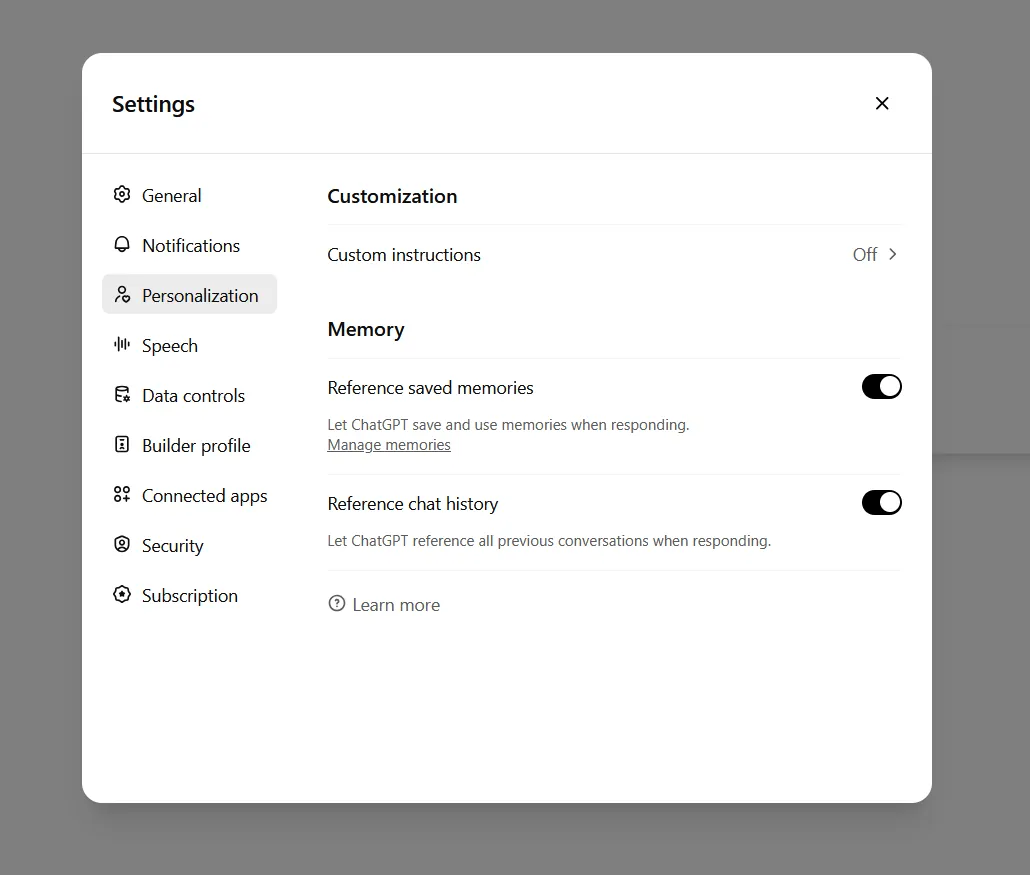
Record the memory page before deleting anything. Capture each listed memory, including innocuous-looking preferences. In a legal workplace, a memory such as “prefers summaries for employment litigation matters” may be less sensitive than a client name, but it still says something about the user’s practice, workload, or employer. If the page contains family, health, finance, client, matter, strategy, or workplace information, mark those entries for later deletion in your log.
The most important caveat comes from OpenAI’s own help language: deleting a saved memory does not remove mentions of the same information from past chats. Those chats must be deleted separately if the goal is to remove the underlying conversation history where the detail appeared. [2]
3. Request the Data Export Before Cleanup
After the prompt review and memory inspection, request a ChatGPT data export. OpenAI’s export help article says export requests may take up to seven days, and the download link expires after 24 hours. That timing matters for anyone creating a defensible record: request the export when someone is actually available to retrieve and preserve it. [3]
Keep three things: the export request confirmation, the email or notification delivering the export link, and the downloaded archive itself. Record the date and time of download. Store it in the same controlled location where the firm would keep other incident-response or risk-review material, not in a personal downloads folder that will be swept away by a laptop replacement.
Do not overstate what the export proves. It is evidence of what the platform made available through the export mechanism at that time. It is not an independent forensic image of OpenAI’s internal systems, and it does not resolve whether prior content was used for model training before a user changed the relevant settings. That distinction becomes important in Step 5.
4. Delete Memories, Then Deal With the Chats That Mentioned Them
Once the export is preserved, delete the saved memories that should not remain operational. Work from the memory page and your log, not from memory. For each item, note the exact wording or a redacted description, the category of concern, the deletion date, and whether related chats were also identified.
Then search the chat history for the underlying mentions. If a memory says the user has a child with a medical condition, deleting the saved memory removes one layer of reuse, but it does not erase the chat where the condition was typed. OpenAI states this directly: memory deletion and chat deletion are separate. [2]
Deleted chats also require careful wording. OpenAI’s chat and file retention policy says deleted chats are removed from the UI immediately and scheduled for permanent deletion within 30 days, unless retention is required for legal or security reasons. The audit record should therefore say “deleted from the account interface and scheduled for deletion under platform policy,” not “permanently erased today.” [4]
That wording may feel cautious. It is also the difference between a record that tracks the vendor’s documented behavior and a record that promises more than the user can verify.
5. Turn Off Model Training for Future Chats
OpenAI’s Data Controls FAQ says the “Improve the model for everyone” setting defaults to On, and that turning it off stops future conversations from being used to train models. It also says turning the setting off does not remove prior conversations from training data if they were already used. [5]
For an audit file, the screenshot needs to show the setting after it is changed. If possible, capture the page title, account identifier, toggle state, and date. In the log, describe the effect narrowly: “Disabled use of future conversations for model improvement under OpenAI’s Data Controls FAQ.” Avoid a broader statement such as “removed my data from training.” The source does not support that.
This is also where older informal use becomes hard to cleanly certify. A lawyer who used ChatGPT before the firm had a policy may be able to show the setting is now off. They may be able to show what the account export contains. They may not be able to prove that no prior conversation was ever used for training. The record should preserve that distinction rather than try to paper over it.
6. Disable Memory If the Account Should Not Build a Profile
After cleaning the existing memory entries, decide whether memory should remain available at all. For many legal users, especially those using a personal ChatGPT account for work-adjacent drafting, research triage, or administrative brainstorming, the safer baseline is to turn memory off unless the firm has approved a different configuration.
OpenAI’s Memory FAQ separates saved memory from chat history, and it makes clear that memory can include sensitive information if the user provides it. The professional concern is not that every memory is harmful. It is that the account can carry facts from one context into another, while the lawyer experiences the chat box as a blank page. [2]
For the audit file, preserve a screenshot showing memory disabled. If the user leaves memory enabled, the file should say why. A defensible exception might be a non-client administrative account used only for generic internal templates. A weak exception is “I like the convenience.” Convenience may be real, but it does not answer the later question of why persistent profile storage was appropriate for the account.
7. Use Temporary Chat Without Pretending It Is Instant Disappearance
Temporary Chat is useful, but it is not a magic privilege container. GC AI’s May 2026 privacy analysis notes that Temporary Chat content is deleted within 30 days but can be produced under valid legal process during that window. That is the caveat most consumer privacy checklists glide past and most lawyers cannot afford to. [6]
Use Temporary Chat for low-retention interactions where the user does not want the exchange saved in chat history or used to build memory. Do not use it as permission to paste client confidences, nonpublic deal facts, sealed material, health information, employee investigations, or privileged strategy. A temporary interface changes retention behavior; it does not convert a third-party AI service into a closed legal workroom.
Preservation obligations are the hard exception. If a preservation order or similar obligation applies, including the May–September 2025 preservation-order window in OpenAI-related litigation, deletion and Temporary Chat settings cannot be treated as a guarantee of total removal. The workflow can still document what the user did. It cannot certify disappearance where legal-process obligations may override ordinary retention expectations.
8. Confirm Security Controls After the Data Controls Are Set
Only after the data audit is underway should the workflow move to ordinary account hardening. Multifactor authentication matters. So does reviewing connected apps, active sessions, browser extensions, and whether the account is being used on unmanaged devices. Those controls reduce account-takeover and leakage risk, but they do not answer the first audit question: what was stored, exported, deleted, and disabled?
PCMag’s June 2026 privacy-control guide identifies Lockdown Mode as one of the available controls and describes it as disabling browsing, deep research, agent mode, and file downloads to reduce prompt-injection exposure. That is especially relevant where a lawyer uses ChatGPT against outside web pages, uploaded files, or agentic workflows rather than simple drafting prompts. [7]
The artifact here is straightforward: screenshots showing MFA enabled and, where appropriate, Lockdown Mode enabled. If Lockdown Mode is not enabled, note the reason. For example, a user may need browsing for a non-client research task. The important point is that the exception is explicit rather than accidental.
What the Audit File Should Contain
At the end of the workflow, assemble one dated file. It does not need to be elaborate. It does need to be complete enough that someone else can understand what was checked without relying on the user’s memory.
- Discovery prompt result: screenshot or PDF of “What do you know about me?” and any follow-up category prompt.
- Memory inventory: screenshot of saved memories before deletion, with sensitive entries categorized in a log.
- Export evidence: export request confirmation, delivery notice, download date, and preserved archive location.
- Deletion record: memories deleted, chats deleted from the UI, and wording that reflects scheduled deletion rather than instant permanent erasure.
- Control state: screenshots showing model-improvement setting, memory setting, Temporary Chat practice, MFA, and Lockdown Mode if used.
If the account was used for client or matter-specific work, preserve the audit file before making any broader privilege, waiver, notification, or disciplinary analysis. The workflow is the factual baseline. It is not the legal conclusion.
Use Narrow Claims in the Final Record
The final note should avoid both panic and over-certification. Good audit wording sounds like this: “On July 25, 2026, I reviewed ChatGPT’s prompt-visible knowledge, inspected saved memories, requested and preserved a data export, deleted identified memories and related chats where located, disabled future model-improvement use, disabled memory, and confirmed account-security controls. Deleted chats are subject to OpenAI’s stated retention and legal-obligation exceptions.”
That is not a dramatic sentence. It is better than a dramatic sentence. It says what was done, when it was done, and where the caveats are. For a legal professional cleaning up informal AI use, that is the first defensible line between uncertainty and evidence.
References
- Find Out What ChatGPT Knows About You — And How To Make It Forget, Forbes, June 2025
- Memory FAQ, OpenAI Help Center, updated July 2026
- Exporting your ChatGPT history and data, OpenAI Help Center
- Chat and file retention policies in ChatGPT, OpenAI Help Center, updated July 2026
- Data Controls FAQ, OpenAI Help Center, updated July 2026
- Is ChatGPT Private?, GC AI, May 2026
- ChatGPT Knows Too Much: 8 Ways to Lock Down Your Privacy, PCMag, June 2026
Grounded in
This procedure is grounded in ABA Formal Opinion 512, independent of any single documented case. See the Regulation tracker for the governing text.
Cases this step would have prevented
No cases have been explicitly linked to this checklist yet. See Risk Digest for documented incidents generally.
← Back to WorkflowsReport a correction or tip
Spotted an outdated figure, a misstated fact, or a ruling this workflow checklist should reflect? Public comments are disabled for this content given the professional cost of a misreported case outcome, penalty amount, or rule text — use the structured correction channel instead.
Report a correction or tip for this record →