
Five ChatGPT Settings Every Lawyer Must Configure Now
A five-step security checklist for legal professionals using ChatGPT. Each action is grounded in ABA Model Rules 1.6 and 1.1, and the February 2026 Heppner ruling, which made account-level data controls essential for preserving confidentiality.
- Applicable role
- attorney
- Workflow stage
- pre-filing
- Primary source
- ABA Formal Opinion 512
The reason a ChatGPT settings page now belongs in a lawyer’s confidentiality analysis is not theoretical. In February 2026, a Southern District of New York ruling in United States v. Heppner held that consumer AI chats lacked a reasonable expectation of confidentiality where the platform’s terms permitted model training and disclosure.[1] That is a narrow holding from one district court, not a universal privilege rule. It is still the kind of ruling risk committees remember after everyone else has moved on.
For lawyers using Free, Plus, or Pro accounts, the practical question is no longer “Is ChatGPT useful?” It is whether the account has been configured in a way the lawyer could defend under ABA Model Rule 1.6’s duty of confidentiality and Rule 1.1 Comment 8’s technology-competence obligation. ABA Formal Opinion 512 adds the sharper point: before entering confidential client information into a self-learning generative AI tool, a lawyer generally needs informed client consent.[2]
That does not make consumer ChatGPT privilege-safe. It means the account settings are now part of the minimum file a careful lawyer should be able to show: what was enabled, when it was checked, and what categories of information were still prohibited.
The Five Settings To Check First
If you have fifteen minutes, do the account work before drafting another prompt. This is the short version of the workflow:
| Action | Where it fits in the risk analysis | What to document |
|---|---|---|
| Turn on MFA or enroll in passkey-based protection | Prevents account takeover from stolen credentials | Date enabled and recovery method reviewed |
| Turn off model training in Data Controls | Reduces platform-side use of chats for model improvement | Screenshot or note showing training disabled |
| Use Temporary Chat only with the 30-day retention caveat | Avoids chat history persistence but does not mean instant disappearance | Matter policy stating what may never be entered |
| Consider Advanced Account Security if available | Bundles passkeys, no SMS recovery, shorter sessions, and training disablement | Enrollment status and backup-key custody |
| Separate consumer accounts from Business or Enterprise workflows | Avoids confusing individual settings with admin-enforced defaults | Tier, workspace owner, and applicable policy |
This is deliberately not a complete AI governance program. It is the account-level hardening a lawyer can perform now, before the firm’s policy committee finishes arguing over definitions.
1. Turn On MFA Before You Worry About Prompt Style
Multi-factor authentication is the least glamorous item on the list and the easiest to defend. Microsoft’s widely cited figure, reported by EDRM in the law-firm security context, is that MFA can block 99.9% of account-compromising attacks.[3] That number maps cleanly to the kind of failure lawyers actually suffer: reused passwords, phishing, infostealer malware, and a personal account that quietly becomes a document repository.
The stolen-credential backdrop is not hypothetical. Group-IB found more than 100,000 stolen ChatGPT credentials on dark-web markets in 2024, a figure later discussed in ESET’s 2026 ChatGPT safety guide.[4] That number is dated and may understate current exposure, but it is enough to make password-only access indefensible for any lawyer using the account for work-adjacent analysis.
Use an authenticator app, passkey, or hardware security key where available. Do not leave SMS as the only meaningful recovery path if stronger recovery options are available. If the account belongs to a solo lawyer or small-firm partner, write down who can recover the account if the lawyer loses a device. A locked-out account is inconvenient; a hijacked account containing matter prompts is a disciplinary exhibit waiting to happen.
2. Disable Model Training In Data Controls
The Data Controls setting is where casual AI use starts to collide with privilege analysis. If a consumer account allows chats to be used to improve the model, the lawyer has a harder time arguing that the communication was treated as confidential. Heppner made that concern concrete by tying the absence of a reasonable expectation of confidentiality to consumer platform terms that permitted training and disclosure.[1]
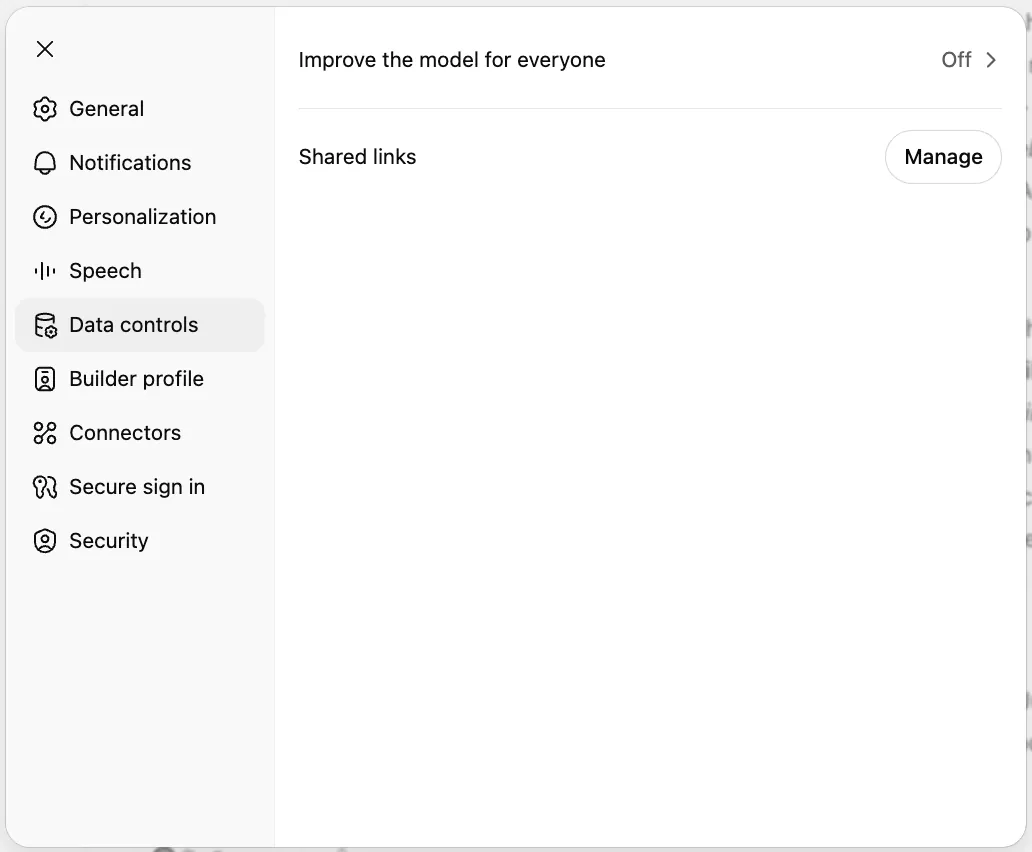
Turn off the setting that permits chats to be used to improve the model. Then document it. A screenshot, dated note, or internal verification log is more useful than a vague assurance that “the AI policy covers this.” Policies are cheap. A checked setting is evidence.
This setting still does less than many lawyers want it to do. It does not turn a consumer account into a privileged workspace. It does not erase the need for informed consent when confidential client information would be entered into a self-learning generative AI tool. ABA Formal Opinion 512 remains the controlling ethics checkpoint for that question.[2]
The distinction matters because many lawyers use “confidential” to mean three different things at once: the prompt is not visible to opposing counsel, the vendor is not training on it, and nobody can retrieve it later. Those are different claims. Turning off training addresses one of them. It does not answer retention, access, subpoena, incident-response, or client-consent questions.
3. Treat Temporary Chat And Deletion As Retention Controls, Not Privacy Shields
Temporary Chat sounds like the kind of feature a lawyer wants. It avoids saving the chat to history and may reduce some downstream exposure. The caveat is the part that belongs in the policy: deleted chats and Temporary Chats can remain on OpenAI’s servers for up to 30 days.[5][6]
That caveat should change behavior. Do not paste a settlement posture into Temporary Chat because the interface feels ephemeral. Do not paste a witness statement because the conversation will not appear in the sidebar. Do not assume deletion means disappearance. In a legal setting, “not in my visible history” is not the same as “not retained by the provider.”
Use Temporary Chat for low-sensitivity work where avoiding account-history persistence is useful: turning a public court rule into a plain-language checklist, brainstorming neutral questions for a CLE panel, or reformatting non-client-specific research notes. If the prompt contains facts that would matter in a privilege log, a settlement conference, a personnel dispute, or a board investigation, Temporary Chat is the wrong comfort.
4. Enroll In Advanced Account Security If Your Account Has It
OpenAI’s Advanced Account Security, reported as rolling out in April and May 2026, is worth attention because it bundles several controls lawyers routinely configure poorly when left to do them one by one: passkey-only login, disabled SMS recovery, shorter login sessions, and automatic disabling of model training.[7][8]
That bundle changes the baseline. A passkey or hardware-key login reduces the damage from a stolen password. Removing SMS recovery closes a common account-recovery weakness. Shorter sessions reduce the time a compromised browser session remains useful. Automatic training disablement prevents a lawyer from relying on memory or a half-read help article for the most legally significant consumer-account toggle.
As of the mid-2026 reporting, feature availability and pricing should be treated as current facts, not promises. ZDNET also noted a Yubico partner discount of $68 for two security keys in connection with the rollout.[7] A firm should not build a permanent policy around that price. It can, however, decide that two hardware keys cost less than explaining why an associate’s reused password opened a trove of matter-related prompts.
Enrollment creates its own housekeeping requirement. Someone must know where backup keys are stored, who may approve recovery, and whether the account is personal, firm-owned, or part of a managed workspace. The worst version of strong authentication is the one a busy lawyer bypasses because nobody planned recovery.
5. Know Whether You Are In A Consumer Account Or A Managed Business Workspace
Free, Plus, and Pro users control key settings individually. Business and Enterprise users operate under different defaults and administrative controls. OpenAI states that it does not train on Business and Enterprise customer data by default, and those workspaces can use admin-enforced controls that individual consumer accounts do not provide.[9]
That distinction is often lost inside firms. A lawyer says “we use ChatGPT,” but the risk analysis depends on which ChatGPT environment is being used, who administers it, whether training is off by default, and whether the user can change relevant settings. A partner’s Plus account and a firm-managed Enterprise workspace are not interchangeable just because the prompt box looks familiar.
For breach context, the account-tier question belongs next to a broader review of OpenAI security incidents and legal risks for law firms. For the ethics framework beyond settings, including Heppner and ABA Formal Opinion 512, use the broader evaluation of free AI tools for lawyers. Those are not substitutes for the five checks here; they explain why the checks are only the beginning.
The Red List Still Controls The Workflow
After the settings are configured, the rule for consumer accounts remains blunt. Do not paste client-confidential material into a consumer ChatGPT account unless the ethics analysis has been completed and the required informed consent has been obtained. Account hardening reduces exposure; it does not authorize the input.
- Personally identifiable information, especially client, employee, patient, or minor data
- Deal terms, valuation assumptions, negotiation positions, and settlement amounts
- Litigation strategy, case assessments, witness statements, and expert work product
- Internal investigation materials, employee discipline facts, and board-level deliberations
- NDA-covered content, nonpublic contracts, source materials, and third-party confidential information
A useful consumer-account prompt is scrubbed before it is clever. Replace names with roles. Remove dates that identify the matter. Use public facts where possible. Ask for structure, issue spotting, drafting alternatives, or plain-language explanations without feeding the system the facts that would create the waiver fight.
What To Record After The Fifteen Minutes
The point of this exercise is not to create a beautiful policy binder. It is to create a small, verifiable record that a lawyer, practice group, or knowledge-management lead can check later.
- Account tier: Free, Plus, Pro, Business, Enterprise, or another managed workspace
- Authentication status: MFA, passkey, hardware key, recovery method, and backup-key location
- Data Controls status: model training disabled, with date checked
- Retention warning: Temporary Chat and deleted chats may remain server-side for up to 30 days
- Use restriction: Red List categories barred from consumer-account prompts
For firms dealing with unmanaged personal use, this same record also belongs in the governance discussion. Shadow AI use is not solved by pretending nobody has a Plus account. It is managed by identifying the account, hardening it, restricting inputs, and moving sensitive workflows into approved systems. The broader organizational problem is covered in the analysis of the AI governance gap as an active legal risk and the shadow-IT review of personal AI use outpacing firm governance.
Configure the account now. Save the evidence that the settings were checked. Then keep the harder line intact: no consumer-tier setting makes it professionally safe to paste confidential client information into ChatGPT without the privilege, confidentiality, competence, and informed-consent analysis the ethics materials require.
References
- AI Privilege Waivers: SDNY Rules Against Privilege Protection for Consumer AI Outputs, Gibson Dunn
- Legal ChatGPT Tips, Prompts and Use Cases, American Bar Association, 2025
- Enhancing Security in Law Firms: The Imperative of Multi-Factor Authentication, EDRM, June 2024
- Is ChatGPT Safe? 2026 Guide, ESET
- Is ChatGPT Private?, Spellbook
- Is ChatGPT Private?, GC AI
- ChatGPT Advanced Account Security, ZDNET
- OpenAI Rolls Out Advanced Security for ChatGPT Accounts, SecurityWeek
- Enterprise Privacy at OpenAI, OpenAI
Grounded in
This procedure is grounded in ABA Formal Opinion 512, independent of any single documented case. See the Regulation tracker for the governing text.
Cases this step would have prevented
No cases have been explicitly linked to this checklist yet. See Risk Digest for documented incidents generally.
← Back to WorkflowsReport a correction or tip
Spotted an outdated figure, a misstated fact, or a ruling this workflow checklist should reflect? Public comments are disabled for this content given the professional cost of a misreported case outcome, penalty amount, or rule text — use the structured correction channel instead.
Report a correction or tip for this record →