
The Solo & Small Firm AI Paradox: Why High Adoption Isn't Translating to Higher Revenue (and How to Fix It)
Solo practitioners and small firms are adopting AI faster than any other segment of the legal profession, yet most haven't adjusted their pricing, lack a formal AI policy, and aren't seeing a financial return. This guide provides a practical, data-driven roadmap for turning AI efficiency into real profitability without a BigLaw budget.
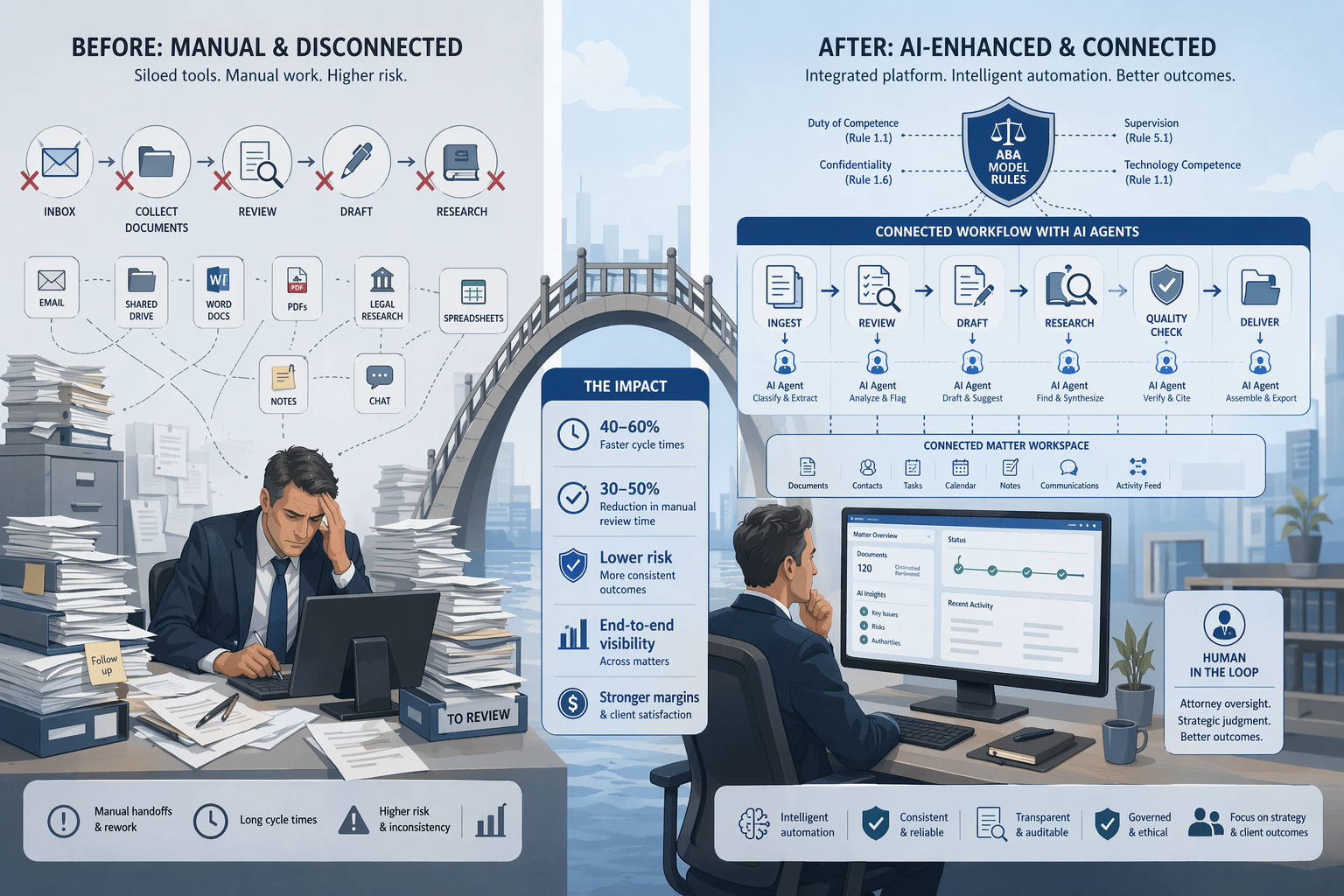
The Solo/Small Firm AI Paradox
The data from the 2026 legal industry surveys tells a story that should give every solo practitioner and small-firm attorney pause. According to the Clio 2026 Solo and Small Firm Report, 71% of solo practitioners and 75% of small firms report using AI in their practice. These are the highest adoption rates of any segment in the legal profession. Yet the same survey reveals a stark disconnect: 86% of solo firms and 78% of small firms have not adjusted their pricing models to account for AI-driven efficiency, and 57% of solo and 55% of small firms have no AI policy in place.
The most telling figure: only about a third of solo (32%) and small firms (31%) report any associated revenue increase from their AI use. This is the paradox at the heart of legal AI adoption in 2026. The firms that are adopting AI fastest are the least prepared to turn that adoption into financial return. They are generating efficiency without capturing its value.
The broader market context reinforces the urgency. The Thomson Reuters 2026 AI in Professional Services Report, surveying more than 1,500 respondents across 27 countries, found that organization-wide AI usage almost doubled to 40% in 2026, up from 22% in 2025. The 8am 2026 Legal Industry Report, surveying over 1,300 legal professionals, found that 69% now use general-purpose AI tools for work. The tools are here, and your competitors are using them. The question is whether you are using them in a way that strengthens your practice or simply subsidizes your clients' bills.
Why Efficiency Without Pricing Adjustment Is an Unplanned Discount
For firms that bill by the hour, the economic logic of AI creates a trap. If AI reduces the time required to draft a contract, conduct legal research, or review discovery documents, and your firm continues to bill by the hour, then every efficiency gain directly reduces your revenue. You are effectively giving your clients a discount you never agreed to.
This is not a hypothetical concern. The Thomson Reuters report found that only 18% of organizations track the ROI of their AI tools. Without measurement, there is no way to know whether AI is helping or hurting the bottom line. And the 8am report shows that only 6% of respondents said clients are explicitly pushing for AI-linked cost reductions — meaning most firms are absorbing the efficiency loss without external pressure to do so.
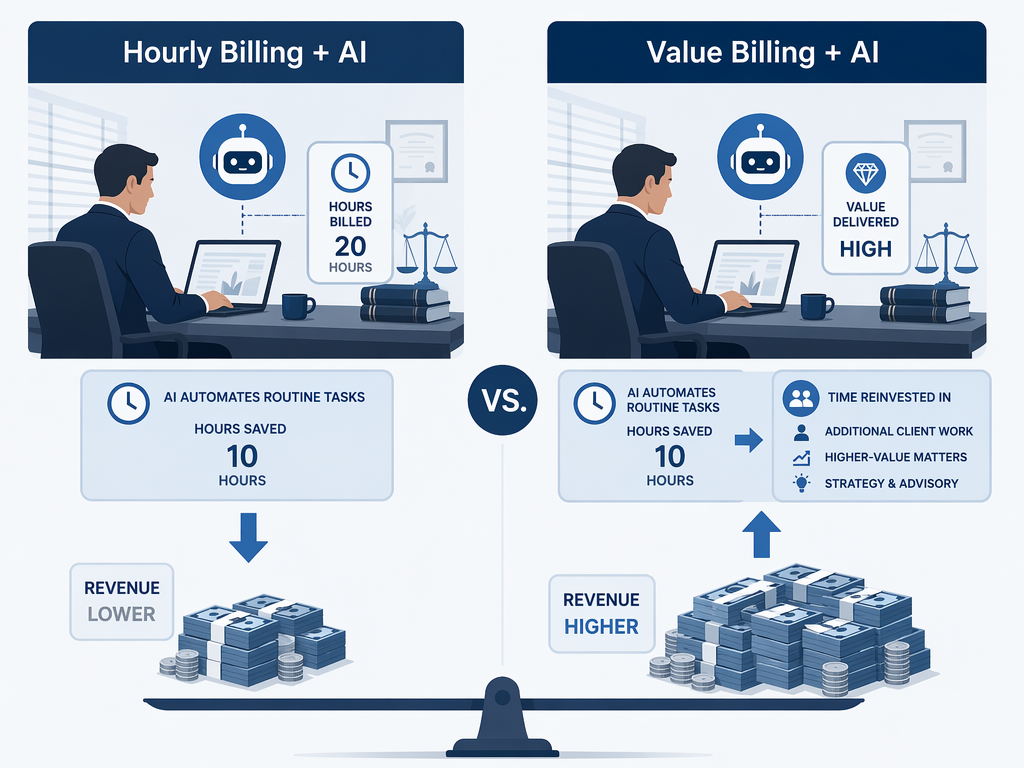
The solution is not to abandon hourly billing overnight — many practice areas and client relationships depend on it. But it does require a deliberate strategy. Consider these approaches:
- Fixed fees for AI-augmented tasks. Set a flat fee for document review, contract drafting, or legal research that reflects the value of the output, not the hours it took to produce.
- Value-based billing for repeat work. For clients with recurring matters — monthly compliance reviews, ongoing contract management — propose a retainer that captures the efficiency gains as profit rather than passing them through as reduced hours.
- Transparent disclosure in engagement letters. Explain that AI tools allow your firm to deliver work more efficiently, and that your pricing reflects the value of the legal product, not the time spent producing it.
Practical Low-Cost AI Entry Points for Small Firms
One of the most common objections from solo and small-firm attorneys is that AI tools are too expensive or require technical expertise to implement. The reality is that the most practical entry points are likely already in your practice management platform.
Clio Manage AI and Clio Work with Vincent AI offer built-in drafting, summarization, and research capabilities that integrate directly with your existing case management workflow. MyCase AI provides similar functionality. These tools do not require separate logins, separate security reviews, or separate training — they are embedded in software your firm already uses.
| Tool / Platform | Primary Use Case | Pricing Tier | Integration |
|---|---|---|---|
| Clio Manage AI | Document drafting, summarization, task automation | Included in existing Clio subscription (various tiers) | Native to Clio platform |
| Clio Work with Vincent AI | Legal research, document analysis, drafting assistance | Add-on to Clio subscription | Native to Clio platform |
| MyCase AI | Document generation, case summarization, email drafting | Included in MyCase subscription | Native to MyCase platform |
| ChatGPT (general-purpose) | Brainstorming, template drafting, research summarization | Free tier available; Plus ~$20/month | Standalone — no native integration |
| Microsoft Copilot (with M365) | Document drafting, email summarization, data analysis | ~$30/user/month (M365 subscription required) | Integrates with Word, Outlook, Excel |
The key principle is to start with tools that integrate into your existing workflow rather than adding new platforms that require separate logins, separate data management, and separate security reviews. The Clio blog's implementation framework emphasizes this directly: choose AI tools that integrate with the technology you already have.
The Security and Ethics Checklist for Small Firms
Small firms without dedicated IT or compliance teams face a particular challenge: they must meet the same professional responsibility obligations as BigLaw firms, but without the infrastructure to manage them. The good news is that the core requirements are straightforward and can be addressed with a focused checklist.
- Verify SOC 2 certification. Any AI tool that processes client data should have SOC 2 Type II certification. This is the minimum security standard for legal technology. Ask vendors for their SOC 2 report before signing up.
- Confirm that your data is not used for model training. Many consumer AI tools use input data to improve their models. For legal work, this is unacceptable. Your vendor agreement must explicitly state that client data will not be used for training or retained beyond the session.
- Apply ABA Formal Opinion 512 principles. The ABA's 2024 opinion established the ethical framework for generative AI use. The core requirements are: competence (Rule 1.1, Comment 8 requires technological competence), confidentiality (Rule 1.6 requires safeguarding client data), communication (Rule 1.4 requires disclosing AI use to clients), candor (Rule 3.3 requires verifying all AI-generated submissions to tribunals), and supervision (Rule 5.3 extends to AI as non-human assistance).
- Maintain human oversight of all AI outputs. No AI-generated document, research result, or analysis should reach a client or court without attorney review. The Thomson Reuters approach of 'human in the loop' — using educated attorney editors to validate every result — is the current best practice standard.
- Document your AI use. Maintain a simple log of which AI tools are used for which tasks, what client data is input, and who verified the output. This documentation is critical for ethics inquiries, malpractice defense, and client transparency.
A Phased Adoption Roadmap: Assess, Automate, Add AI, Measure, Adjust
The most common mistake small firms make is jumping straight to AI tools without first fixing their underlying processes. The Clio blog's five-step framework provides a clear sequence that prevents this error. Below is that framework adapted specifically for solo and small-firm contexts.
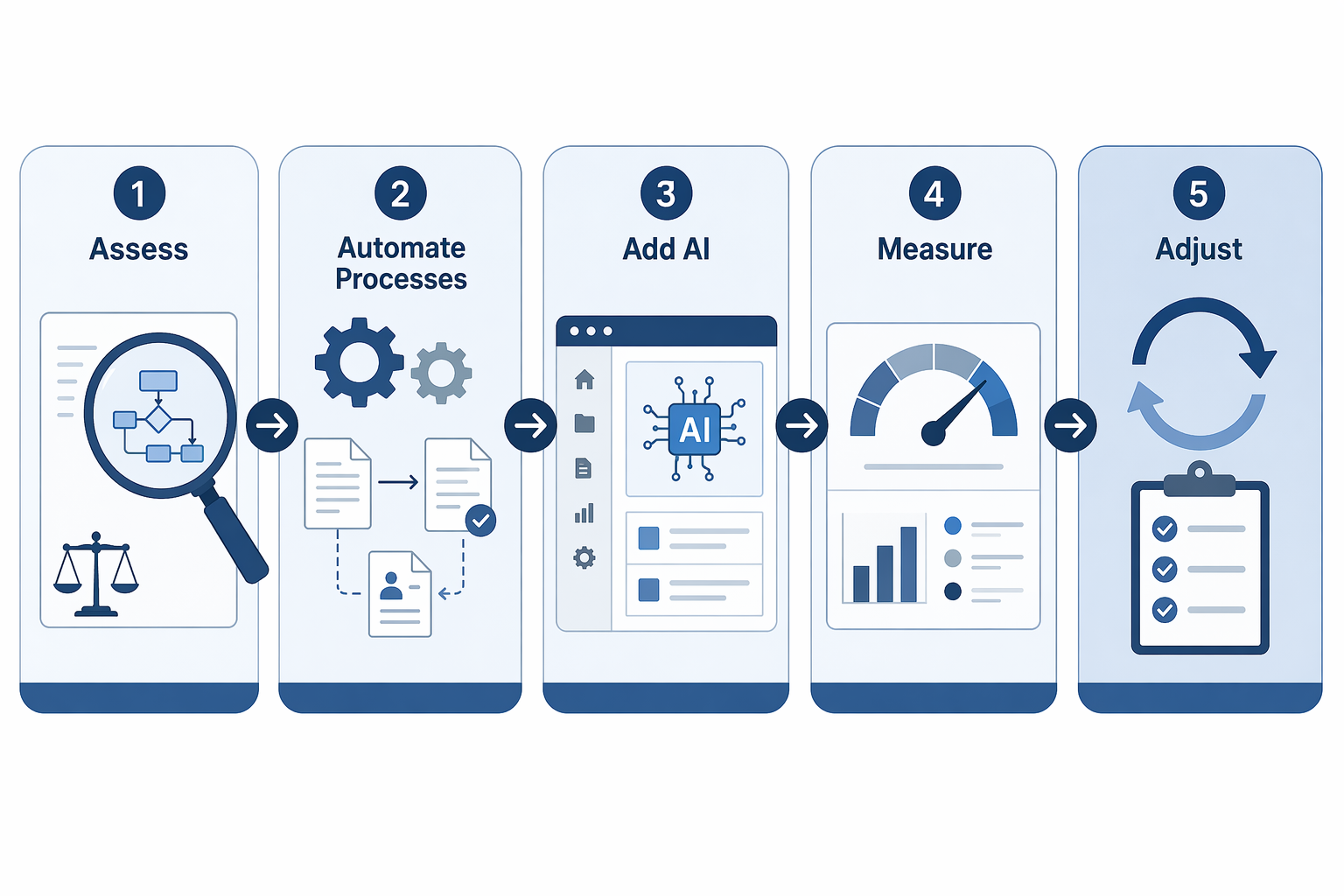
Phase 1: Assess Your Current Tech Infrastructure
Before adding any AI tool, map your current technology stack. What practice management software do you use? What document management system? What billing platform? The Clio framework emphasizes that outdated or disconnected tools limit AI benefits. If your systems do not talk to each other, AI cannot help.
Phase 2: Automate Processes First, Then Add AI
Process automation should precede AI adoption. Focus on:
- Client intake automation — online forms, automated conflict checks, electronic signature collection
- Document templates and workflow automation — standardize the documents your firm produces most frequently
- Time tracking and billing automation — reduce manual data entry and capture all billable time
- Legal research workflow — establish a consistent process for research requests, review, and delivery
Phase 3: Add AI Tools That Integrate
Once your processes are automated and your systems are connected, add AI tools that integrate with your existing stack. The goal is to make AI invisible — embedded in the tools your attorneys already use, not requiring separate logins or separate workflows.
Phase 4: Measure ROI
The Thomson Reuters report found that only 18% of organizations track AI ROI. This is a critical gap. Define specific KPIs before you start, and measure them regularly.
| KPI | What to Measure | Target Improvement |
|---|---|---|
| Document turnaround time | Hours from request to delivery for standard documents | 30-50% reduction |
| Manual data entry reduction | Hours per week spent on data entry tasks | 50-75% reduction |
| Attorney satisfaction | Survey scores on tool usability and time saved | 80%+ positive |
| Client response time | Hours from client inquiry to substantive response | 40-60% reduction |
| Revenue per matter | Average revenue per matter type before and after AI adoption | Stable or increasing |
Phase 5: Adjust and Iterate
AI adoption is not a one-time project. Review your KPIs quarterly, adjust your tool set based on what is working, and update your policies as the technology and regulatory landscape evolve. The NexLaw integration guide recommends starting with a 2-4 week pilot program with defined KPIs before rolling out firm-wide.
The AI Policy Template: What Every Small Firm Needs in Writing
The 8am report found that 43% of firms have no formal AI policy and no plans to create one. Only 9% have a written policy that is enforced. For solo and small firms, the numbers are worse: 57% of solos and 55% of small firms lack any AI policy. This is not just a compliance gap — it is a professional responsibility risk that could surface in an ethics inquiry or malpractice claim.
A small-firm AI policy does not need to be a 20-page document. It needs to answer five questions clearly:
- Which AI tools are approved for use? List the specific tools (e.g., Clio Manage AI, ChatGPT with data protection settings) that attorneys and staff may use. All other tools require prior approval.
- What client data can be input? Define which categories of client information may be entered into AI tools. For example: anonymized facts for research, but never privileged communications, Social Security numbers, or financial account details.
- How is AI-assisted work documented? Require that every document or analysis produced with AI assistance include a notation of which tool was used and which attorney verified the output.
- Who is responsible for verification? Assign responsibility for reviewing all AI outputs before they reach a client or court. This should be the supervising attorney on the matter.
- How are violations handled? Specify the process for reporting and addressing unauthorized AI use or policy violations.
Client Communication: Disclosing AI Use in Engagement Letters
ABA Model Rule 1.4 requires lawyers to communicate with clients about matters that require informed consent. As AI becomes integrated into legal workflows, this includes disclosing how AI tools are used in the representation. The Thomson Reuters report found that 40% of firm respondents have received conflicting client instructions — some clients want AI used to reduce costs, while others explicitly prohibit it.
Proactive disclosure in engagement letters addresses both ethical obligations and client expectations. Consider adding language like the following to your standard engagement letter:
Our firm uses artificial intelligence tools to enhance the efficiency and quality of our legal services. These tools assist with legal research, document drafting, and document review. All AI-generated work product is reviewed and verified by a licensed attorney before it is used in your representation. Client data is handled in accordance with our confidentiality obligations and is not used to train third-party AI models. If you have questions about our use of AI or wish to discuss specific limitations, please contact us.
This language accomplishes several things: it informs the client of AI use, it establishes that attorney oversight remains in place, it addresses data confidentiality, and it opens a dialogue for clients who have concerns or preferences.
Free and Low-Cost Training Resources for Solo and Small Firms
The 8am report found that 54% of firms provided no training on responsible AI use and have no plans to do so. For small firms, the barrier is often not cost but awareness of what is available. The following resources offer accessible, affordable training tailored to legal professionals.
| Provider | Cost | Format | Topic Focus |
|---|---|---|---|
| State Bar Associations | Free - $50 (often included in membership) | Live webinars and on-demand CLE | Ethics of AI use, state-specific guidance, professional responsibility |
| Clio (Clio Webinars) | Free | Live and on-demand webinars | AI in practice management, workflow automation, ethical implementation |
| MyCase (MyCase Academy) | Free | On-demand video library | AI features in MyCase, document automation, firm efficiency |
| Thomson Reuters (TR Webinars) | Free | Live and on-demand webinars | AI in legal research, ethical considerations, firm-wide adoption strategies |
| ABA Center for Professional Responsibility | Free - $100 | On-demand CLE and published guidance | ABA Formal Opinion 512, Model Rules analysis, ethics frameworks |
| 8am (8am Reports and Webinars) | Free | Downloadable reports and webinars | Industry benchmarks, adoption trends, ROI analysis |
For firms that want structured learning, many state bar associations now offer AI-specific CLE credits. The North Carolina Bar Association, for example, has published synthesis articles that are themselves educational resources. The key is to ensure that every attorney in your firm completes at least one AI ethics CLE per year — this is the minimum standard for demonstrating technological competence under Model Rule 1.1, Comment 8.
Conclusion: AI Doesn't Require a BigLaw Budget — But It Does Require Intentionality
The data is clear: solo and small firms are adopting AI faster than any other segment of the legal profession. But adoption alone is not a strategy. Without workflow redesign, pricing adaptation, policy creation, and client communication, the efficiency gains from AI will flow to clients as unplanned discounts rather than to your firm as increased profitability.
The tools are accessible and affordable. The ethical framework is established. The training resources are available. What separates firms that benefit from AI from those that simply use it is intentionality — the deliberate decision to assess your processes, automate before adding AI, measure your results, and adjust your business model to capture the value you create.
Start with Phase 1 of the roadmap: assess your current technology infrastructure. Map what you have, identify the bottlenecks, and fix your processes before adding AI. The firms that thrive with AI are not the ones chasing features — they are the ones designing workflows.
Grounded in
This procedure is grounded in the cited rule or opinion, independent of any single documented case. See the Regulation tracker for the governing text.
Cases this step would have prevented
No cases have been explicitly linked to this checklist yet. See Risk Digest for documented incidents generally.
← Back to WorkflowsReport a correction or tip
Spotted an outdated figure, a misstated fact, or a ruling this workflow checklist should reflect? Public comments are disabled for this content given the professional cost of a misreported case outcome, penalty amount, or rule text — use the structured correction channel instead.
Report a correction or tip for this record →