
Which Free AI Legal Assistants Can You Safely Use?
A task-by-task comparison of six free-tier AI legal assistants—ChatGPT, Claude, Gemini, Perplexity, TheLawGPT, and Genie AI—showing solo and small-firm attorneys exactly where each tool saves time and where free limitations demand paid upgrades or manual verification.
- Hallucination rate
- Not measured / undisclosed
The practical question is not whether an ai legal assistant free tier can sound competent. Most of them can. The question for a solo or small-firm lawyer is narrower: what can be handed to the tool today without creating a confidentiality problem, a citation problem, or a polished draft that takes longer to repair than it saved?
Here is the working map. It treats free tiers as supervised assistants, not as legal authority.
| Tool | Research orientation | Drafting | Contract boilerplate flagging | Intake/admin summaries | Citation handling | Jurisdiction-specific analysis | Confidentiality posture | Free-tier limits |
|---|---|---|---|---|---|---|---|---|
| ChatGPT free | Useful for issue spotting, search terms, and outlining research questions; not a source of law. | Strong for first-pass letters, email tone cleanup, checklists, and memo skeletons. | Can flag common boilerplate concerns if the lawyer supplies the clause and review goal. | Useful for summarizing scrubbed notes and turning messy facts into timelines. | Must be independently cite-checked; do not rely on generated authorities. | Requires explicit jurisdiction prompts and independent confirmation of current law. | Do not enter client-identifying or confidential facts unless the lawyer has confirmed the applicable data-use terms and professional obligations. | General-purpose free usage and feature limits vary; not built around legal workflow controls. |
| Claude free | Useful for long-form organization, issue framing, and comparing arguments at a high level. | Strong for readable first drafts and revising client-facing language. | Good at explaining why a clause may be one-sided, but not a substitute for a contract playbook. | Useful for summaries of scrubbed transcripts, intake notes, and chronologies. | Must be cite-checked; fluent prose can conceal unsupported propositions. | Can follow jurisdiction instructions, but the lawyer must verify the answer against controlling law. | Same core problem as other general-purpose tools: confidentiality review comes before prompting. | Free access is useful for experimentation, not dependable daily matter flow. |
| Gemini free | Useful for broad orientation and drafting research plans, especially when the lawyer already knows what must be verified. | Suitable for ordinary correspondence and internal planning drafts. | Can identify clause categories and surface negotiation points. | Useful for administrative summaries when facts are anonymized. | Citation and source reliability still require manual review. | Jurisdiction must be specified; local rules and current law must be checked elsewhere. | Treat prompts as potentially sensitive unless the firm has cleared use under its confidentiality policy. | General-purpose limits and product behavior can change; not a legal practice system. |
| Perplexity free | Best fit among the general tools for source-oriented research orientation, because it is designed around linked sources. | Less of a drafting specialist, but useful for turning sourced orientation into an outline. | Can help locate commentary about clause types, but cannot enforce a firm playbook. | Adequate for short summaries and administrative organization. | Linked sources help the lawyer start verification, but they do not replace checking cases, statutes, rules, and citator status. | Can point toward jurisdictional material; the lawyer still confirms controlling authority. | Source-oriented does not solve confidentiality; scrub facts first. | Free tier can help triage research questions, not finish legal research. |
| TheLawGPT free | Legal-specific orientation and task categories make it more aligned with lawyer workflows than a general chatbot. | Useful for limited legal drafting experiments and prompts tailored to solo practice. | Can assist with limited contract-related questions. | Some administrative use, but not enough free capacity for routine intake operations. | Legal-specific framing does not remove the duty to verify citations and authority. | May be better oriented to legal context, but current jurisdictional analysis still requires lawyer review. | Legal-specific branding is not a confidentiality waiver; client data still needs protection. | TheLawGPT’s comparison identifies a free cap of 3 Q&A, which is too low for daily workflow integration.[1] |
| Genie AI free | Less useful as a general research assistant; better understood as a document-oriented legal tool. | Can help with limited document drafting or clause work. | More relevant for contract templates and clause review than broad litigation research. | Not a natural intake/admin system for a small firm. | Document support does not make citations or legal conclusions filing-ready. | Contract enforceability and local-law questions still need legal review. | Documents may contain sensitive facts; confidentiality review comes before upload. | TheLawGPT’s comparison identifies a free cap of 2 documents per month, which makes it a trial tier rather than a daily practice layer.[1] |
The table is deliberately conservative. A free tool that can draft a decent client email is still not a legal research platform. A legal-specific interface with a tiny monthly allowance may be useful for testing, but it cannot honestly be called integrated into a practice if the lawyer runs out of capacity before the first week of ordinary matters is over.
Where free tools actually help
The safest free-tier uses are the ones where the lawyer is asking for structure rather than authority. That includes turning intake notes into a chronology, converting a rough explanation into a client-friendly email, making a checklist for a first consultation, or asking for a neutral rewrite of correspondence that has become too sharp in tone.
In those tasks, the tool is not deciding what the law is. It is reducing blank-page time. The lawyer still decides what facts matter, what advice can be given, and what should be left unsaid. That distinction matters because small firms often lose time in exactly these low-glamour areas: cleaning up notes after a call, making sense of a scattered fact pattern, or preparing a client update that is accurate without sounding like a brief.
Clio reports that 71–75% of solo and small-firm attorneys have adopted AI, but also frames a gap between adoption and improved financial results.[2] That is the part worth sitting with. Adoption alone does not tell a lawyer whether the tool is saving billable time, reducing write-offs, or merely adding another layer of review to work that was already underpriced.
A free general-purpose assistant is often enough for the first pass at:
- A plain-English summary of anonymized intake notes.
- A timeline from scrubbed facts supplied by the lawyer.
- A first draft of a non-privileged administrative email.
- A list of possible issues to research, with no reliance on the answer as law.
- A negotiation-prep outline based on facts the lawyer has already reviewed.
For that kind of work, ChatGPT, Claude, and Gemini are broadly useful. Claude tends to be comfortable with longer, polished prose. ChatGPT is flexible for checklists, drafts, and role-based revision. Gemini can be useful for orientation and planning. Those are practical differences, not ethical permissions. The duty to supervise the output does not change because the draft happens to read well.

Research orientation is not legal research
Perplexity deserves separate treatment because source orientation is genuinely helpful. When a lawyer is trying to understand the landscape of an unfamiliar issue, linked sources can speed the first sweep. It may help identify agencies, statutes, practice guides, news coverage, or secondary sources that deserve a closer look.
That still leaves the important work untouched. The lawyer must confirm whether the source is primary or secondary, whether the authority is binding or persuasive, whether it is current, whether it applies in the relevant jurisdiction, and whether later authority has limited it. A source-linked answer is easier to audit than a source-free answer, but easier to audit is not the same as reliable.
This is where free tools become dangerous in a very ordinary way. They do not need to invent a spectacularly fake case to cause harm. They can cite a real case for the wrong proposition, summarize a rule without the exception that controls the client’s facts, or answer a state-law question as if the jurisdiction were obvious. The lawyer who files, advises, or bills from that answer owns the result.
Mata v. Avianca remains the familiar warning about AI-generated fake citations, and Whiting v. City of Athens added a more recent reminder when the Sixth Circuit imposed $30,000 in sanctions in March 2026 for hallucinated citations. Courts do not care whether the bad authority came from a free chatbot, a paid legal AI product, or an associate’s unverified draft. The signature and the certification are the lawyer’s.
Contract review needs more than a clever clause summary
Free AI can be useful for contract boilerplate flagging if the task is kept modest. A lawyer can paste a non-confidential clause, say what kind of agreement it comes from, and ask the model to identify common concerns: unilateral termination, broad indemnity, missing notice mechanics, vague payment timing, or a venue clause that deserves a jurisdiction check.
That is not the same thing as contract review. Thomson Reuters draws the paid-versus-free line around work such as jurisdiction-specific enforceability analysis, regulatory compliance verification, and integrated contract reading with playbook enforcement.[3] Those are not cosmetic features. They are the difference between “this clause may deserve attention” and “this clause violates our client’s approved fallback position under the governing playbook.”
A free model may notice that an indemnity is broad. It will not reliably know the client’s risk tolerance, insurance position, market fallback, prior negotiation history, or governing-law consequences unless the lawyer supplies and verifies that framework. Supplying that framework may itself require entering confidential or commercially sensitive information, which brings the lawyer back to the confidentiality gate before the review even begins.
For a deeper look at why this gap persists, see AI Contract Review vs. General-Purpose AI: Why the Gap Persists in 2026. The short version for free-tier use is simple enough: clause spotting is a reasonable first pass; playbook-driven legal review is not.
The free legal-specific tools are trials, not workflow systems
TheLawGPT and Genie AI are attractive because they look closer to the work lawyers actually do. That matters. A legal-specific interface can reduce some of the friction of getting a useful first answer. It may ask better initial questions, frame output in more familiar categories, or keep the user closer to legal drafting and document tasks than a general chatbot does.
But a free cap of 3 Q&A for TheLawGPT and 2 documents per month for Genie AI is not enough for a small firm’s daily rhythm.[1] A solo lawyer can burn through those limits before finishing one matter review, much less building a repeatable intake, drafting, or contract workflow. These tiers are best treated as evaluation windows: useful for deciding whether the paid product deserves attention, not as the system of record for practice operations.
That distinction is not vendor nitpicking. Workflow integration means staff know when to use the tool, what inputs are allowed, where the output goes, who reviews it, and how often the process can run. A tool that only permits a handful of uses per month cannot carry that load, even if the individual answers are helpful.
The verification workflow that makes free use defensible
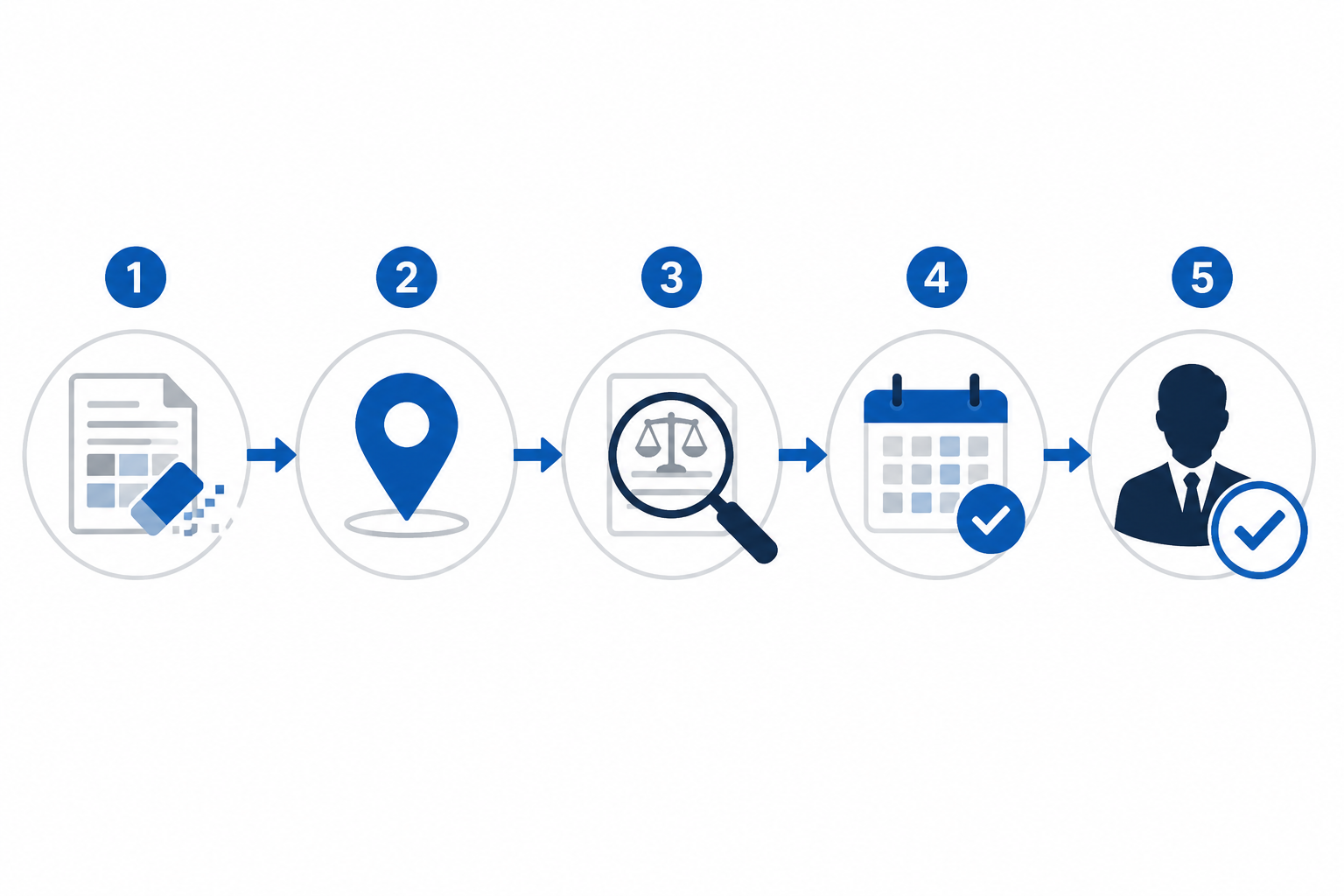
ABA Formal Opinion 512 treats generative AI use through familiar professional duties, including competence, confidentiality, communication, supervisory obligations, and fees.[4] For a small firm, that means the workflow matters as much as the tool choice. A free assistant is only safe inside a process that assumes the answer may be incomplete, stale, jurisdictionally wrong, or too confident.
| Step | What the lawyer does | Why it matters |
|---|---|---|
| 1. Scrub the input | Remove names, addresses, account numbers, medical details, trade secrets, and other client-identifying facts unless use has been cleared under the firm’s confidentiality analysis. | The model cannot protect information the lawyer should not have entered. |
| 2. State the jurisdiction and limits | Tell the tool the jurisdiction, procedural posture, date sensitivity, and that it must identify uncertainty rather than assume missing facts. | Many bad answers begin with an unstated jurisdictional assumption. |
| 3. Demand source separation | Ask the tool to separate legal authorities, secondary sources, assumptions, and drafting suggestions. | This makes review easier and prevents a polished memo from hiding weak support. |
| 4. Verify citations independently | Check every case, statute, rule, quotation, and parenthetical in trusted legal research sources. | Generated citations are not authority until the lawyer confirms them. |
| 5. Confirm current law and local rules | Review the controlling rule set, court procedures, standing orders, and recent amendments. | A correct general proposition can still be wrong in the forum handling the matter. |
| 6. Keep a human reviewer at the end | Have the responsible lawyer decide what survives into advice, correspondence, contracts, or filings. | Model Rule 5.3-style supervision logic does not disappear because the assistant is software. |
This workflow is not glamorous, and it will sometimes erase the apparent time savings. That is not a failure of the process. It is useful information. If verifying a free tool’s research answer takes as long as doing the research properly in the first place, the firm has learned that the task belongs in paid legal research, a better workflow, or no AI at all.
Ethics rules are a floor, and state variation matters
The ABA opinion is the baseline, not the whole regulatory picture. Clio’s 2026 ethics overview notes state-level variation, including California’s expanded 2026 guidance and a Florida court rule effective June 15, 2026.[4] A lawyer using AI in a multistate practice, or even near a state line, should not treat national commentary as the final answer.
The practical consequence is straightforward: before a firm builds any AI process, someone must check the jurisdiction’s current ethics opinions, court rules, disclosure expectations, and confidentiality guidance. The answer may affect whether a tool can be used at all for certain client information, whether client consent is needed, how staff must be trained, and what review record the firm should keep.
When paying, verifying manually, or abstaining is the better choice
Pricing should come after task fit, not before it. The Legal Prompts’ 2026 pricing survey places paid legal AI tools broadly in the $49 to $500-plus per month range, while also noting vendor-reported variation and discrepancies across products.[5] That range is meaningful for a small firm, but the upgrade question is not “Can we afford AI?” It is “Which tasks are too risky or too frequent for free tiers?”
A paid tool becomes easier to justify when the firm needs one or more of the following:
- Dependable legal research tied to professional research sources and citator workflows.
- Contract review against a client-specific or firm-specific playbook.
- Confidential document handling under reviewed contractual and security terms.
- Repeat daily use by lawyers and staff without tiny monthly caps.
- Administrative controls, auditability, matter organization, or integration with existing systems.
Even then, paid does not mean self-verifying. ABA Formal Opinion 512’s verification posture applies to generative AI use generally, not only to free consumer tools.[4] A paid legal AI platform may reduce certain risks, improve source grounding, or fit better into firm operations, but it does not move the professional responsibility burden off the lawyer.
If the firm has reached that point, How to Choose a Legal AI Tool for Your Small Law Firm in 2026 is the more useful next framework. Free-tier comparison answers the first question: where can we experiment safely? Paid-tool selection answers the next one: what must become reliable enough to operationalize?
The safest answer by task
For intake summaries, administrative organization, first drafts, and plain-language rewrites, free ChatGPT, Claude, Gemini, and similar tools can be useful if the facts are scrubbed and the lawyer reviews the output. For source-oriented research triage, Perplexity can help start the hunt, but it cannot finish it. For limited legal-specific experimentation, TheLawGPT and Genie AI may be worth testing, but their free caps keep them out of daily workflow territory.
The line gets much harder at legal authority, jurisdiction-specific advice, confidential document upload, contract playbook review, and filing-ready work. Those tasks require paid infrastructure, independent research, manual verification, or abstention. A free AI legal assistant is safest when it is treated as a supervised drafting and organization aid. It is not safest when it is treated as the lawyer’s authority system.
References
- Best AI Legal Assistants for Solo Lawyers in 2026, TheLawGPT
- Free Legal AI Tools That Actually Work, Clio
- Free legal AI vs paid alternative analysis for legal work, Thomson Reuters
- AI Ethics in Law (2026): ABA Guidance & State Requirements, Clio
- Legal AI Pricing 2026: Harvey vs CoCounsel vs Clio, The Legal Prompts
Chronological incident history
No sanction cases have named this tool in the tracked record set to date. This does not imply the tool is safe — see Risk Digest for ongoing monitoring.
← Compare peer toolsReport a correction or tip
Spotted an outdated figure, a misstated fact, or a ruling this tool profile should reflect? Public comments are disabled for this content given the professional cost of a misreported case outcome, penalty amount, or rule text — use the structured correction channel instead.
Report a correction or tip for this record →