
Implement AI in Your Law Firm with a Workflow-Guided Framework
A structured five-phase framework helps law firms move from ad hoc AI use to governed, ROI-measured deployment — addressing the readiness gap where 69% of professionals use AI but fewer than 9% of firms have enforced policies.
The hard part of implementing ai in the legal sector is no longer convincing lawyers that the tools exist. They are already using them. The operational problem in Q3 2026 is that individual adoption has moved faster than firm governance, faster than training, and much faster than measurement.
8am reports that 69% of legal professionals use AI tools, while fewer than half of firms provide training on responsible use.[1] Clio’s solo and small-firm data shows the policy gap more plainly: 57% of solo practitioners and 55% of small firms have no AI usage policy.[2] Thomson Reuters adds the management layer that usually gets less attention in launch meetings: only 18% of organizations collect ROI metrics around AI, and only 9% have an enforced written AI policy.[3]
Those figures do not all measure the same thing. Some surveys count any AI tool, including consumer-grade applications; others focus more narrowly on generative AI used at work. A North Carolina Bar Association synthesis of multiple surveys treats those numbers as complementary evidence of the same readiness gap rather than as a single clean adoption rate.[4] That distinction matters. A firm can be “using AI” because several associates paste draft language into a public chatbot, because a research platform has embedded AI into its interface, or because the firm has redesigned an intake workflow around legal-specific automation. Those are not the same operating condition.

A law firm does not need to wait for perfect regulation before it builds useful AI workflows. It does need to stop treating unmanaged experimentation as an implementation plan. The sequence below is built for that middle ground: practical enough for a firm that has matters to move this week, disciplined enough for the lawyer who has to sign the filing, supervise the work, or explain the process after something goes wrong.
The Five-Phase Sequence
The framework is sequential, but governance is not the last box to check. Written policy, training, supervision, and verification standards need to run beside every phase. If they wait until after pilot users have already built habits, the firm has made the hardest version of the change for itself.
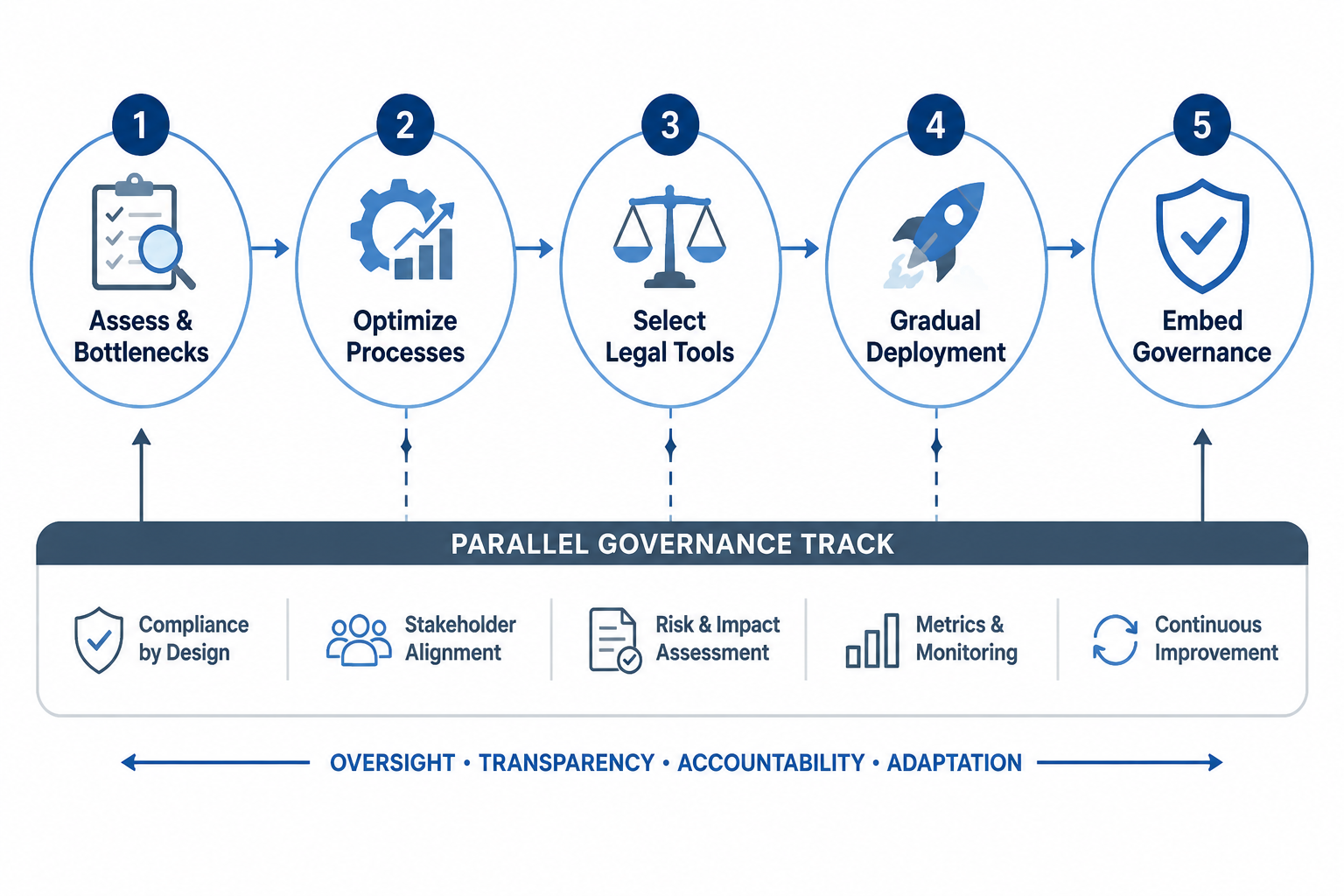
| Phase | Primary question | What should exist before moving on |
|---|---|---|
| 1. Assess infrastructure and bottlenecks | Where does work actually slow down, fragment, or require repeated first-pass effort? | A workflow map, system inventory, risk points, and candidate use cases |
| 2. Optimize the underlying process | Is the current process worth automating, or is it just familiar? | Clean inputs, defined review points, ownership, and repeatable procedures |
| 3. Select legal-specific tools | Which tools fit the workflow, data sensitivity, and verification duty? | Security review, integration review, source and citation evaluation, and user limits |
| 4. Deploy gradually and measure ROI | Which narrow use cases can show task-level value without creating unacceptable risk? | Pilot scope, baseline metrics, approval path, and review cadence |
| 5. Embed governance from day one | Who may use AI, for what, with what disclosure, training, supervision, and verification? | Written policy, enforced training, audit trail, escalation path, and update process |
That order is not decorative. AI magnifies the condition of the workflow underneath it. A messy document system produces messy retrieval. An intake process with inconsistent facts produces unreliable summaries. A drafting process with no clear review point produces faster drafts that still leave a senior lawyer reconstructing the reasoning at night.
Phase 1: Assess The Work Before Assessing The Tool
The first assessment is not a vendor demo. It is a map of how work currently moves through the firm. Start with the systems people already touch: document management, legal research databases, matter management, intake, calendaring, litigation support, billing, CRM, and any shared drives that everyone pretends are temporary. Then map the work that crosses those systems.
For each practice group or recurring matter type, identify where someone repeatedly performs a first-pass task: summarizing records, comparing clauses, drafting standard correspondence, preparing chronology tables, reviewing discovery, extracting intake facts, or turning a partner’s comments into a revised draft. Those are often better AI candidates than open-ended legal analysis because the input, expected output, and review standard can be described.
A useful assessment does not ask only, “Could AI do this?” It asks:
- Where does the same information get re-entered by different people?
- Which drafts are heavily templated but still consume lawyer time?
- Which review steps depend on institutional memory rather than a visible checklist?
- Which systems contain privileged, confidential, regulated, or client-restricted data?
- Where would a wrong answer create filing risk, client advice risk, confidentiality risk, or billing risk?
This is also the moment to separate adoption from readiness. If a practice group already has lawyers using AI informally, that is not evidence that the group is ready for broad deployment. It is evidence that the firm needs to know what data is being entered, what outputs are being relied on, and whether any client or court obligations are affected.
For solo and small firms, the assessment can be lighter but should not disappear. A solo lawyer may not need a committee, but still needs a list of the workflows where AI is permitted, the tools used, the client data that may not be entered, and the points where the lawyer personally verifies the output. Clio’s data on solo and small-firm policy gaps is a warning precisely because those firms often have fewer internal buffers when a workflow breaks.[2]
What The Assessment Should Produce
The deliverable should be short enough that people will use it. A practical AI readiness map usually includes four columns: workflow, current bottleneck, AI candidate, and required control. For example, a litigation team might identify complaint response preparation as a bottleneck, name first-pass issue spotting or draft assembly as the AI candidate, and require attorney verification against the complaint, governing rules, and jurisdiction-specific pleading standards.
The assessment should also name non-candidates. If a task requires unsettled legal judgment, sensitive strategic advice, or direct reliance on uncited authority, it may still involve AI at some supporting layer, but it should not become the first pilot. Saying no to the wrong first use case protects the useful ones.
Phase 2: Fix The Process Before You Automate It
The most expensive AI mistake is automating a process that nobody has been willing to clean up. If intake forms are inconsistent, AI will summarize inconsistent intake. If templates are outdated, AI will accelerate outdated drafting. If a document management system contains duplicate, misnamed, or obsolete files, retrieval becomes a scavenger hunt with a confident interface.
Before tool selection, firms should remove avoidable variation from the workflow. That does not mean flattening legal judgment into a script. It means making the repeatable parts visible enough that a lawyer can decide where judgment begins.
- For intake: standardize required fields, conflict-check handoff, source documents, and missing-information follow-up.
- For drafting: update templates, clause banks, style conventions, jurisdiction notes, and required citations.
- For litigation support: define document sets, privilege review boundaries, issue tags, and escalation triggers.
- For research: define approved sources, citation verification steps, and when a human researcher must restart from primary authority.
- For matter management: decide where AI-generated work product is stored, labeled, reviewed, and billed.
This phase often feels less exciting than procurement, which is exactly why it gets skipped. But it is where implementation becomes real. Someone has to decide whether AI output may be saved to the client file, whether draft summaries are work product, whether prompts become part of the matter record, and whether a paralegal can use the tool before an attorney reviews the instruction set.
A hypothetical example shows the difference. Suppose a firm wants AI to help prepare first drafts of demand letters. If every lawyer uses a different template, intake notes live in different places, and settlement authority is sometimes buried in email, the tool is not the bottleneck. The process is. A cleaned-up workflow would define the intake fields, required documents, approved template, review lawyer, citation or evidence attachment standard, and final client approval step before any AI-generated draft is created.
Process cleanup also gives the firm a baseline. If no one knows how long the current task takes, how many revisions it normally needs, or who touches it, the firm cannot later say whether AI improved the work. That is how firms end up with impressive anecdotes and no ROI file.
Phase 3: Choose Legal-Specific Tools For The Workflow You Actually Have
Tool selection should come after the firm knows which workflow it is improving. A general-purpose chatbot, a legal research assistant, a contract review platform, an intake automation product, and a litigation document tool solve different problems and create different controls. Treating them as interchangeable because they all say “AI” is how a firm buys a subscription and still leaves staff improvising.
The first screening question is data. What information the tool will receive, where it will be processed, whether the vendor will use it for training, how long it will be retained, and who can access it are not technical footnotes. They are implementation requirements. Legal-specific products should be reviewed for confidentiality protections, administrative controls, auditability, user permissions, and fit with the firm’s professional obligations.
The second question is retrieval and verification. ABA Formal Opinion 512 warns lawyers to address competence, confidentiality, communication, supervision, fees, and candor when using generative AI tools.[5] In practice, that means the firm should prefer tools that make verification easier, not merely tools that write more fluently. Legal-specific AI tools that use retrieval-augmented generation and verified citation databases can reduce hallucination risk compared with consumer-grade tools, but they do not remove the lawyer’s duty to verify the result.[5]
The third question is integration. Thomson Reuters’ SYNERGY implementation guidance emphasizes that high-performing firms embed AI into existing systems such as document management, research databases, and matter management rather than treating AI as a standalone tool.[6] That is a workflow point, not a branding point. If a lawyer has to copy client facts from one system, paste them into another, save output somewhere else, and then ask an associate to reconstruct the audit trail, the firm has created a new process risk while trying to remove an old one.
For a deeper product-selection checklist, use How to Choose AI Tools for Your Law Firm in 2026. Smaller practices should also compare the constraints in How to Choose a Legal AI Tool for Your Small Law Firm in 2026, because a solo or five-lawyer firm may need simpler administration, clearer default settings, and fewer integration dependencies than an AmLaw environment.
What Not To Let The Demo Decide
A demo can show whether a product is usable. It cannot, by itself, answer whether the tool fits the firm’s data restrictions, professional duties, review model, billing practices, or matter systems. Before approval, someone should test the tool against the firm’s own selected workflows using non-client or properly controlled test materials. The evaluation should record where the tool performed well, where it produced unsupported statements, and what human review was required.
Accuracy comparisons can help, but they need to be read as evidence about a specific product, task, dataset, and testing method. For research-heavy workflows, a benchmark such as CoCounsel vs Lexis+ AI: Accuracy, Hallucination Rates, and the Duty to Verify is more useful than a generic promise that a platform is “legal-grade.”
Phase 4: Deploy Gradually And Measure The Work
A good pilot is narrow enough to manage and important enough to measure. “Let everyone try the tool and report back” is not a pilot. It is a purchasing afterthought. The firm should select one or two workflows where the task is repetitive, the inputs are controlled, the output can be reviewed, and the baseline is known.
The AmLaw100 litigation example often cited in discussions of legal AI is useful because it is bounded. Harvard’s Center on the Legal Profession reported that a complaint response system reduced a specific task from 16 hours to 3–4 minutes, producing a 100x-plus productivity gain on that litigation task.[7] That is not proof that every legal task can or should be compressed that way. It is proof that when a task is narrow, repeatable, and embedded in a system, the gain can be real enough to change staffing, pricing, and review expectations.
Pilot metrics should stay close to the work. Track time to first draft, number of review cycles, lawyer correction time, citation errors found, documents processed per hour, intake completion rate, client response time, or write-off patterns. Broad statements about productivity are easy to make and hard to manage. Task-level measures show whether the workflow improved or merely shifted effort from one person to another.
| Pilot candidate | Why it may fit | Metric to track |
|---|---|---|
| First-pass document summary | Inputs can be defined and output can be checked against the source set | Attorney correction time and missed material facts |
| Intake triage | Forms, conflicts handoff, and follow-up questions can be standardized | Time from inquiry to complete intake packet |
| Template-based drafting | Approved forms and clause libraries can limit unnecessary variation | Review cycles and substantive edits |
| Discovery issue tagging | Review categories can be defined before processing | Documents reviewed per hour and quality-control exceptions |
| Research starting-point memo | The tool can help orient the lawyer if sources are verified afterward | Unsupported citations, omitted controlling authority, and verification time |
8am’s list of practical AI use cases for lawyers includes litigation and drafting tasks that can be used as candidates for this kind of controlled selection.[8] The point is not to copy a use-case catalog into firm policy. The point is to choose a use case where the review standard is visible before deployment begins.
Boutique-firm examples deserve the same bounded treatment. Reports of smaller firms using AI-powered intake, CRM, and drafting to compete with larger organizations show that useful deployment is not limited to firms with large innovation departments.[9] But the advantage comes from fitting AI into business development, client intake, and drafting workflows, not from buying the most theatrical product in the market.
The pilot should have a stop rule. If the tool repeatedly creates unsupported citations, mishandles confidential information, increases review time, or pushes work onto senior lawyers without reducing total effort, the firm should pause or narrow the use case. That is not anti-innovation. That is how an implementation avoids becoming a sunk-cost defense.
Phase 5: Build Governance Beside The Workflow, Not After It
Governance is where many firms are furthest behind the actual behavior of their lawyers. The Thomson Reuters finding that only 9% of organizations have an enforced written AI policy is more troubling than a low adoption figure would be, because it means the tools are already inside professional work while the operating rules are still informal.[3]
A workable AI policy does not need to predict every future model release. It needs to answer the questions staff face before they open the tool:
- Which tools are approved, restricted, or prohibited?
- What client, confidential, privileged, sealed, or regulated information may not be entered?
- Which tasks require attorney approval before AI may be used?
- How must AI-assisted work be labeled, stored, reviewed, and billed?
- When must clients, courts, opposing counsel, or supervising lawyers be informed?
- What verification is required before an output is relied on or filed?
ABA Formal Opinion 512 is a useful anchor because it frames generative AI through professional duties rather than through technology excitement. Competence, confidentiality, client communication, supervision, fees, and candor are not separate from implementation; they are the conditions under which implementation becomes professionally usable.[5] For a dedicated ethics workflow, see How to Build an ABA Formal Opinion 512 Compliance Playbook.
Training is part of governance, not a courtesy session after rollout. The 8am finding that fewer than half of firms provide responsible-use training should make every managing partner uneasy, because the people most likely to use AI day to day may be the least likely to receive a written rule before they experiment.[1] Training should include approved use cases, prohibited data entry, prompt hygiene, output verification, citation checking, client confidentiality, billing treatment, and escalation when the tool produces something suspicious.
Verification deserves special treatment. Lawyers cannot outsource the duty to confirm legal authority to a model, even a legal-specific one. Coverage of hallucination sanctions has made the practical point unavoidable: the filing lawyer bears the consequence when unsupported authorities reach the court. For a deeper sanctions-focused treatment, see AI Hallucination Sanctions in 2026: The Enforcement Wave by the Numbers.
The Minimum Governance File
For most firms, the governance file should contain five living documents: an AI usage policy, an approved-tools list, a training record, a workflow-specific verification checklist, and an incident or exception log. None of these has to be long. All of them have to be maintained.
The exception log is especially useful because it converts near misses into process improvements. If a tool invents a citation, the response should not be only “the associate should have checked.” The firm should ask whether the tool was appropriate for the task, whether the verification checklist was followed, whether the training covered that scenario, and whether the workflow allowed unsupported authority to move too far before review.
Governance also needs ownership. A policy that belongs to everyone usually belongs to no one. In a larger firm, legal operations, risk, IT, knowledge management, and practice leadership may all need seats at the table. In a small firm, one lawyer may own the policy and a senior staff member may maintain the tool list and training record. The structure can be modest. The responsibility cannot be imaginary.
How To Keep The Sequence From Collapsing Into Ad Hoc Use
Implementation fails quietly before it fails publicly. A few lawyers receive access before the policy is final. A paralegal uses a consumer tool because the approved one is hard to reach. A partner likes the demo output and asks for the same thing on a client matter before anyone has reviewed the data terms. None of those moments looks dramatic at the time. Together, they create the operating model the firm later insists it never approved.
The antidote is not a fifty-page policy that no one reads. It is a deployment gate. Before a use case moves from experiment to ordinary practice, the firm should be able to answer four questions in writing: what workflow is being changed, what tool is approved, what human review is required, and what metric will show whether the change worked.
This gate protects ROI as much as ethics. Thomson Reuters’ finding that only 18% of organizations collect ROI metrics around AI means many firms may be spending time and money without knowing whether the tool reduces total effort, improves quality, or simply makes work feel more modern.[3] Measurement does not have to be sophisticated at the start. It does have to be tied to the task the tool was supposed to improve.
A good monthly review is brief: list active AI workflows, usage volume, time or quality metrics, exceptions, user feedback, and policy updates needed. If the firm cannot identify its active AI workflows, it is not governing AI. It is discovering usage after the fact.
A Practical Q3 2026 Standard
The realistic standard for law firms in Q3 2026 is not perfection. It is traceability. A firm should be able to trace an AI-assisted workflow from approved use case to approved tool, from tool to data controls, from output to human review, and from pilot to measured result.
That standard is reachable for large firms, boutiques, and solos, though the documentation will look different. Start with the work. Improve the process before automating it. Choose legal-specific tools with security, retrieval, verified citation sources, and integration in mind. Deploy on narrow use cases where outcomes can be measured. Build policy, training, oversight, and verification beside the workflow from the first day, not after the first mistake.
References
- 2026 Legal Industry Report, 8am, link
- AI Legal Trends, Clio, link
- How AI is transforming the legal profession, Thomson Reuters, link
- By the Numbers: What Surveys Show About Law Firm AI Adoption, North Carolina Bar Association, link
- ABA issues first ethics guidance on a lawyer’s use of AI tools, American Bar Association, link
- 4 winning strategies top law firms use for AI implementation, Thomson Reuters, link
- The Impact of Artificial Intelligence on Law: Law Firms’ Business Models, Harvard Center on the Legal Profession, link
- Ten AI Use Cases for Lawyers, 8am, link
- How High-Performing Law Firms Are Using AI in 2026 Without Replacing Attorneys, Attorney and Practice, link
Grounded in
This procedure is grounded in the cited rule or opinion, independent of any single documented case. See the Regulation tracker for the governing text.
Cases this step would have prevented
No cases have been explicitly linked to this checklist yet. See Risk Digest for documented incidents generally.
← Back to WorkflowsReport a correction or tip
Spotted an outdated figure, a misstated fact, or a ruling this workflow checklist should reflect? Public comments are disabled for this content given the professional cost of a misreported case outcome, penalty amount, or rule text — use the structured correction channel instead.
Report a correction or tip for this record →