
AI Contract Review Buyer's Guide: How to Evaluate Tools (2026)
An independent, criteria-driven framework for GCs, legal ops managers, and law firm partners evaluating AI contract review software. Covers six evaluation criteria, professional responsibility obligations under ABA Model Rules, red flags, and a vendor comparison checklist.
- Hallucination rate
- Not measured / undisclosed
The Cost of Choosing the Wrong AI Contract Review Tool
The market for AI contract review software is moving fast — and so is the risk of making a poor procurement decision. A December 2025 survey of 452 in-house legal professionals conducted by LegalOn and In-House Connect found that 52% of teams are already using or actively evaluating AI for contract review. That figure has doubled year-over-year and nearly quadrupled since 2024. The pressure to adopt is real, but the consequences of choosing a tool that does not meet professional standards are equally real.
Consider the evidence. A Stanford RegLab study documented that generic AI models hallucinate legal information in case law outputs at rates that are unacceptable for contract review. The LegalOn 2026 Contract Review Benchmark, which tested 11 AI models across 3,282 pairwise contract reviews on 21 precision-critical guidelines, found that general-purpose AI models fail systematically on five specific tasks: specific clause identification, quantitative threshold checks, cross-reference validation, multi-part requirements, and absence checks. These are not edge cases — they are the core work of contract review.
The thesis of this guide is straightforward: evaluating AI contract review tools requires a framework that goes beyond feature checklists. Attorneys must assess accuracy methodology, attorney involvement in model training, data security architecture, and alignment with professional responsibility obligations. Choosing the wrong tool creates both operational drag and ethical exposure.
For a deeper look at the adoption data and governance implications behind the 52% figure, see our workflow guide on AI contract review adoption and the governance gap.
Criterion 1: Legal Expertise Integration — Is the AI Trained by Lawyers?
The single most important differentiator among AI contract review tools is whether the model is built on attorney-vetted legal content or on general web text. A tool that wraps a generic LLM in a legal-themed interface will fail on the precision tasks that contract review demands.
Purpose-built tools invest heavily in attorney-authored playbooks and issue libraries. LegalOn, for example, has built a library of more than 10,000 legal issues, each vetted by practicing attorneys. Its 50+ pre-built playbooks cover standard contract types and are updated as law and market practice evolve. Harvey, which reports adoption by more than 60% of the Am Law 100, similarly relies on domain-specific training and attorney oversight. In contrast, tools that started as general-purpose AI assistants and added a legal skin later typically lack the depth needed for nuanced clause analysis.
When evaluating a vendor, ask these questions:
- Who built the playbooks? Are they created by licensed attorneys or by data scientists working from public sources?
- How often are playbooks updated? Contract law and market standards change — stale playbooks produce stale analysis.
- Does the tool surface the legal reasoning behind each flag, or does it just highlight text without explanation?
- Can the tool distinguish between a clause that is missing and one that is present but non-standard? This is a known failure mode for general AI.
Criterion 2: Accuracy Methodology — Beyond Raw Accuracy Claims
Every vendor claims high accuracy. The question is how they measure it. The best metric for evaluating contract review AI is the F1 score, which balances recall (did the tool find all the issues?) and precision (were the issues it found actually relevant?). Raw accuracy percentages can be misleading if the test set is narrow or if the vendor cherry-picks easy contract types.
The 2026 benchmark data provides a useful reference point. LegalOn's 3,282-contract benchmark tested across 21 provision types and found that purpose-built tools significantly outperform general models on every metric. Kira Systems, with its library of 1,400+ clause types, reports 90%+ accuracy on clause extraction for standard agreements. The broader market data from Simular's testing suggests that top tools achieve 90-95% accuracy on clause identification and risk flagging for standard contract types (NDAs, employment agreements, SaaS contracts), with accuracy dropping for specialized or unusual agreements.
The five failure modes for general AI models, as identified in the LegalOn benchmark, are worth memorizing:
| Failure Mode | Description | Example |
|---|---|---|
| Specific clause identification | Model cannot distinguish between similar but legally distinct clauses | Confusing an indemnification clause with a limitation of liability |
| Quantitative threshold checks | Model fails to evaluate numeric conditions correctly | Missing that a notice period is 30 days instead of the required 60 |
| Cross-reference validation | Model does not verify that terms are consistent across sections | Not flagging a definition in Section 1 that conflicts with a use in Section 12 |
| Multi-part requirements | Model misses clauses that must satisfy multiple conditions simultaneously | Overlooking that a termination clause requires both written notice AND a cure period |
| Absence checks | Model cannot reliably identify that a required clause is missing entirely | Failing to flag that the contract has no governing law provision |
For readers who want the technical details on how RAG architecture and playbook automation address these failure modes, our technical explainer on AI contract review software architecture provides a deeper look.
Criterion 3: Security and Confidentiality — Protecting Client Data Under Model Rule 1.6
Data privacy is not just an IT concern — it is a professional responsibility obligation. ABA Model Rule 1.6 requires attorneys to make reasonable efforts to prevent the disclosure of client information. When you upload a contract to an AI tool, you are transmitting client data to a third party. The vendor's data handling practices must meet the standard of care that the rule demands.
The critical question is whether the vendor trains its AI models on customer contract data. Several major vendors explicitly state that they do not. LegalOn, Conga, Harvey, and LinkSquares all confirm that customer contract data and proprietary playbooks are isolated and never used to train public-facing AI models. LinkSquares, for example, states that its data is SOC 2 Type II compliant and that customer data is completely isolated from model training. Others may have less protective policies — always verify in writing.
| Vendor | Data Training Policy | Certifications | Deployment Options |
|---|---|---|---|
| LegalOn | Does not train on customer data | SOC 2 Type II | Cloud; on-premises available |
| Harvey | Does not train on customer data | SOC 2 Type II | Cloud; enterprise-grade |
| LinkSquares | Does not train on customer data | SOC 2 Type II | Cloud |
| Conga | Does not train on customer data | SOC 2 Type II | Cloud; hybrid |
| Kira (Litera) | Varies by deployment | SOC 2 Type II (cloud) | Cloud; on-premises |
| Ironclad | Varies by deployment | SOC 2 Type II | Cloud |
Beyond training data, evaluate encryption standards (AES-256 at rest and TLS 1.3 in transit are the baseline), data residency options (especially for firms subject to GDPR or CCPA), and whether the vendor offers on-premises deployment for clients with heightened security requirements. The 2026 LegalOn/In-House Connect survey found that 59% of in-house teams cite data privacy and confidentiality concerns as a top challenge in AI adoption — this is not a theoretical worry.
Criterion 4: Day-One Productivity vs. Setup Investment
Time-to-value varies dramatically across tools. The difference comes down to whether the vendor provides pre-built, attorney-vetted playbooks or requires you to build your own from scratch.
The data on playbook readiness is stark. The LegalOn/In-House Connect survey found that 95% of legal teams have playbook gaps: 34% have no playbooks at all, 19% rely only on basic clause libraries, and 42% have some general or partial playbooks. Only 5% have comprehensive coverage. For a team with no playbooks, a tool that requires custom playbook development means a 3+ month setup period before the AI can deliver meaningful results. A tool with 50+ pre-built playbooks, by contrast, can be operational in 1-2 days.
| Setup Scenario | Timeframe | Best For |
|---|---|---|
| Pre-built playbooks (e.g., LegalOn, goHeather) | 1-2 days | Teams that need immediate value and lack dedicated playbook resources |
| Integrating existing standards | 1-3 weeks | Teams with established playbooks that need to be digitized |
| Building custom playbook libraries | 3+ months | Enterprise teams with unique contracting needs and dedicated legal ops staff |
| Full CLM deployment (e.g., Ironclad) | 2-9 months | Organizations replacing an entire contract lifecycle management system |
The ROI can be substantial once the tool is operational. LegalOn reports that teams can expect a 50-90% reduction in time per contract and the capacity to handle two to three times more contracts weekly. Conga cites Thomson Reuters data showing that AI adoption saves legal professionals 240 hours per year, valued at $19,000 per person, with a total industry impact of $32 billion. But these returns depend on choosing a tool that matches your team's readiness level.
Criterion 5: Workflow Integration — Where Your Team Actually Works
Contract review does not happen in a vacuum. It happens inside Microsoft Word, inside email threads, inside CLM platforms, and inside document management systems. A tool that requires your team to copy and paste text into a browser interface adds friction, not efficiency.
The most seamless tools offer native Word add-ins that allow attorneys to review, redline, and comment without leaving the document. Spellbook, LegalOn, Definely, and goHeather all provide deep Word integration. Harvey similarly operates within the tools that legal teams already use. Tools that are browser-only or that require document uploads to a separate platform create context switching that reduces adoption — and adoption is the single biggest predictor of ROI.
| Integration Type | Tools With This Feature | Why It Matters |
|---|---|---|
| Native Word add-in | Spellbook, LegalOn, Definely, goHeather | Attorneys can review and redline without leaving their primary workspace |
| CLM platform integration | Ironclad, LinkSquares, Conga | Centralizes contract data and workflows for enterprise teams |
| Document management system (iManage, NetDocuments) | Varies by vendor | Enables secure document retrieval and storage within existing DMS |
| Browser-only / copy-paste | Some general AI wrappers | Adds friction; reduces adoption rates |
The 2026 LegalOn/In-House Connect survey found that 51% of in-house teams cite difficulty integrating with existing systems as a top challenge. Before selecting a tool, map your team's actual workflow: where do contracts enter the process, who touches them, and where do they go after review? The tool that fits your workflow will deliver higher adoption and better results than the tool with the most features.
Criterion 6: Pricing Transparency — What You Actually Pay
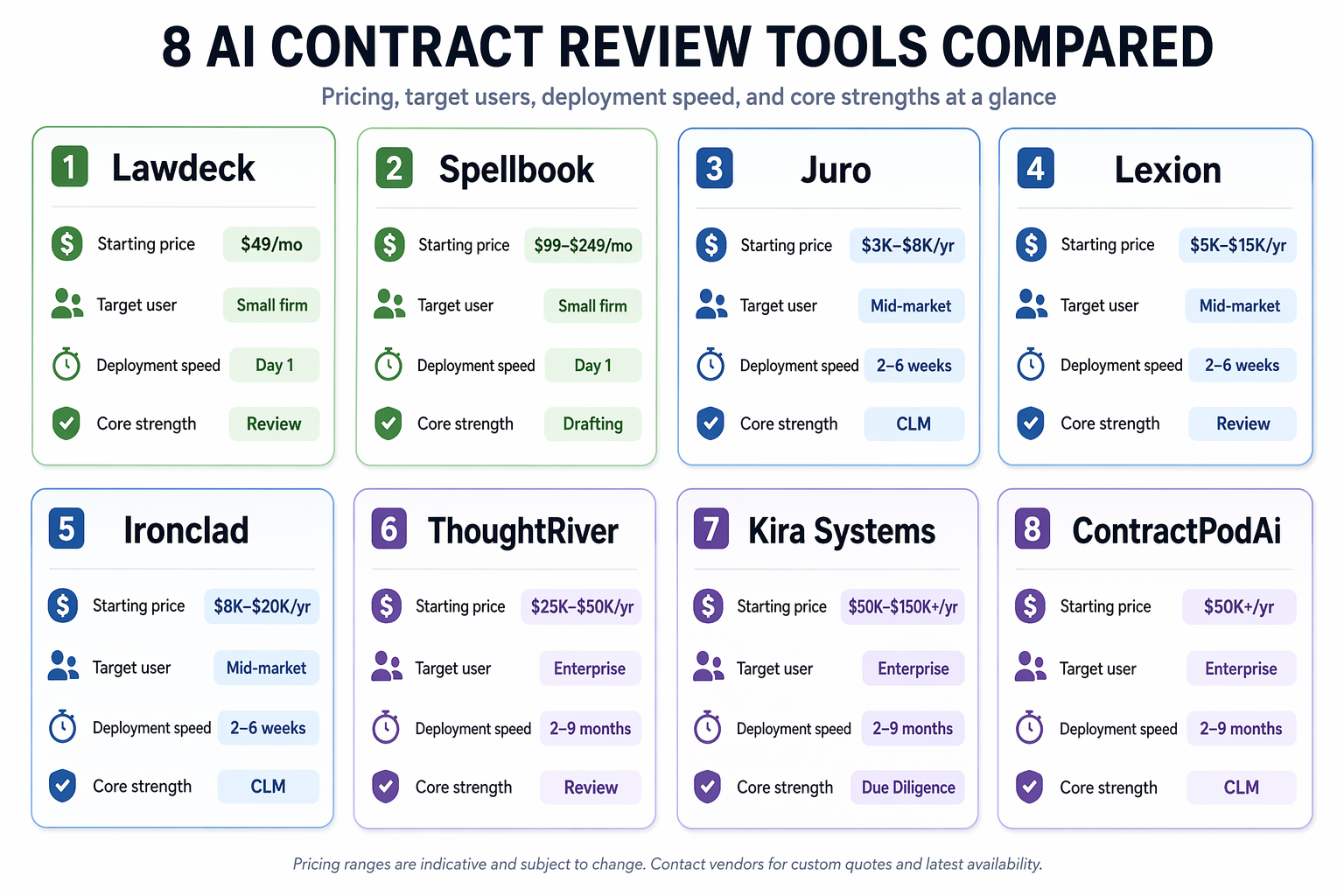
Pricing in the AI contract review market is opaque. Most vendors do not publish prices, and the range is enormous — from $99 per month for a solo practitioner tool to $150,000+ per year for an enterprise deployment. Understanding the pricing landscape is essential for making a realistic budget comparison.
| Pricing Tier | Typical Range | Example Vendors | Best For |
|---|---|---|---|
| Per-user subscription | $99 - $3,000+/month | goHeather ($99/mo), Harvey ($30K+/mo) | Small firms, solo practitioners, or teams with predictable volume |
| Annual platform fee (small teams) | $3,000 - $8,000/year | LegalOn (small team tier) | Small to mid-size legal departments |
| Enterprise annual license | $30,000 - $150,000+/year | Kira ($50K+/yr), Evisort ($30K+/yr), Ironclad ($50K+/yr) | Large law firms, enterprise legal departments |
| Outcome-based / managed services | Varies by contract volume | Robin AI, Unframe | Teams that want to outsource review rather than license software |
Hidden costs can significantly increase the total cost of ownership. Onboarding and training fees, playbook development costs (especially for tools that require custom builds), and integration consulting are common add-ons. A tool with a lower license fee but a 3-month custom playbook build may end up costing more than a higher-priced tool with pre-built playbooks that is operational in two days.
Professional Responsibility Considerations: ABA Model Rules 1.1, 1.6, and 5.3
The decision to adopt an AI contract review tool is not just a technology procurement — it is an ethics decision. Three ABA Model Rules are directly implicated.
- Model Rule 1.1 (Competence): The duty of technology competence requires attorneys to understand the capabilities and limitations of the AI tools they use. This includes knowing when the tool is likely to hallucinate, when it misses clauses, and how to verify its outputs. A lawyer who blindly trusts an AI output without review is not meeting the standard of competence.
- Model Rule 1.6 (Confidentiality): As discussed in Criterion 3, transmitting client contracts to a third-party AI vendor requires reasonable efforts to prevent disclosure. This means vetting the vendor's data handling policies, encryption standards, and whether customer data is used for model training.
- Model Rule 5.3 (Non-Lawyer Assistance): AI tools are, in effect, non-lawyer assistants. The attorney must supervise their work and ensure that their conduct is compatible with the lawyer's professional obligations. This is not a theoretical concern — multiple state bar associations have issued ethics opinions requiring attorney oversight of AI outputs.
The regulatory landscape is evolving rapidly. The EU AI Act's phased compliance milestones, which began taking effect in 2025 and continue through 2027, impose additional obligations on AI systems used in legal contexts. For a comprehensive reference on jurisdiction-specific rules, see our glossary entry on ABA Model Rule 1.1 and the duty of technology competence.
Red Flags: What to Avoid When Evaluating AI Contract Review Tools
Harvey's guide to choosing legal AI identifies several red flags that are worth adopting as your own evaluation criteria. A tool that exhibits any of these characteristics should be approached with caution:
- Started as a general tool. If the vendor's origin story is about building a general-purpose chatbot and then adding a legal skin, the model likely lacks the depth needed for contract review.
- Cannot show its work. A tool that flags a clause as risky but cannot cite the specific language or legal reasoning behind the flag is not trustworthy. Source citations are not optional.
- Requires copying and pasting. Tools that cannot integrate with Word or your document management system add friction and reduce adoption.
- Lacks jurisdictional awareness. Contract law varies by jurisdiction. A tool that treats a California choice-of-law clause the same as a New York clause is not doing its job.
- Cannot explain how it handles governing law differences. This is a specific test of the tool's legal sophistication. If the vendor cannot articulate how the model accounts for jurisdictional variation, that is a red flag.
- Claims 100% accuracy. No AI tool achieves perfect accuracy on contract review. Any vendor making this claim is either testing on an unrealistically narrow dataset or misleading you.
For a critical perspective on how even top-performing tools like Harvey and CoCounsel can underperform in daily practice despite strong benchmark scores, see our analysis of the benchmark-to-practice gap.
Evaluation Checklist and Vendor Comparison Worksheet
Use the following checklist as a structured decision-support tool when evaluating vendors. Each criterion maps to a specific risk or opportunity discussed in this guide.
| Evaluation Criterion | Questions to Ask | Why It Matters |
|---|---|---|
| Legal expertise integration | Who built the playbooks? Are they attorney-vetted? How often are they updated? | Determines whether the tool can handle nuanced legal analysis or just surface-level pattern matching |
| Accuracy methodology | What is the F1 score? On what dataset was it measured? Does the tool fail on the five documented failure modes? | Raw accuracy claims without F1 scores or test-set transparency are not trustworthy |
| Security and confidentiality | Does the vendor train on customer data? What encryption standards are used? Is SOC 2 Type II certified? | Directly implicates ABA Model Rule 1.6 and client confidentiality obligations |
| Day-one productivity | Are pre-built playbooks available? How long does setup take? What is the time-to-value? | Determines whether the tool delivers ROI in days or months |
| Workflow integration | Does the tool integrate with Word, your CLM, and your DMS? Is it native or browser-only? | Integration quality is the strongest predictor of adoption rates |
| Pricing transparency | What is the all-in cost including onboarding, training, and playbook development? | Hidden costs can double the total cost of ownership |
| Professional responsibility alignment | Does the vendor understand ABA Model Rules? Can the tool's outputs be supervised effectively? | Failure to align with ethics rules creates malpractice exposure |
For each vendor you evaluate, create a comparison row using the following worksheet template. Rate each criterion on a scale of 1 (does not meet) to 5 (exceeds expectations), and note the specific evidence that supports your rating.
| Vendor | Legal Expertise | Accuracy | Security | Productivity | Integration | Pricing | Ethics Alignment | Total Score |
|---|---|---|---|---|---|---|---|---|
| Example: LegalOn | 5 (50+ pre-built playbooks, attorney-vetted) | 5 (ELO 1,778 in 2026 benchmark) | 5 (SOC 2, no customer data training) | 5 (1-2 day setup) | 5 (Word add-in, CLM integrations) | 4 ($3K-$8K/yr for small teams) | 5 (clear ethics posture) | 34/35 |
| Example: Harvey | 5 (60%+ Am Law 100 adoption) | 4 (strong but less public benchmark data) | 5 (SOC 2, no customer data training) | 4 (setup varies by deployment) | 4 (strong integration but enterprise-focused) | 3 ($30K+/mo) | 5 (clear ethics posture) | 30/35 |
| Example: Kira | 4 (1,400+ clause types) | 4 (90%+ on standard clauses) | 4 (varies by deployment) | 3 (custom setup required) | 3 (strong but legacy interface) | 2 ($50K+/yr) | 4 (established vendor) | 24/35 |
For detailed profiles of individual tools mentioned in this guide, see our deep dive on Luminance's Panel of Judges architecture and our tool directory for structured profiles of LegalOn, Harvey, Kira, Ironclad, and other major vendors.
Chronological incident history
No sanction cases have named this tool in the tracked record set to date. This does not imply the tool is safe — see Risk Digest for ongoing monitoring.
← Compare peer toolsReport a correction or tip
Spotted an outdated figure, a misstated fact, or a ruling this tool profile should reflect? Public comments are disabled for this content given the professional cost of a misreported case outcome, penalty amount, or rule text — use the structured correction channel instead.
Report a correction or tip for this record →