
Free AI Tools for Solo and Small-Firm Lawyers: A Budget-Conscious Assessment with Cost-Per-Task Analysis
This article helps solo practitioners and small-firm owners (2–10 attorneys) navigate the free AI tool landscape with a clear focus on budget constraints. It maps free tools to common workflows, exposes hidden costs like privacy risks and verification time, and provides a threshold analysis to determine when free becomes more expensive than paid.
- Hallucination rate
- Not measured / undisclosed
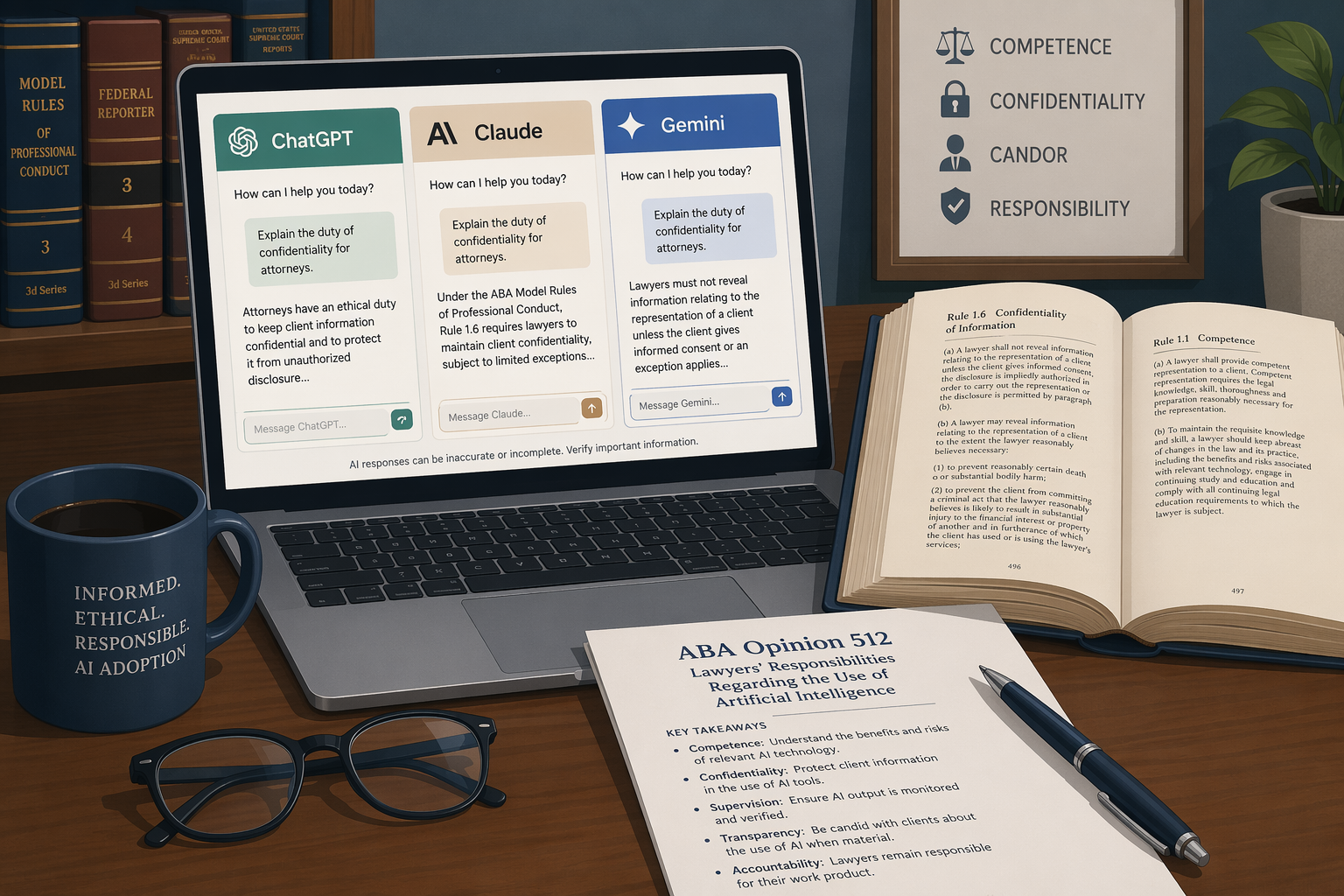
The Solo/Small-Firm AI Reality: Why Budget Matters More Than Hype
The legal profession's AI adoption curve has bent sharply upward. The Clio 2024 Legal Trends Report, published in October 2024, found that 79% of legal professionals now use AI tools, up from just 19% in 2023. But for solo practitioners and small-firm owners with two to ten attorneys, that headline number obscures a more complicated financial picture.
Solo practitioners' technology spending is growing at a rate of 56% annually — more than twice the industry average. Yet solo lawyers spend only 0.58% of their total expenses on software, compared to 1.77% for firms with two to four lawyers. Every software dollar must be justified, and the margin for error is thin. A $50 monthly subscription that does not deliver measurable time savings is not a minor expense; it is a direct hit to profitability in a practice where the difference between a good year and a bad one can hinge on a handful of billable hours.
Free AI tools are an obvious entry point. They require no upfront financial commitment, and the barrier to experimentation is low. But free tiers are not designed as charity. They are customer acquisition funnels with built-in limitations — usage caps, feature restrictions, and data-handling terms that may conflict with a lawyer's professional obligations under ABA Formal Opinion 512, issued July 29, 2024. The opinion makes clear that Model Rules 1.1 (Competence), 1.6 (Confidentiality), 1.4 (Communication), and 1.5 (Fees) apply directly to a lawyer's use of generative AI. A free tool that trains on user prompts may violate the duty of confidentiality. A tool that requires extensive output verification may make the lawyer's fee unreasonable if that verification time is not properly accounted for.
This article is written for the solo practitioner or small-firm owner who needs to make every technology dollar count. It maps free AI tools to the five core workflows that dominate a small practice — client intake, legal research, document drafting, contract review, and legal writing polish — and then exposes the hidden costs that free tiers impose. The final section provides a threshold analysis: a framework for calculating when the cumulative cost of managing free-tier limits and verifying AI output exceeds the price of a paid tool. No free tool replaces an attorney's judgment, and verification is non-negotiable. But with the right framework, free tools can be a genuine asset rather than a hidden liability.
Free Tools Mapped to Common Solo Workflows
The Thomson Reuters 2025 Generative AI in Professional Services Report confirms that among legal professionals currently using AI tools, 77% use it for document review, 74% for legal research, 74% to summarize documents, and 59% to draft briefs or memos. These are precisely the workflows where free AI tools can deliver value — provided the practitioner understands each tool's limitations and the professional responsibility context in which it operates.
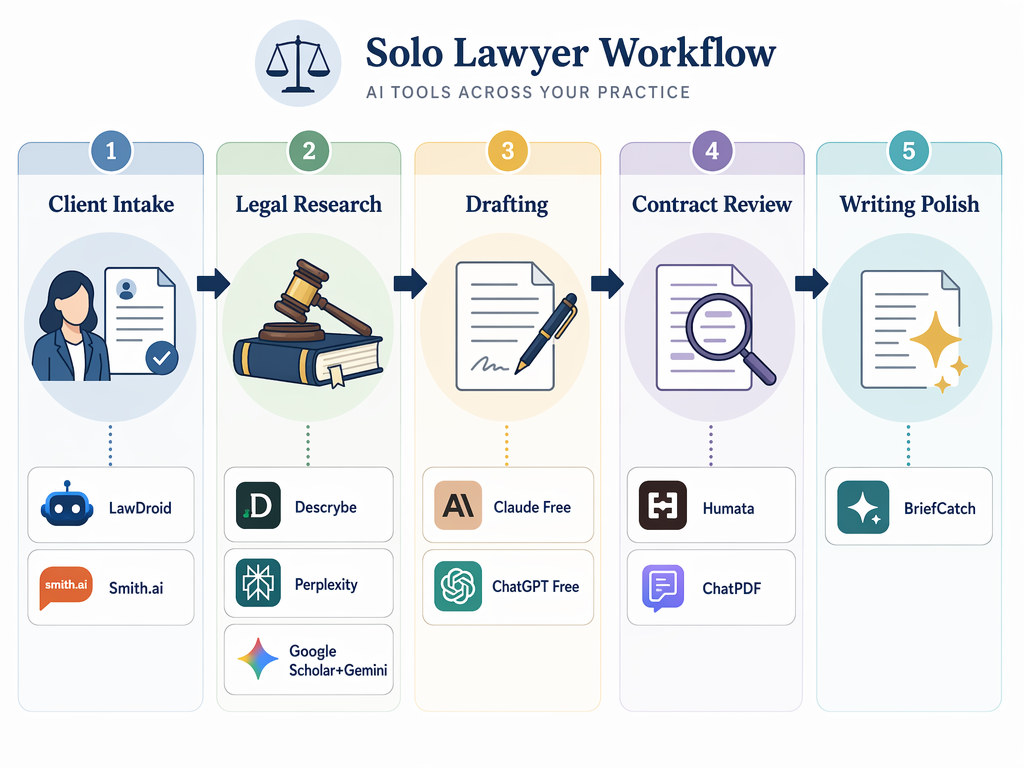
Client Intake: LawDroid and Smith.ai
Client intake is often the first point of contact, and a poorly managed intake process can lose a potential client before the first consultation. LawDroid Builder offers a free tier for building basic intake bots that can qualify leads, collect initial information, and schedule consultations. The free tier is limited in customization and volume, but for a solo practitioner handling fewer than 20 new inquiries per month, it can automate the repetitive screening questions that otherwise consume phone time.
Smith.ai provides a different model: a human-staffed virtual receptionist service that uses AI routing. The free tier is limited, but the service can be cost-effective for solos who need after-hours coverage without hiring a part-time employee. Neither tool handles confidential legal information at the intake stage without careful configuration — the practitioner must ensure that any data collected through the bot is transmitted securely and stored in compliance with Model Rule 1.6.
Legal Research: Descrybe.ai, Perplexity, and Google Scholar + Gemini
Legal research is the area where free AI tools have made the most dramatic strides, but also where the risk of error is highest. Descrybe.ai offers free AI-powered case law search and AI summaries. Its paid tier, the Legal Research Toolkit, costs $20 per month (commercial) or $10 per month (non-commercial) and includes the Cytator citator, a Brief Checker for hallucinated citations, and Boolean search operators. The free tier is genuinely useful for initial case discovery and getting a quick overview of a legal question, but it lacks the citator functionality that a practitioner needs before relying on a case in a filing.
Perplexity AI's free tier returns answers with cited sources from live web content. The SpotDraft analysis identifies it as the strongest free option for research orientation because it links directly to the source material, allowing the attorney to verify the underlying authority. The free tier does not offer enterprise-grade data controls, so it should not be used for research involving confidential client information.
Google Scholar remains a free, reliable source for case law, and combining it with Gemini (Google's free AI assistant) for summarization creates a no-cost research pipeline. The workflow is: search Google Scholar for relevant case law, paste the opinion into Gemini, and ask for a summary of the holding and reasoning. The attorney must then read the original opinion to verify the summary — but this is faster than reading every case in full during the initial triage phase.
For readers who want a deeper comparison of risk-tiered research tools, our Best Free AI for Legal Research: A Risk-Tiered Comparison for Attorneys provides a more detailed evaluation of research-specific tools and their citator reliability.
Document Drafting: ChatGPT Free Tier and Claude Free Tier
Drafting is where generative AI shows its most immediate utility — and its most dangerous failure modes. ChatGPT's free tier (powered by GPT-4o mini or a similar model) can generate first drafts of demand letters, simple motions, and correspondence. The free tier has usage caps — typically a limited number of messages per day — and the model's training data cutoff means it may not reflect the most current law.
Claude's free tier (by Anthropic) is the stronger option for nuanced drafting and summary work for a specific reason: Claude does not use user prompts or responses for training without explicit permission. This is a meaningful privacy advantage over ChatGPT's free tier, which by default may use inputs to improve its models. For a solo practitioner drafting a demand letter that contains client-specific facts, this distinction matters under Model Rule 1.6.
For a comprehensive ethics and risk framework on using ChatGPT for legal tasks, see our guide ChatGPT for Legal Work: The Complete Ethics and Risk Framework for Attorneys in 2026.
Contract Review: Humata and ChatPDF
Contract review is a high-volume, high-stakes workflow where free AI tools can save significant time — but only within strict boundaries. Humata AI's free tier has a 60-page limit, making it impractical for high-volume review of large contracts but useful for occasional low-stakes spot-checks — a short NDA, a simple vendor agreement, or a lease addendum. The tool allows the user to upload a PDF and ask questions about its contents, and it returns answers with citations to specific pages.
ChatPDF offers a similar capability with daily limits on the number of PDFs that can be processed. Both tools are useful for extracting key terms from a document quickly — identifying the governing law clause, the termination provision, or the indemnification section — but neither should be used as the sole review method for high-value or confidential agreements. The SpotDraft analysis explicitly warns that general-purpose tools should not be used as the sole review method for high-value or confidential agreements.
For readers interested in adoption and ROI data on AI contract review tools, our article AI for Contract Review: What the Data Says About Adoption, ROI, and the Governance Gap provides a deeper analysis.
Legal Writing Polish: BriefCatch Free Version
BriefCatch is a legal-specific writing assistant that analyzes briefs and motions for clarity, concision, and persuasiveness. Its free version provides basic style suggestions — identifying passive voice, weak verbs, and overly long sentences. For a solo practitioner who does not have a partner or associate to review drafts, BriefCatch's free tier can catch writing habits that weaken advocacy. The paid version adds deeper analytical features, but the free tier is sufficient for a first-pass polish before the attorney's own final review.
The Hidden Costs of Free: Usage Caps, Privacy Risks, and Verification Time
Free AI tools are not free. They extract payment in three forms: usage limitations that interrupt workflow, data-handling terms that create professional responsibility exposure, and the time required to verify AI output against primary legal sources. For a solo practitioner, these hidden costs compound because there is no team to absorb them.
Usage Caps: The Interruption Tax
Every free tier has a ceiling. Humata's 60-page limit means a single 30-page commercial lease and a 25-page service agreement exhaust the monthly allowance. ChatGPT's free tier imposes rate limits that can interrupt a drafting session mid-thought. Perplexity's free tier limits the number of queries per day. These caps are not merely inconvenient — they impose a cognitive cost. A practitioner who must stop mid-task to wait for a rate limit to reset, or to find an alternative tool, loses the flow state that makes legal work efficient.
| Tool | Free Tier Limit | Practical Impact |
|---|---|---|
| Humata AI | 60 pages total | Useful for 1–2 short contracts per month; impractical for any review volume above that |
| ChatGPT Free | Limited messages per day (varies) | Interrupts drafting sessions; forces the user to plan around rate limits |
| Perplexity Free | Limited queries per day | Suitable for occasional research; not viable for daily research workflow |
| ChatPDF | Limited PDFs per day | Useful for occasional document extraction; not a review pipeline tool |
| Descrybe.ai Free | Case law search and summaries only | No citator; requires manual Shepardizing or KeyCite verification |
Privacy Risks: The Model Rule 1.6 Exposure
ABA Formal Opinion 512 is explicit: Model Rule 1.6 requires lawyers to protect all client information, and using generative AI without appropriate safeguards may breach this duty. The critical distinction between free tiers is whether the vendor trains its models on user inputs.
- ChatGPT's free tier: OpenAI may use inputs to improve its models. A solo practitioner who pastes a client's confidential facts into a ChatGPT prompt is potentially sharing that information with the vendor.
- Claude's free tier: Anthropic does not use user prompts or responses for training without explicit permission. This is a meaningful privacy advantage for legal work.
- Perplexity's free tier: Does not offer enterprise-grade data controls. The vendor's terms should be reviewed carefully before inputting any client-specific information.
- Humata and ChatPDF: Both process uploaded documents on their servers. The terms of service for each should be reviewed to determine whether uploaded documents are used for model training.
Verification Time: The Unbillable Tax
The most expensive hidden cost is the time required to verify AI output. A free AI tool can generate a first draft of a motion in 30 seconds, but the attorney must then verify every citation, every legal proposition, and every factual assertion. The Thomson Reuters survey found that 74% of legal professionals use AI to summarize documents — but a summary is only useful if it is accurate, and accuracy can only be confirmed by reading the original document.
ABA Formal Opinion 512 also addresses fees: a lawyer may charge for time spent using generative AI to draft a pleading (e.g., 15 minutes of input time plus the time to review and verify the output), but generally cannot charge for learning how to use the AI tool. This means the verification time is billable, but the learning curve is not. For a solo practitioner, every hour spent learning a new free tool's quirks — its tendency to hallucinate citations, its preferred formatting, its refusal to handle certain types of queries — is an unbillable hour.
The ABA Model Rule 1.1 and AI: The Duty of Technology Competence for Attorneys glossary entry provides a deeper explanation of the competence obligations that drive this verification requirement.
Threshold Analysis: When Does Free Become More Expensive Than Paid?
The decision to use a free tool versus a paid tool is not a binary choice between spending money and not spending money. It is a calculation of total cost per task, where the inputs include the tool's subscription price (zero for free tiers), the time cost of managing usage caps, the time cost of verifying output, and the risk cost of a data privacy breach.
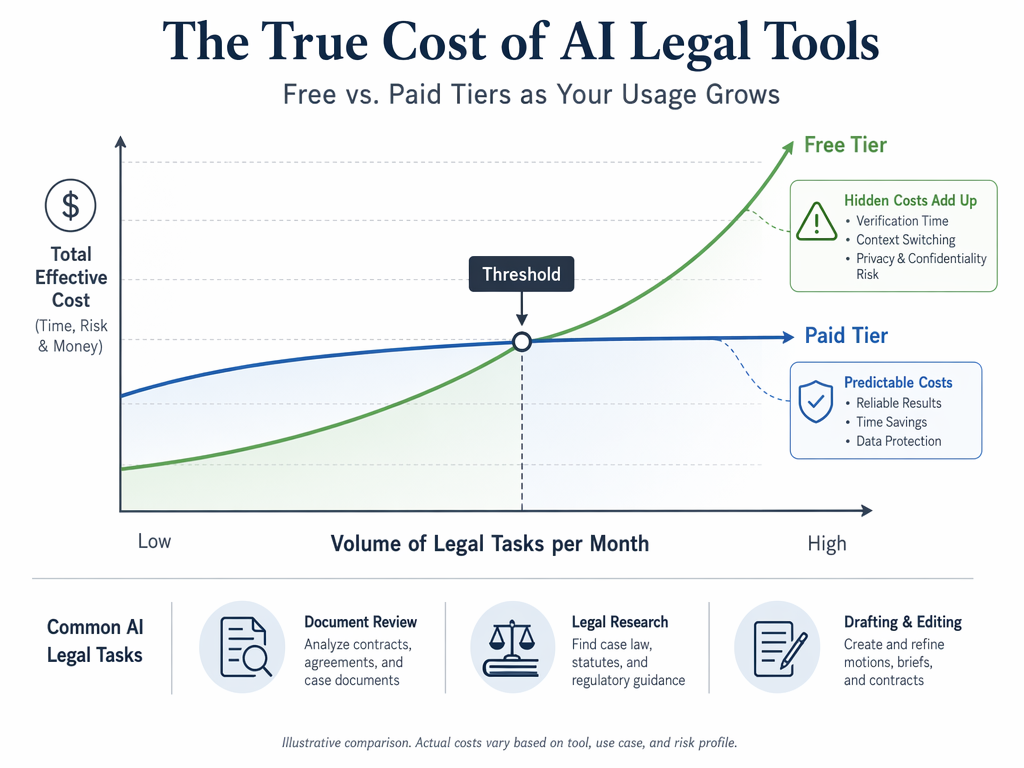
Consider a solo practitioner who handles 15 contract reviews per month. Using Humata's free tier with a 60-page limit, the practitioner can process perhaps two or three short contracts before hitting the cap. The remaining 12–13 contracts must be reviewed manually or through a different tool. If the practitioner's effective hourly rate is $300, and each manual review takes 45 minutes, the cost of the manual reviews alone is $2,925 per month. A paid contract review tool at $100–$200 per month that can handle unlimited pages and provides higher accuracy would reduce the manual review time to 15 minutes per contract, saving $2,250 per month.
| Task Type | Free Tier Cost/Month | Paid Tier Cost/Month | Break-Even Volume |
|---|---|---|---|
| Legal research | $0 + 2 hrs verification time ($600) | $20–$50 + 30 min verification ($150) | ~8 research sessions/month |
| Document drafting | $0 + 1 hr verification ($300) | $20–$50 + 20 min verification ($100) | ~10 drafts/month |
| Contract review | $0 + 45 min per contract ($225) | $100–$200 + 15 min per contract ($75) | ~5 contracts/month |
| Writing polish | $0 + 30 min per document ($150) | $30–$50 + 10 min per document ($50) | ~8 documents/month |
The threshold analysis reveals a counterintuitive truth: for a solo practitioner with moderate to high task volume, the paid tier is often the cheaper option. The free tier is only genuinely cost-effective for very low-volume use — a practitioner who does three legal research queries per month, drafts one letter, and reviews one contract is better off with free tools. But a practitioner who does 15 research queries, 10 drafts, and 5 contract reviews per month will almost certainly save money by paying for tools that eliminate usage caps and reduce verification time.
Recommended Free Stack for a Solo Practitioner in 2026
Based on the analysis above, here is a curated free tool stack for a solo practitioner who handles low-to-moderate task volume and needs to minimize both financial outlay and professional responsibility exposure.
- Client intake: LawDroid Builder free tier for basic intake automation. Configure the bot to collect only non-confidential initial information (name, contact, practice area) and schedule consultations. Do not use the free tier to collect detailed case facts.
- Legal research: Descrybe.ai free tier for initial case discovery, Perplexity free tier for source-linked answers on procedural or factual questions, and Google Scholar + Gemini for no-cost case law search and summarization. Always verify any case you intend to cite using a paid citator (Shepard's or KeyCite) or the Descrybe paid tier's Cytator.
- Document drafting: Claude free tier for first drafts of correspondence, demand letters, and simple motions. Claude's default privacy posture (no training on user prompts) makes it the safer choice for drafting that involves client-specific facts. Use ChatGPT free tier as a backup when Claude's rate limits are reached.
- Contract review: Humata free tier for occasional spot-checks on short, low-risk agreements (NDAs, simple vendor contracts). Do not use for high-value or complex agreements. For any contract review that matters, upgrade to a paid tool or conduct a manual review.
- Legal writing polish: BriefCatch free version for a first-pass style check on briefs and motions. The free version catches passive voice, weak verbs, and overly long sentences — enough for a solo practitioner's self-editing workflow.
When your task volume exceeds the thresholds identified in Section 4, the recommendation shifts: upgrade to the paid tier of the tool that handles your highest-volume workflow first. For most solo practitioners, that will be either a paid legal research tool (Descrybe's $20/month tier, which includes the Cytator citator and Brief Checker) or a paid drafting tool. The Clio data shows that firms spending 12% more on software see 21% higher profitability — but that correlation only holds when the software is actually used to improve workflow efficiency, not when it sits unused after a single trial.
The free AI tool landscape in 2026 offers genuine value for solo and small-firm lawyers — but only when approached with clear eyes. Understand the usage caps. Understand the privacy terms. Calculate your own cost-per-task threshold. And never forget that the most expensive tool is the one that produces an error you did not catch.
Chronological incident history
No sanction cases have named this tool in the tracked record set to date. This does not imply the tool is safe — see Risk Digest for ongoing monitoring.
← Compare peer toolsReport a correction or tip
Spotted an outdated figure, a misstated fact, or a ruling this tool profile should reflect? Public comments are disabled for this content given the professional cost of a misreported case outcome, penalty amount, or rule text — use the structured correction channel instead.
Report a correction or tip for this record →