Full profile
Search for legal AI tools for non lawyers and the first frustration appears fast: many of the most polished products are not for you. Harvey, CoCounsel, and Spellbook are usually discussed as legal AI success stories, but they are built for lawyers, law firms, or legal departments, not for a tenant answering an eviction notice, a founder staring at a vendor contract, or a consumer trying to understand a demand letter before a deadline expires.[1]
The tools a non-lawyer can actually open today fall into a different map. Some help organize a case or research basic legal issues. Some sell document drafting and small-business legal workflows. Some promise consumer claim automation. Those are not interchangeable jobs. A tool that helps you sort exhibits is not the same thing as a tool that drafts a court filing, and neither is the same thing as a lawyer who can appear, advise, negotiate, and take responsibility for the result.
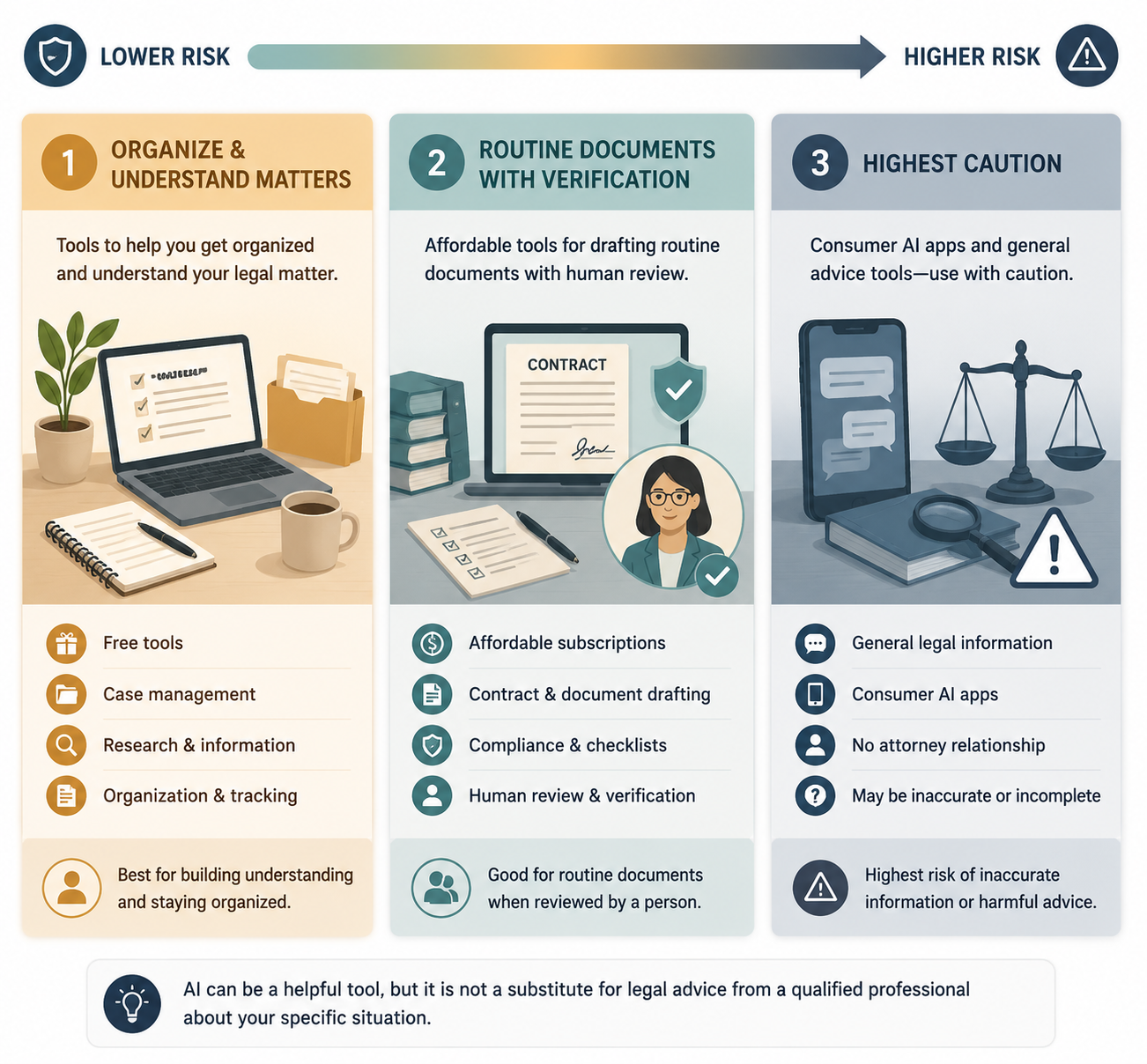
| Category | Best used for | Main constraint | Risk posture |
|---|---|---|---|
| Free pro se tools | Case organization, legal research, chat intake, referrals | Usage caps, limited scope, no attorney-client relationship by default | Useful when they help you understand and organize; risky if treated as representation |
| Affordable small-business services | Routine contracts, compliance checklists, IP-adjacent workflows, document review | Vendor claims vary; attorney review may cost more or be limited | Potentially worthwhile for repeat low-stakes documents if review options are clear |
| Consumer apps | Simplifying legal language or automating narrow consumer claims | Weakest accuracy assurances and highest regulatory caution | Use carefully; DoNotPay is now a warning label, not just a product name |
The practical question is not whether a product is “AI legal tech.” It is whether, for your task, the tool is helping you organize, understand, draft, or decide. The farther it moves toward deciding legal strategy or producing something that will be filed, signed, or relied on in a dispute, the less tolerance there is for guesswork.
Clear Away the Lawyer-Only Tools First
Lawyer-facing systems matter because they shape expectations. They also clutter search results. A small business owner may read about AI contract review and assume the same quality of workflow is available for a monthly consumer subscription. Often it is not. Darrow AI’s 2026 roundup places tools such as Harvey, CoCounsel, and Spellbook in the lawyer-tool universe, where professional users bring legal training, firm supervision, malpractice exposure, and client-confidentiality systems to the workflow.[1]
That difference is not cosmetic. A lawyer can test an AI answer against doctrine, procedure, local rules, and professional obligations. A non-lawyer often receives the output at face value. If the tool hallucinates a citation, misses a deadline issue, or drafts language that harms the user’s position, the cleanup lands somewhere else: with the user, the clerk, the judge, an opposing lawyer, or a legal aid attorney asked to fix the mess late.
For a deeper split between consumer and professional legal AI markets, see the internal guide to free legal AI apps and the consumer-professional market bifurcation. This article stays with tools a non-lawyer can realistically access.
Free Pro Se Tools: Helpful When They Narrow the Next Step
Free pro se tools sit closest to the access-to-justice problem. They are also the easiest to overpraise. A person without counsel does not need a product demo that sounds like a substitute law office. They need to know what to do before the deadline, what papers they have, what questions to ask, and whether they need a human lawyer immediately.
Prosei AI presents itself as free AI case management for pro se litigants. Its own product page emphasizes case organization, document handling, and AI assistance, while also showing practical limits such as caps on active cases and AI credits.[2] That matters. A cap is not a minor pricing footnote when someone has multiple related matters, a long-running dispute, or a document-heavy case.
Used well, a case-management tool can reduce chaos. It can help a user collect the lease, complaint, notices, emails, payment records, photos, or prior orders in one place. That may be the difference between an intake worker seeing the problem quickly and spending the appointment reconstructing the timeline from a phone gallery. But it should not be treated as a judgment engine. The tool can help organize a defense packet; it does not decide whether the defense is legally sufficient in that court.
Cetient is closer to the research side. Its pro se product page describes free legal research AI for non-lawyers with usage limits.[3] Research assistance can be valuable when it translates legal vocabulary into a starting point: What is a motion? What does service mean? What issues are usually relevant in a debt collection answer? That is different from telling a user, “File this argument,” or inventing authorities that look official enough to pass a frightened person’s smell test.
LawConnect takes another route: free AI legal chat paired with a lawyer referral option.[4] The referral path is important because many legal problems do not become safer merely because the explanation is clearer. If a user describes a live lawsuit, a pending eviction, a wage claim, a restraining order, immigration consequences, or a business dispute with real money attached, the best feature may be the handoff, not the chat.
| Tool | Plausible non-lawyer use | Do not stretch it into |
|---|---|---|
| Prosei AI | Organizing matter files, deadlines, documents, and case materials within stated caps[2] | A litigation strategy or court-filing substitute |
| Cetient | Understanding legal concepts and researching starting points within stated limits[3] | A guarantee that cited law applies to your facts and jurisdiction |
| LawConnect | Initial legal chat and possible referral to a lawyer[4] | A replacement for legal advice in a high-stakes dispute |
This is where free can be genuinely useful. A tool that helps a self-represented person arrive at a clinic with documents sorted, questions written down, and the basic vocabulary understood is doing real work. A tool that nudges the same person into filing confident nonsense is not democratizing anything; it is moving the cost of error downstream.
Affordable Small-Business Services: Read the Claims Like Contract Terms
Small-business legal AI has a different bargain. The user is often not in court tomorrow. They need a service agreement, privacy policy, employment document, contractor template, compliance explanation, or first pass at IP-related paperwork. The risk is still real, but the buying question is more commercial: Is the subscription cheaper than repeated outside counsel for routine work, and is there a real review layer when the document matters?
Talking Tree describes a $20-per-month nonprofit service for small businesses covering contracts, intellectual property, and compliance. In its own 2026 guide, it reports 92–95% accuracy on routine legal tasks and claims average annual savings of $15,000–$40,000 compared with outside counsel.[5] Those numbers should be read as vendor-reported claims, not independent proof. They may still help frame the product’s promise, but they do not answer the harder questions: accuracy on whose documents, in which jurisdictions, reviewed by whom, and measured against what standard?
DocDraft’s public product page presents a higher subscription range, from $39.99 to $139.99 per month, and emphasizes an attorney review layer. It also self-reports more than $100 million saved by customers, more than 50,000 documents drafted, 92% satisfaction, and a less-than-1% attorney acceptance rate.[6] Again, those are vendor disclosures. The attorney review layer is the part to inspect closely, because it changes the practical risk more than a savings headline does.
- Ask what “attorney review” covers: legal substance, formatting, jurisdiction fit, business risk, or only a surface check.
- Check whether review is included in the subscription or charged separately.
- Look for limits on document type, turnaround time, revisions, and state-specific advice.
- Do not rely on satisfaction or savings figures unless the methodology is clear.
- Treat anything involving litigation, investor rights, regulated employment, taxes, or major IP ownership as a lawyer-review matter.
The best use case is boring and repeatable: a founder needs a first draft of a routine contractor agreement, a small shop needs to compare terms in a vendor contract, or a nonprofit needs to identify clauses that deserve counsel’s attention. The weak use case is the document that looks routine only because the user does not know what is at stake. Noncompetes, equity, data rights, indemnity, employment classification, and regulated-industry promises can hide a lot of damage in friendly wording.
General-purpose AI tools are tempting here, especially when money is tight. They can explain language and produce draft clauses, but they are not built around legal-source control, confidentiality expectations, jurisdictional checks, or attorney review. For contract-specific risks, the internal comparison of AI contract review versus general-purpose AI goes deeper.
Consumer Tools: Useful Narrowly, Dangerous When They Perform Confidence
Consumer-oriented legal AI tools should earn more skepticism than feature-tour space. Some perform narrow jobs that can help. Legal Robot, as described in an idea2patentai article on generative AI legal tools for non-attorneys, is positioned around simplifying legal-document language.[7] That can be a reasonable task: take dense text and make it easier to read. It is not the same as telling you whether to sign.
Simplification has its own trap. A plain-English version may make a clause feel less threatening without changing the legal effect. If a release, arbitration clause, confession of judgment, warranty disclaimer, or indemnity provision is softened into readable prose, the business consequence may still be severe. The safe output is “here is what this appears to say, and here are the parts to ask a lawyer about,” not “you are fine.”
DoNotPay needs a different treatment because the Federal Trade Commission has already acted. In January 2025, the FTC finalized a $193,000 order over deceptive claims, and the agency said DoNotPay had not tested whether its AI chatbot’s legal-service features were as accurate as a human lawyer.[8] That finding changes the posture. This is not merely a debate about whether a consumer app is innovative; it is a regulator saying legal-accuracy claims were not substantiated.
DoNotPay has also faced class-action litigation, a point worth knowing before treating it as a harmless shortcut.[9] The existence of lawsuits does not prove every user was harmed, and it does not mean every automated consumer-claim workflow is useless. It does mean that “AI lawyer” branding deserves a hard stop. If a product automates a demand letter, cancellation, appeal, or claim form, ask whether the task is administrative, adversarial, jurisdiction-specific, or likely to trigger a response you are not prepared to handle.
For more on unauthorized-practice exposure around AI chatbots, see the internal overview of AI chatbot UPL liability cases. The short version for users is simpler: a tool can help you prepare, but it should not pretend to be your lawyer.
Courts Are Already Seeing the Spillover
This is not just a consumer-app story. Bloomberg Law reported in March 2026 that pro se employment suits had surged 49% and pro se Fair Housing Act suits had surged 69%. The same reporting identified 52 AI-misuse court rulings in February 2026 alone.[10] Those figures do not prove that any one tool caused the increase, and they should not be read as an indictment of every self-represented litigant using technology. They do show that courts are already absorbing AI-assisted filings and AI-related mistakes at scale.
That matters because the justice system has little spare capacity for cleanup. A hallucinated case citation wastes court time. A generated complaint that misses required facts can hurt the person who filed it. A confident but defective answer may preserve nothing. Judges and clerks cannot become personal legal editors for everyone who was sold the idea that a chatbot could do the job.
The New York State Bar Association’s discussion of pro se advocacy in the AI era frames the same tension: AI can expand access to legal information, but it raises ethical and professional-responsibility problems when non-lawyers receive outputs that resemble legal advice without the safeguards of representation.[11] That is the tension a good tool has to respect instead of marketing around.
There are also narrower, more hopeful examples. Stites & Harbison’s 2025–2026 discussion describes AI helping pro se litigants in contexts such as preventing evictions and defending debt collection actions.[12] The responsible lesson is not that AI now replaces legal aid. It is that structured help at the right moment can improve a person’s ability to respond, especially when the alternative is silence, default, or missed paperwork.
For a fuller look at the litigation trend, the internal article on the AI-fueled pro se surge covers the court-facing side in more depth.
A Practical Sorting Test Before You Use One
Before choosing a tool, name the task in plain language. “I need legal help” is too broad. “I need to upload and organize my eviction documents before intake,” “I need to understand what this arbitration clause says,” “I need a first draft of a standard services agreement,” and “I need to decide whether to countersue” are very different requests.
| If the task is... | A tool may be appropriate when... | Get licensed legal help when... |
|---|---|---|
| Organizing documents | The tool stores, labels, summarizes, or timelines materials without deciding strategy | The deadline is near or the document set affects a live court filing |
| Understanding legal language | The output explains terms and flags questions without telling you what to do | You must sign, waive rights, settle, or respond under deadline |
| Drafting routine business documents | The matter is low-stakes, repeatable, and review options are clear | The document controls ownership, liability, employment status, regulated duties, or investor rights |
| Filing or defending a case | The tool helps prepare materials for a clinic, lawyer, or self-help center | The tool is generating arguments, citations, claims, defenses, or procedural choices |
| Automating a consumer claim | The process is administrative and the consequences are limited | The other side may sue, escalate, report, terminate service, or demand legal concessions |
Cost should be part of the analysis, but not the whole analysis. Lawfare has warned that AI will not automatically make legal services cheaper, and that is a useful correction to the fantasy that software alone fixes the access gap.[13] A cheaper tool can still be expensive if it produces a bad filing, a broken contract, or a false sense of safety.
The best tools are usually modest about the boundary. They tell you what they are doing, preserve the materials you need, label uncertainty, offer review or referral when the matter crosses a line, and avoid pretending that legal information is the same as legal advice. The worst ones make the user feel represented when nobody has taken professional responsibility for the work.
Free pro se tools may help you organize and understand a matter. Affordable small-business services may be useful for routine documents when claims are verifiable and attorney review is available. Consumer apps require the most caution, especially when they imply lawyer-like accuracy. Complex, high-stakes, jurisdiction-specific, or adversarial matters still belong with licensed legal help.
References
- AI Tools for Lawyers, Darrow AI, 2026.
- Prosei AI, Prosei AI.
- Pro Se, Cetient.
- LawConnect, LawConnect.
- Legal AI for Small Business, Talking Tree, 2026.
- DocDraft, DocDraft.
- Generative AI Legal Tools for Non-Attorneys, idea2patentai.
- DoNotPay, Federal Trade Commission, January 2025.
- DoNotPay, Wikipedia.
- Big Law Grapples With AI-Fueled Pro Se Surge, Rising Legal Costs, Bloomberg Law, March 2026.
- Pro Se Advocacy in the AI Era: Benefits, Challenges and Ethical Implications, New York State Bar Association.
- AI and Pro Se Litigation: How LLMs Are Reshaping Legal Strategy, Stites & Harbison, 2025-2026.
- AI Won’t Automatically Make Legal Services Cheaper, Lawfare.
Comments
Join the discussion with an anonymous comment.