
Legal AI Pricing in 2026: What You Actually Pay vs. What You Get
Only two of ten leading legal AI platforms publish individual pricing. This guide exposes the transparency gap, explains what drives cost, and provides a framework for evaluating tools based on total cost of ownership rather than seat prices.
- Hallucination rate
- Not measured / undisclosed
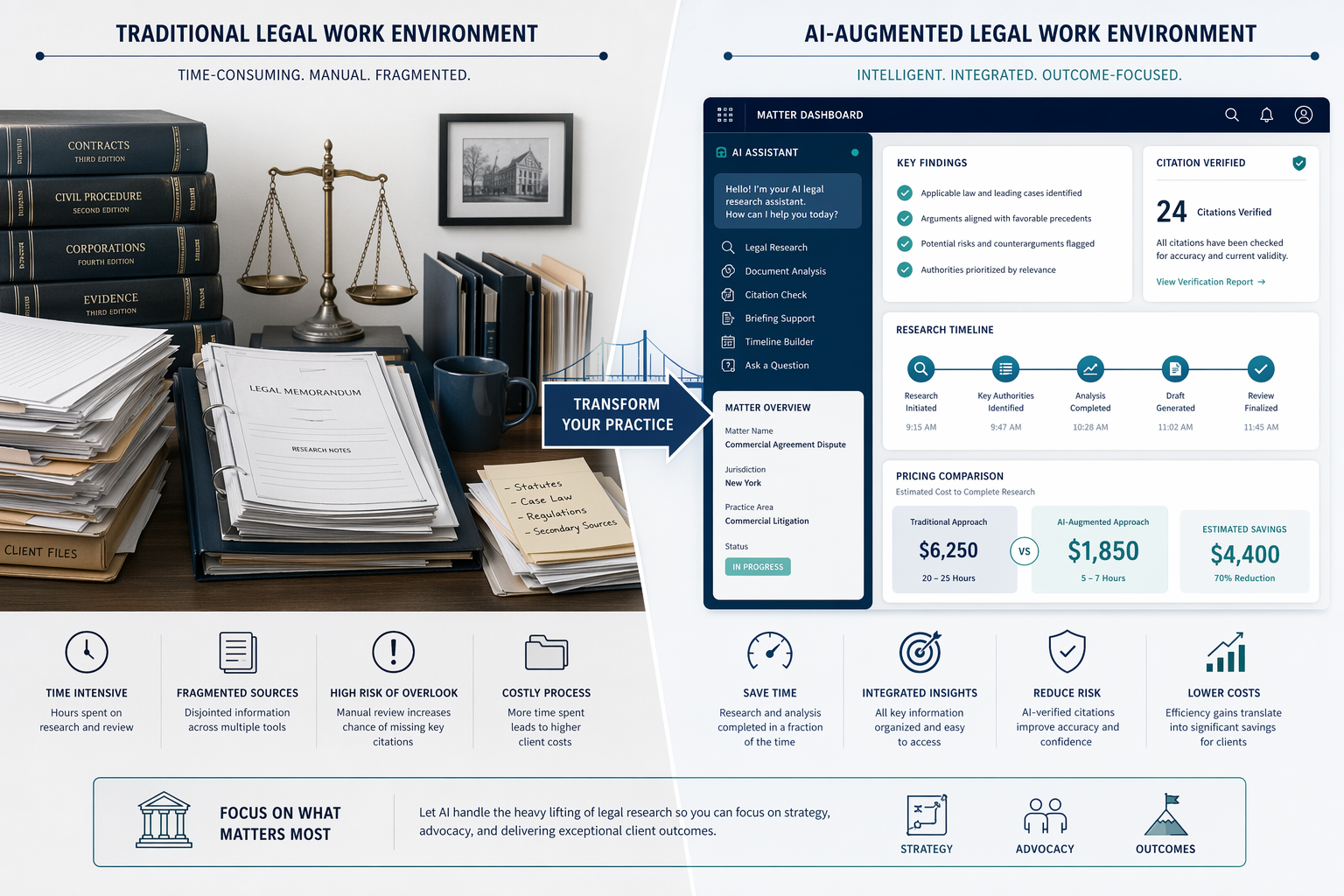
The Pricing Transparency Gap: Why 8 of 10 Vendors Won't Tell You Their Price
If you are a managing partner or legal ops director trying to budget for AI tools in 2026, you will encounter a frustrating reality: most vendors will not tell you what their product costs until you sit through a sales demo. A June 2026 analysis by GC AI found that only two of the ten leading legal AI platforms publish individual pricing. The other eight — including Harvey, Thomson Reuters CoCounsel, Westlaw Precision AI, Lexis+ with Protégé, Spellbook, vLex Vincent AI, Legora, and Alexi — require a sales call to get a number.
| Tool | Published Price (per user/month) | Pricing Model |
|---|---|---|
| GC AI | $500 | Published; subscription |
| Paxton AI | $499 (or $2,999/year) | Published; subscription or annual |
| Harvey | Not published | Enterprise / custom |
| Thomson Reuters CoCounsel | Not published | Enterprise / custom |
| Westlaw Precision AI | Not published | Bundled with Westlaw |
| Lexis+ with Protégé | Not published | Bundled with Lexis+ |
| Spellbook | Not published | Enterprise / custom |
| vLex Vincent AI | Not published | Enterprise / custom |
| Legora | Not published | Enterprise / custom |
| Alexi | Not published | Enterprise / custom |
This opacity is not accidental. When pricing is hidden, buyers cannot comparison-shop without investing significant time in sales processes. It also masks the total cost of ownership: a tool that appears affordable at the seat level may carry hidden costs for data licensing, integration, training, or compliance infrastructure. The result is that purchasing decisions are driven by sales relationships rather than objective value comparisons.
The transparency gap is particularly acute for solo practitioners and small firms, who lack the procurement infrastructure to run competitive evaluations. But it also affects enterprise buyers: without published pricing, it is difficult to benchmark whether a vendor's proposal is competitive or inflated. This lack of market-wide pricing data is a symptom of a broader governance gap in AI adoption, where individual practitioners adopt tools faster than their firms can establish procurement standards.
What Actually Drives Legal AI Pricing
Understanding why legal AI tools cost what they do requires looking beyond the monthly subscription fee. Five primary cost drivers determine the price a vendor must charge — and each has a direct implication for what the buyer actually receives.
- Data quality and legal grounding. Tools that rely on licensed case law databases — such as Westlaw, LexisNexis, or vLex — pay substantial licensing fees to publishers. These costs are passed to the buyer. Tools that use web-scraped or general-purpose data sources have lower data costs but carry higher hallucination risk. The 2024 Stanford RegLab study found that Westlaw AI-Assisted Research hallucinated approximately 33% of queries and Lexis+ AI approximately 17%, though those versions may have been updated since. Data licensing is the single largest structural cost for legal-specific AI.
- Security and compliance infrastructure. Legal AI tools must meet professional responsibility obligations around confidentiality (ABA Model Rule 1.6), data retention, and data residency. SOC 2 certification, zero-data-retention policies, and multi-region hosting all add to operational costs. Enterprise-grade security infrastructure is expensive to maintain, and vendors pass that cost to buyers who require it.
- Integration depth. A tool that lives in a browser tab is cheaper to build and maintain than one that embeds directly into practice management software (Clio, MyCase, iManage) or document management systems. Platform-integrated tools require ongoing API maintenance, compatibility testing, and support for multiple versions of the host software.
- Model and compute costs. Running large language models at scale requires significant GPU compute. While Gartner projects compute costs will drop 90% by 2030, current costs are non-trivial. Tools that fine-tune models on legal data or use retrieval-augmented generation (RAG) incur additional compute overhead for indexing and retrieval.
- Support and training tier. Enterprise plans typically include dedicated account management, custom onboarding, and ongoing training. These services add 20-40% to the per-seat cost compared to self-service plans.
The Four Pricing Architectures: From Free to Enterprise
Legal AI tools fall into four broad pricing architectures, each serving a different buyer profile and use case. Understanding which architecture a tool belongs to helps set expectations for cost, capability, and support.
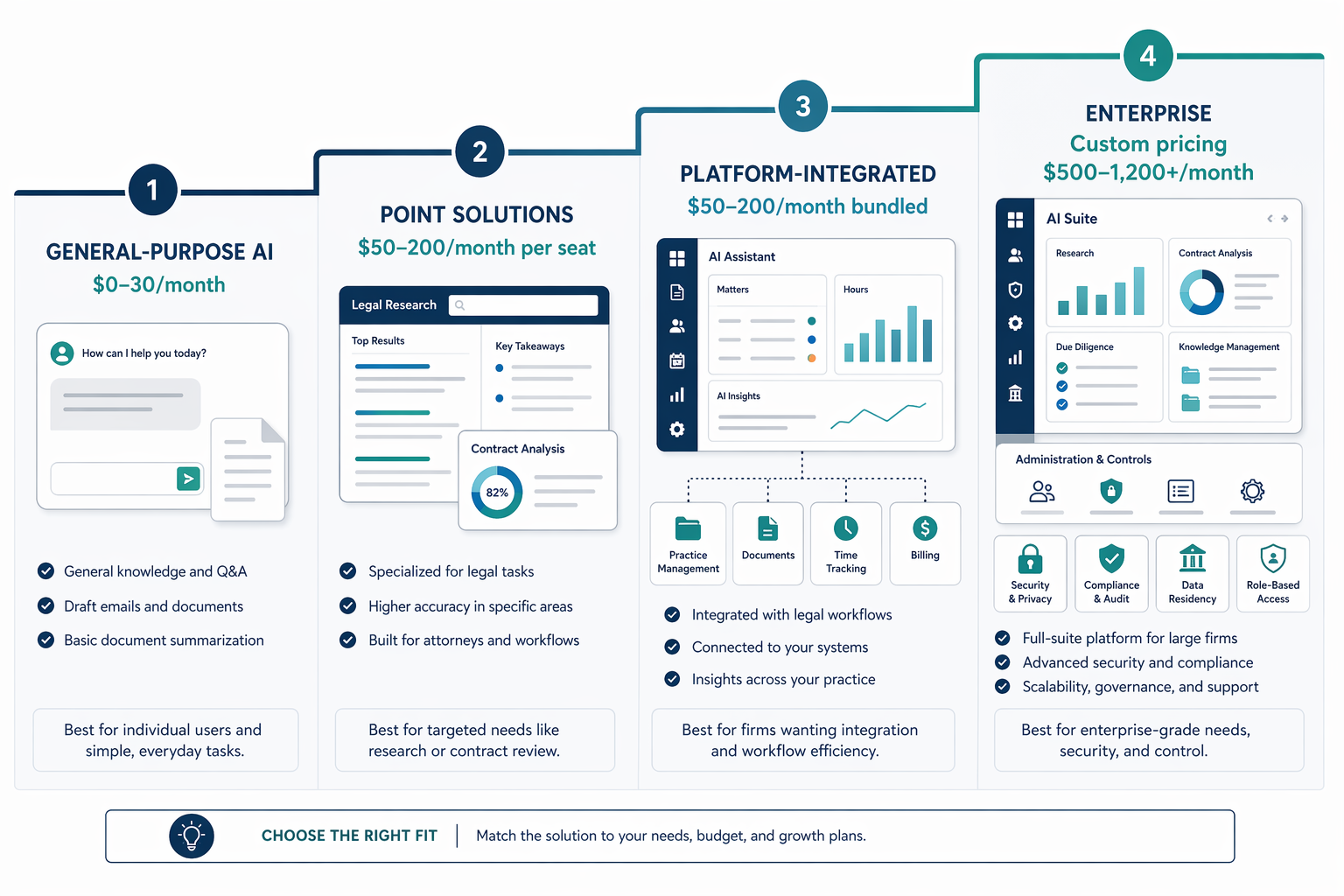
| Architecture | Price Range (per seat/month) | Examples | Best For |
|---|---|---|---|
| General-purpose AI | $0 – $30 | ChatGPT, Claude, Gemini | Solo practitioners exploring AI; low-risk tasks like brainstorming or drafting outlines |
| Point solutions | $50 – $200 | Spellbook, Alexi, Legora | Focused tasks like contract drafting or legal research; firms that need specialized capability without full-platform commitment |
| Platform-integrated | $50 – $200 (bundled) | Clio Manage AI, MyCase AI | Firms already using the host practice management software; seamless workflow integration |
| Enterprise platforms | $500 – $1,200+ (custom) | Harvey, CoCounsel, GC AI, Paxton AI | Large firms and corporate legal departments needing comprehensive coverage, security, and dedicated support |
The boundaries between these categories are not rigid. Some point solutions offer enterprise tiers, and some enterprise platforms offer scaled-down plans for smaller firms. But the architecture framework helps buyers understand what they are paying for: general-purpose tools offer breadth at low cost but lack legal grounding; point solutions offer depth in one area; platform-integrated tools reduce friction for existing software users; and enterprise platforms offer comprehensive coverage with the highest security and support.
For a deeper look at how these categories compare on evaluation criteria beyond pricing, see our independent buyer's guide to AI software for law firms, which covers tool categories, evaluation criteria, and workflow fit in detail.
The ROI Math: What a $100/Month Tool Actually Returns
The most common mistake in legal AI purchasing is evaluating tools on cost alone without calculating the return on investment. A tool that seems expensive at $200 per seat per month may deliver enormous value if it meaningfully compresses task time. Conversely, a free tool that requires extensive manual verification may cost more in attorney time than a paid alternative.
The standard ROI framework, as outlined in Clio's 2026 pricing analysis, is straightforward: at a $300 per hour billing rate, a $100 per month tool that saves five hours per week returns more than $6,000 per month in capacity. The math works across different billing rates and time savings.
| Monthly Tool Cost | Hours Saved per Week | Billing Rate | Monthly Capacity Value | Net Monthly Return |
|---|---|---|---|---|
| $100 | 5 | $200/hr | $4,000 | $3,900 |
| $100 | 5 | $300/hr | $6,000 | $5,900 |
| $100 | 10 | $300/hr | $12,000 | $11,900 |
| $200 | 5 | $300/hr | $6,000 | $5,800 |
| $500 | 10 | $400/hr | $16,000 | $15,500 |
The critical variable is not the tool cost — it is whether the firm can actually capture the time savings as revenue or margin. This is where the billing model becomes decisive.
Why Your Billing Model Determines Whether AI Pays Off
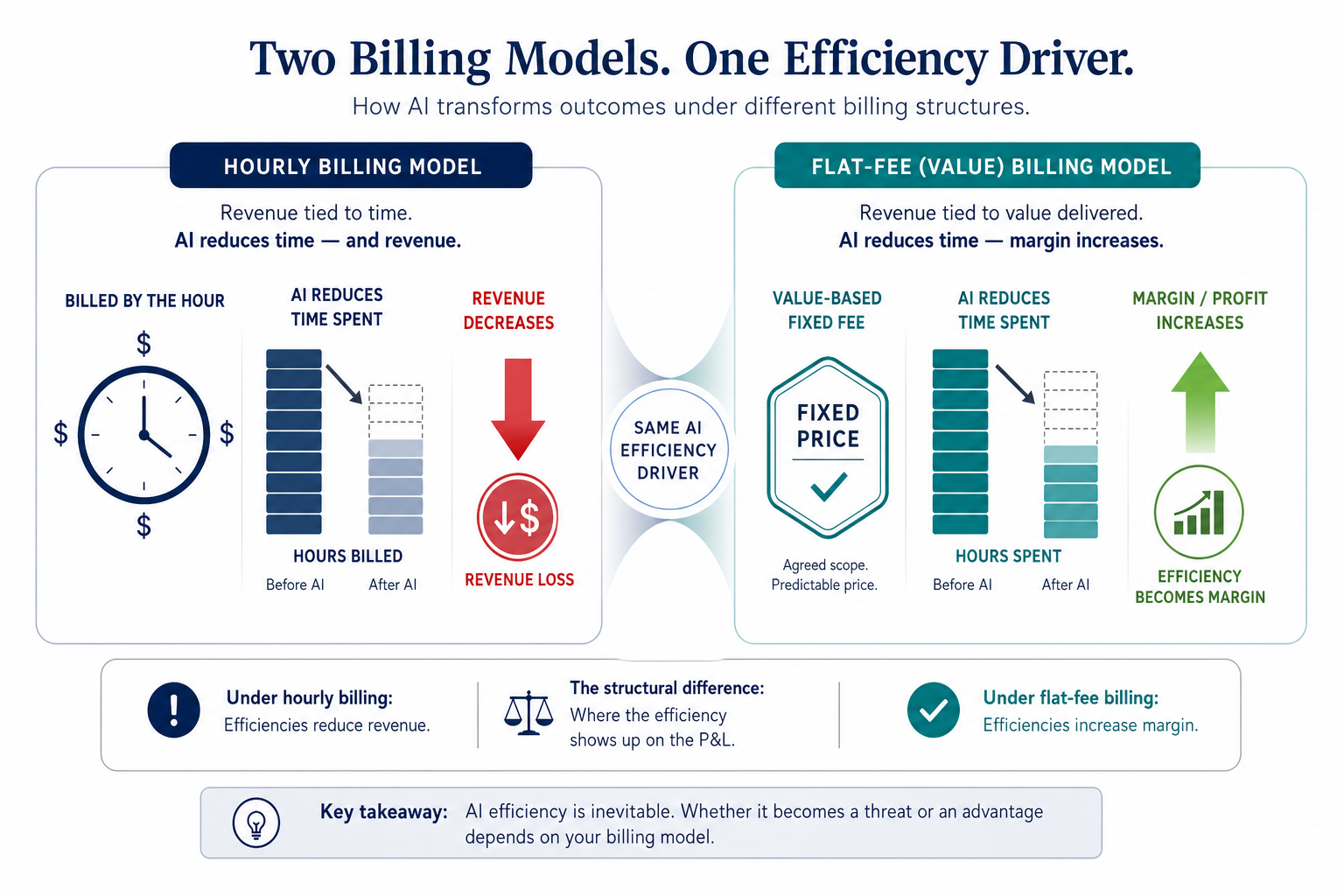
The billing model a firm uses is the single most important factor determining whether AI tools generate profit or simply reduce revenue. Under hourly billing, every hour saved by AI is an hour that cannot be billed to the client. Under flat-fee or value-based billing, every hour saved becomes pure margin.
The market is already shifting. A Wolters Kluwer survey cited in Clio's 2026 pricing analysis found that 67% of corporate legal departments and 55% of law firms expect AI to change how hours are billed. Meanwhile, LeanLaw data shows that 71% of clients prefer flat fees for entire cases. The pressure to move away from hourly billing is intensifying as AI compresses task times.
For firms that remain on hourly billing, the adoption of AI creates a structural tension: the more efficiently a matter is handled, the less revenue it generates. This is not sustainable. Firms that fail to adapt their billing models will find that AI adoption erodes their top line even as it improves their service delivery.
The 8am 2026 Legal Industry Report adds another dimension: 47% of legal professionals expect AI to affect billing practices, with 25% expecting a reduction in billable hours per matter and 22% expecting more fixed fees. Only 6% of respondents said clients have actually requested AI-related price reductions, suggesting that the billing model shift is still in its early stages.
Market Trends: Where Pricing Is Headed
Several forces are reshaping legal AI pricing, and understanding them helps buyers anticipate where the market is going.
- Compute costs are falling. Gartner projects that AI compute costs will drop 90% by 2030. This will reduce the marginal cost of running AI models, potentially lowering prices for tools that are not constrained by data licensing costs. However, the savings may not flow directly to buyers if vendors maintain pricing to capture margin.
- Data licensing remains the durable pricing power center. The cost of licensed case law databases is not falling. Vendors that control access to high-quality legal data — Thomson Reuters, LexisNexis, vLex — have structural pricing power. Tools that rely on these databases will continue to carry a premium, while tools using web-scraped data may face margin pressure as accuracy expectations rise.
- Value-based pricing is emerging. Some vendors are experimenting with pricing tied to outcomes — per-matter fees, usage-based billing, or revenue-sharing models. This aligns vendor incentives with buyer value but adds complexity to procurement.
- Bundling is increasing. Major practice management platforms (Clio, MyCase) are embedding AI features into existing subscriptions, making it harder to separate AI costs from platform costs. This reduces transparency but may lower overall cost for firms already using the platform.
The broader implication is that firms cannot rely on market forces alone to deliver fair pricing. Active procurement management — including competitive evaluations, total cost of ownership analysis, and billing model adaptation — will be essential. For a broader perspective on why firms that fail to adapt may face existential risk, see our analysis of why AI will not replace lawyers but will replace law firms that refuse to adapt.
How to Evaluate Tools When Vendors Won't Publish Pricing
When vendors refuse to publish pricing, buyers must shift their evaluation framework from price comparison to outcome comparison. The goal is to determine what a tool is worth to your practice, then negotiate from that value rather than from a competitor's price.
Use the following checklist to structure your sales conversations and internal evaluation.
- Ask about data licensing. Which case law databases does the tool use? Are they licensed from a publisher or web-scraped? Licensed data costs more but carries lower hallucination risk.
- Verify security certifications. Does the vendor have SOC 2 Type II certification? What is their data retention policy? Do they offer data residency options? These factors affect both cost and compliance.
- Assess integration depth. Does the tool embed into your existing practice management or document management system, or does it require switching between browser tabs? Integration depth correlates with both cost and workflow efficiency.
- Understand the support tier. What level of support is included? Is there dedicated account management? What is the training process? Enterprise support adds 20-40% to per-seat costs but may be essential for firm-wide adoption.
- Calculate total cost of ownership. Include not just the subscription fee but also implementation costs, training time, integration maintenance, and any data licensing surcharges. A tool that costs $200 per seat may have a true TCO of $300+ when these factors are included.
- Run a time trial. Have two associates perform the same task — one with the AI tool, one without. Measure time spent, quality of output, and required verification effort. Use the results to calculate your specific ROI.
For a detailed comparison of free versus paid options, see our analysis of whether free AI can replace Westlaw for solo practitioners, which provides a cost-vs-risk framework for evaluating free tools against paid alternatives.
Chronological incident history
No sanction cases have named this tool in the tracked record set to date. This does not imply the tool is safe — see Risk Digest for ongoing monitoring.
← Compare peer toolsReport a correction or tip
Spotted an outdated figure, a misstated fact, or a ruling this tool profile should reflect? Public comments are disabled for this content given the professional cost of a misreported case outcome, penalty amount, or rule text — use the structured correction channel instead.
Report a correction or tip for this record →