
AI Software for Law Firms: An Independent Buyer's Guide to Tool Categories, Pricing, and Evaluation Criteria
An independent, criteria-driven framework for attorneys and legal ops professionals evaluating AI software purchases. Covers the full pricing spectrum, six evaluation criteria, category-by-category mapping, and a structured decision matrix — designed to help buyers avoid the most common procurement mistake of comparing tools across categories before identifying their firm's workflow bottleneck.
- Hallucination rate
- Not measured / undisclosed
Why 'AI Software for Law Firms' Is Too Broad — Start With Your Workflow Bottleneck
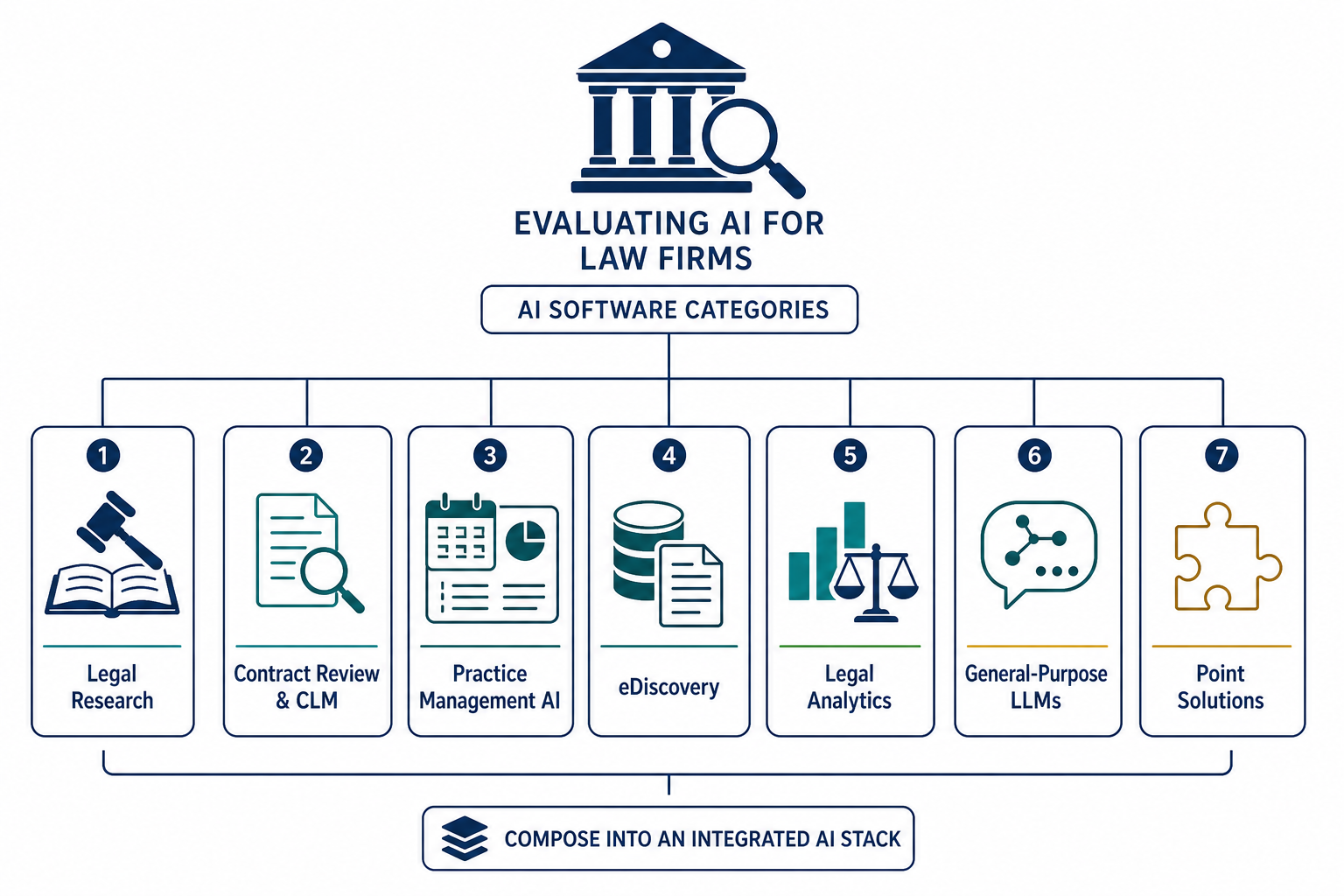
Searching for "AI software for law firms" returns a market landscape that spans free general-purpose chatbots to enterprise platforms costing more than $1,200 per seat per month. The AI software market in the legal industry was estimated at $2.67 billion in 2026, growing to $4.42 billion by 2031 at a 10.53% CAGR, according to Mordor Intelligence. That breadth is the source of the most common procurement mistake: comparing tools across fundamentally different categories before identifying the firm's actual workflow bottleneck.
A legal research platform like Westlaw AI or Lexis+ AI solves a different problem than a contract lifecycle management tool like Luminance or Ironclad. An e-discovery platform like Relativity aiR addresses a completely separate workflow from a practice management AI like Clio Manage AI. Comparing them on feature lists or pricing before knowing which workflow category needs improvement is like comparing a scalpel to a stethoscope before diagnosing the patient.
The 8am 2026 Legal Industry Report (n=1,300) found that 69% of legal professionals now use general-purpose generative AI tools for work — more than double the 31% reported in 2025. But only 42% use legal-specific AI tools. The gap suggests many practitioners are using general-purpose tools for tasks that purpose-built legal AI handles more reliably, often because they haven't diagnosed which workflow would benefit most from a specialized solution.
The Six Evaluation Criteria That Predict ROI
Feature lists and brand recognition are poor predictors of whether a tool will deliver value in daily practice. The six criteria below correlate most strongly with real-world return on investment, based on adoption data, practitioner surveys, and documented failure modes.
- Citation discipline. Does the tool verify its outputs against retrievable primary sources? Legal research tools like Westlaw AI and Lexis+ AI link every generated statement to a specific case or statute. General-purpose LLMs do not. A March 2026 Legaltech News article reported that only 22.1% of legal users have high trust in generative AI output. Citation verification is the single most important feature for reducing hallucination risk in legal work.
- Legal-specific tuning. Tools fine-tuned on legal corpora — case law, statutes, regulations, contracts — produce more accurate results for legal tasks than general-purpose models. The 8am report found that 42% of legal professionals now use legal-specific AI tools, up from 21% in 2025, suggesting the market is shifting toward specialized models.
- Integration depth. The 8am report found that 52% of firms using legal-specific AI chose tools integrated into software they already use. Matter-aware tools that understand client, matter, and document context from your practice management or document management system eliminate manual data entry and context switching.
- Security posture. SOC 2 Type II certification is the minimum baseline for any tool handling client data. Zero-data retention agreements — where the vendor contractually commits not to train on client data — and published Data Processing Agreements (DPAs) with clear data residency commitments are non-negotiable for Model Rule 1.6 compliance.
- Transparent pricing. Per-seat, usage-based, and flat-fee models have very different cost profiles depending on firm size and usage patterns. Enterprise tools like Harvey and CoCounsel do not publish public pricing, which makes apples-to-apples comparison difficult. Demand a written pricing breakdown before any trial.
- Trial accessibility. A 14-day trial with real client data (properly anonymized) is the minimum for meaningful evaluation. Tools that offer only vendor-led demos or sandbox environments make it harder to assess real-world fit.
The 2026 Pricing Landscape: From Free to $1,200+/Seat
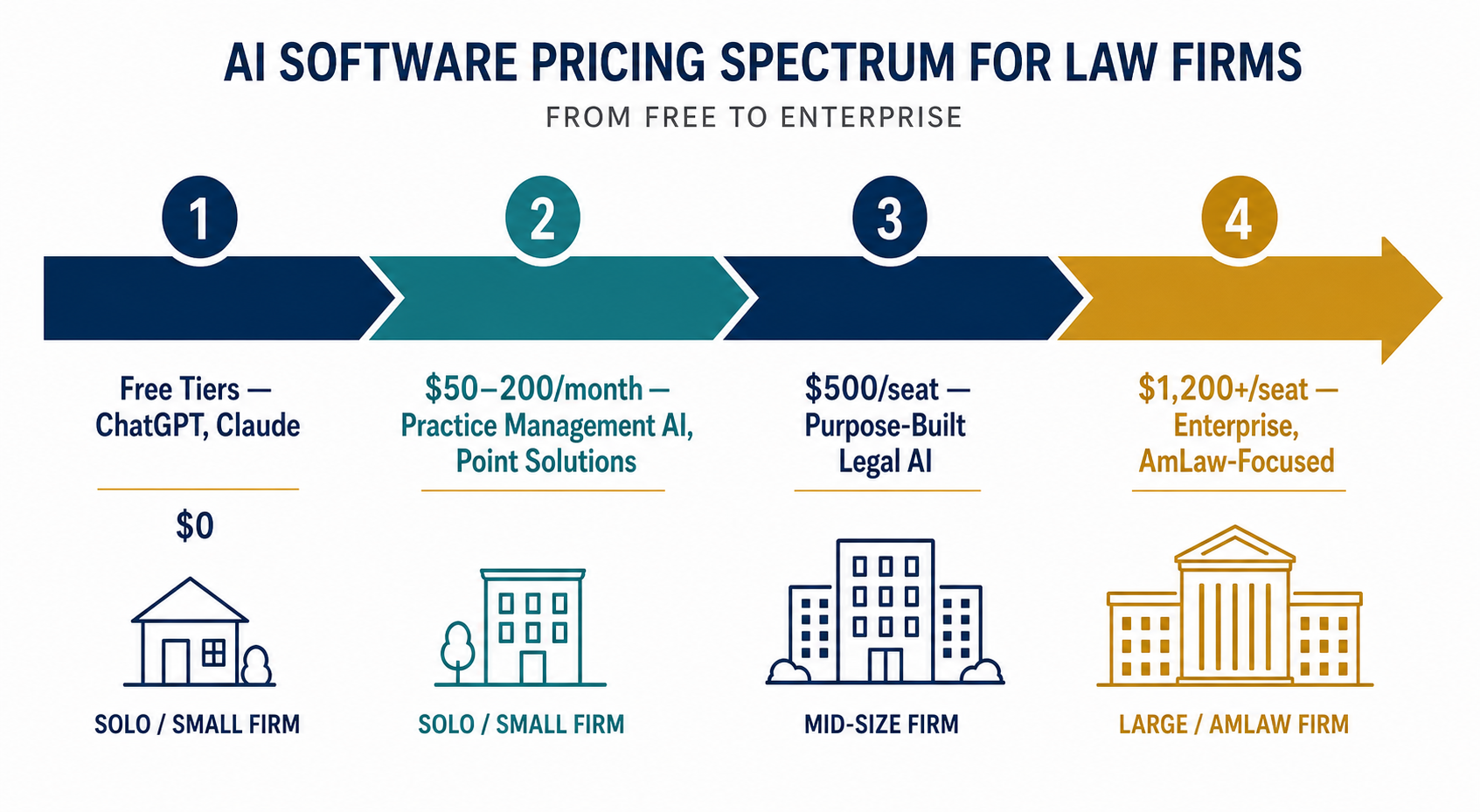
Legal AI pricing in 2026 spans four distinct tiers, each serving a different firm size and use case. Clio's pricing analysis provides the most comprehensive public benchmark, showing that most solo and mid-sized firm tools fall in the $50 to $200 per month range, while enterprise platforms start at $500 per seat and can exceed $1,200.
| Tier | Price Range | Typical Tools | Best For |
|---|---|---|---|
| Free / General-Purpose | $0 | ChatGPT, Claude, Gemini | Brainstorming, initial drafting, general research — with significant caveats on confidentiality and citation accuracy |
| Practice Management AI / Point Solutions | $50–$200/month | Clio Manage AI, MyCase IQ, Smokeball Archie AI | Solo and small firms (2–15 attorneys) looking for integrated AI within existing practice management software |
| Purpose-Built Legal AI | $500/seat/month | GC AI, Westlaw AI, Lexis+ AI | Mid-size firms (16–100 attorneys) and in-house teams needing specialized legal research or drafting capabilities |
| Enterprise / AmLaw-Focused | $1,200+/seat/month | Harvey, CoCounsel (Casetext) | Large firms (100+ attorneys) and AmLaw 100 firms with complex, multi-workflow requirements |
Harvey's co-founders publicly noted in a December 2025 Reddit AMA that the platform requires "too many seats to be cost effective" for smaller practices, as cited by GC AI. This is a rare instance of a vendor acknowledging that its pricing model is not designed for the entire market. For solo and small firms, the $50–$200/month tier — often bundled with existing practice management subscriptions — offers the most accessible entry point.
Category-by-Category Evaluation Framework
Each AI software category has distinct evaluation criteria that reflect the specific workflow it supports. The table below maps the major categories, representative tools, and the key criteria to prioritize during evaluation.
| Category | Representative Tools | Key Evaluation Criteria | Typical Pricing Model |
|---|---|---|---|
| Legal Research | Westlaw AI / CoCounsel, Lexis+ AI, Bloomberg Law AI | Citation verification (every output linked to retrievable source), jurisdiction coverage, integration with existing research ecosystem | Subscription (often bundled with existing Westlaw/Lexis contracts) |
| Contract Review & Drafting | Harvey, Spellbook, Kira, Luminance, Ironclad | Redlining accuracy, clause extraction precision, support for multiple document formats, integration with CLM platforms | Per-seat subscription ($500–$1,200+/month for enterprise) |
| Practice Management AI | Clio Manage AI, MyCase IQ, Smokeball Archie AI | Depth of integration with practice management workflows, matter-aware context, time capture automation | Bundled with existing practice management subscription ($50–$200/month) |
| E-Discovery | Relativity aiR, Everlaw | Technology-assisted review accuracy, processing speed, support for multiple data sources, chain-of-custody documentation | Usage-based or per-GB pricing |
| Legal Analytics | Lex Machina, Pre/Dicta, Premonition | Data coverage (courts, judges, case types), prediction accuracy, update frequency, integration with case management | Subscription (varies widely by data scope) |
For deeper dives into specific tools within these categories, see our structured profiles: Harvey AI Enterprise Legal Platform and Luminance Legal AI Deep Dive. For head-to-head comparisons within a category, see Harvey vs Casetext: Legal AI Research Platform Comparison.
The Integration Litmus Test: Matter-Aware vs. Standalone
Integration depth with existing practice management and document management systems is the single most predictive factor for adoption success. The 8am 2026 Legal Industry Report found that 52% of firms using legal-specific AI chose tools integrated into software they already use. Trust in the provider was the number one driver.
Matter-aware tools understand the context of your work — which client, which matter, which document — without requiring manual data entry. A standalone tool, by contrast, requires you to copy and paste text, upload documents manually, and re-enter context information with every query. The difference in daily friction is substantial.
- Matter-aware tools: Pull client and matter context from your practice management system (Clio, MyCase, Smokeball). Automatically associate generated documents with the correct matter. Reduce data entry and context-switching overhead.
- Standalone tools: Require manual upload of documents and manual entry of context for each session. No integration with billing, time tracking, or document management. Higher friction, lower adoption rates.
During any demo, ask the vendor to show you the tool working inside your existing practice management or document management system — not in a standalone sandbox. If the vendor cannot demonstrate live integration with your specific platform (Clio, iManage, NetDocuments, etc.), treat that as a red flag.
Security Checklist: What Every Law Firm Must Verify Before Signing a DPA
Data security is not a differentiator — it is a baseline requirement. Every AI tool that processes client data must meet minimum standards before any evaluation of features or pricing begins. The consequences of a data breach or inadvertent training on client data extend beyond reputational damage to professional liability and bar discipline.
- SOC 2 Type II certification (not Type I). Type II audits test controls over an extended period, not just a point in time. This is the industry standard for legal technology.
- Zero-data retention agreement. The vendor must contractually commit not to use client data for model training or improvement. This is non-negotiable for Model Rule 1.6 compliance.
- Published Data Processing Agreement (DPA). The DPA must specify data residency commitments, sub-processor lists, breach notification procedures, and data deletion timelines.
- Encryption at rest and in transit. AES-256 for data at rest, TLS 1.3 for data in transit. Verify these are documented in the vendor's security whitepaper.
- Client data segregation. For multi-tenant cloud deployments, confirm that your firm's data is logically or physically segregated from other customers' data.
The shadow IT problem — attorneys using general-purpose LLMs like ChatGPT without enterprise accounts or DPAs — remains widespread. The 8am report found that 54% of firms offer no AI training, and 43% have no AI policy. Only 9% have an actively enforced policy. This creates a situation where individual attorneys are making independent procurement decisions without firm-level security review.
ROI Calculation Framework: Hours Recaptured, Risk Reduction, and Pricing Model Alignment
Calculating ROI for legal AI requires more than comparing subscription costs to billable hours. The most defensible framework accounts for three factors: hours recaptured, risk reduction, and pricing model alignment.
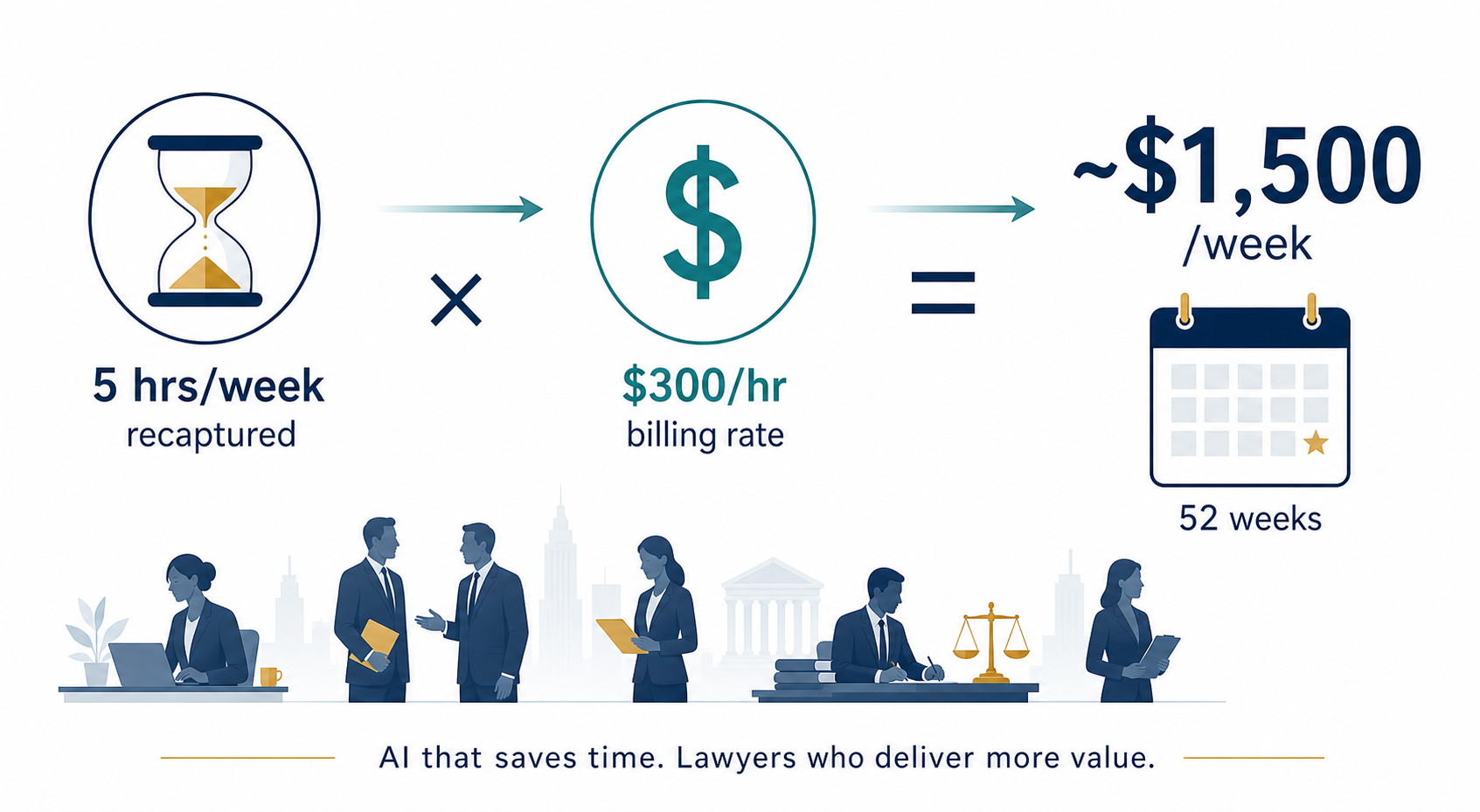
Clio's 2025 Legal Trends Report found that 65% of firms using AI reported saving up to five hours every week. At a $300 billing rate, five hours represent $1,500 per week in recaptured capacity — or approximately $78,000 per year per attorney. Among firms using AI across their workflows, 69% reported a positive revenue impact, compared to 36% overall.
| ROI Factor | Data Point | Source |
|---|---|---|
| Hours recaptured | 65% of firms save up to 5 hrs/week | Clio 2025 Legal Trends Report |
| Value at $300/hr | $1,500/week per attorney | Clio pricing analysis |
| Revenue impact (AI across workflows) | 69% report positive impact | Clio 2025 Legal Trends Report |
| Revenue impact (overall) | 36% report positive impact | Clio 2025 Legal Trends Report |
| High-trust teams: positive ROI | 89.5% | Legaltech News, March 2026 |
| Low-trust teams: positive ROI | 27.8% | Legaltech News, March 2026 |
| Organizations collecting AI ROI metrics | 18% | Thomson Reuters 2026 AI in Professional Services Report |
Risk reduction is harder to quantify but equally important. Citation errors, privilege breaches, and sanctions from AI-generated hallucinations carry costs that far exceed any subscription fee. The AI Hallucination Benchmarks article provides specific accuracy data for major legal AI tools.
Pricing model alignment matters because per-seat pricing penalizes firms with many occasional users, while usage-based pricing can surprise firms with variable workloads. The Beyond the Benchmark article explores why benchmark performance does not always translate to daily practice ROI.
A 14-Day Trial Protocol: How to Test Before You Buy
A structured trial protocol prevents the common mistake of treating a trial as a feature demo rather than a workflow test. The following 14-day protocol is designed to surface integration gaps, accuracy issues, and adoption barriers before a purchasing decision.
| Phase | Days | Activities |
|---|---|---|
| Setup & Security Review | 1–2 | Complete DPA review, verify SOC 2 Type II certification, set up integrations with practice management and DMS, configure user permissions |
| Real Task Testing | 3–7 | Run 5 real client tasks (anonymized) with manual verification of every output. Compare results against current workflow. Document errors, hallucinations, and gaps. |
| Quality Comparison | 8–10 | Compare output quality against current workflow benchmarks. Measure time saved per task. Evaluate citation accuracy and source verification. |
| Multi-Attorney Testing | 11–12 | Have 2–3 attorneys in different practice areas test the tool with their own tasks. Collect independent feedback on usability, accuracy, and workflow fit. |
| Go/No-Go Decision | 13–14 | Evaluate against the six criteria (citation discipline, legal-specific tuning, integration depth, security posture, transparent pricing, trial accessibility). Make a go/no-go decision. |
During the trial, ask the vendor these specific questions:
- "Can you show me a hallucination in your system and how it handles it?" A vendor that cannot or will not demonstrate error handling is not being transparent.
- "What is your citation verification rate on legal research tasks?" The answer should reference specific benchmarks, not vague claims.
- "Can you show me the tool working inside our practice management system?" If the demo is in a standalone sandbox, integration depth is likely limited.
- "What happens to our data if we cancel?" The answer should reference specific data deletion timelines and procedures.
Decision Matrix: Matching AI Software to Firm Size and Practice Area
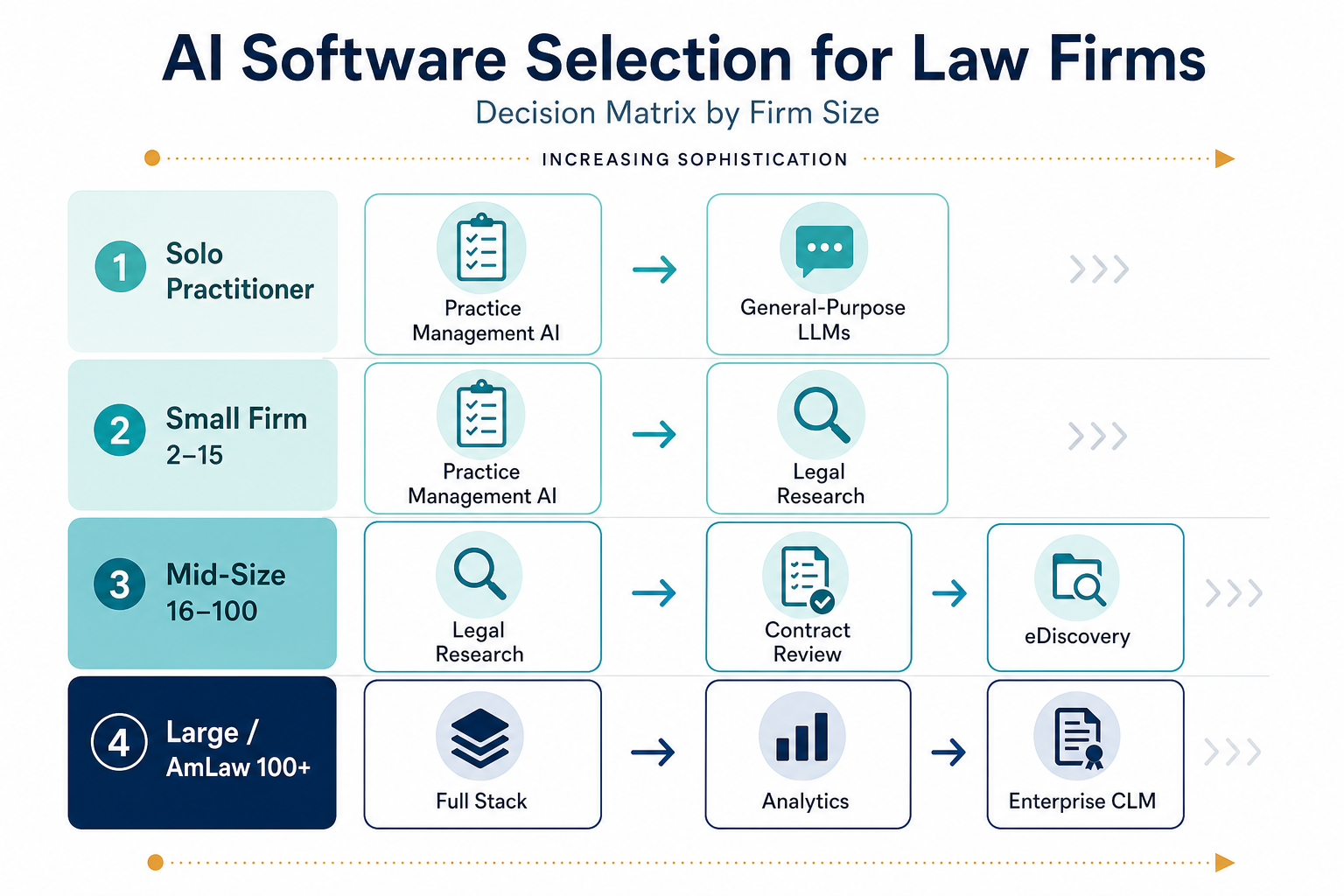
The right AI software category depends on firm size, practice area, and existing technology stack. The matrix below maps the most relevant categories to common firm profiles.
| Firm Size | Litigation | Corporate / Transactional | Regulatory / Compliance | General Practice |
|---|---|---|---|---|
| Solo Practitioner | Practice Management AI + General LLM | Practice Management AI + General LLM | Practice Management AI + General LLM | Practice Management AI + General LLM |
| Small Firm (2–15) | Practice Management AI + Legal Research | Practice Management AI + Contract Review | Practice Management AI + Compliance Monitoring | Practice Management AI + Legal Research |
| Mid-Size Firm (16–100) | Legal Research + E-Discovery | Contract Review + CLM | Compliance Monitoring + Legal Research | Legal Research + Practice Management AI |
| Large Firm / AmLaw 100+ | Full Stack: Legal Research, E-Discovery, Analytics, Contract Review, Enterprise CLM | Full Stack: Contract Review, CLM, Legal Research, Analytics | Full Stack: Compliance Monitoring, Legal Research, Analytics | Full Stack: All categories |
The data supports broad adoption across firm sizes. Clio's 2026 Mid-Sized Law Firms Report found that 86% of mid-sized firms have adopted AI. The FTI Consulting and Relativity 2026 General Counsel Report puts in-house generative AI usage at 87%, nearly double the 44% reported a year prior. But adoption does not equal effective use: Clio's 2026 Solo & Small Firm Report found that 71% of solo practitioners and 75% of small firms have adopted AI, yet only 32% of solos and 31% of small firms report an associated revenue increase.
Chronological incident history
No sanction cases have named this tool in the tracked record set to date. This does not imply the tool is safe — see Risk Digest for ongoing monitoring.
← Compare peer toolsReport a correction or tip
Spotted an outdated figure, a misstated fact, or a ruling this tool profile should reflect? Public comments are disabled for this content given the professional cost of a misreported case outcome, penalty amount, or rule text — use the structured correction channel instead.
Report a correction or tip for this record →