
AI in Law Practice: A Practical Workflow Integration Guide for 2026
A step-by-step implementation framework for attorneys and legal ops professionals at small to mid-sized firms, covering infrastructure assessment, process optimization, tool selection, ethics compliance, and gradual rollout with ROI measurement.

State of AI Adoption in Legal Practice
The numbers are no longer debatable. According to Clio's 2025 Legal Trends Report, 79% of legal professionals now use AI in their firms. That figure represents a dramatic leap from the 19% reported in 2023. The 8am 2026 Legal Industry Report, surveying 1,300 respondents, found that 69% use general-purpose generative AI tools for work — more than double the 31% from the prior year — and 42% now use legal-specific AI tools, up from 21%. Litify's 2025 report independently pegs the adoption rate at 78%. Across three different surveys with different methodologies, the directional signal is identical: AI use in law firms has become mainstream in roughly two years.
But adoption without governance creates risk. The same 8am report found that 54% of law firms offer no AI training and have no plans to implement it. Forty-three percent have no AI policy and no intention of creating one. Only 9% have an AI policy that is actively enforced. This gap between individual usage and institutional readiness is the central problem this guide addresses.
The consequences of that gap are already visible in court dockets. As of June 2026, the Ropes & Gray AI court order tracker records 681 cases and court rules on AI use across federal and state courts. Sanctions for AI-generated hallucinated citations — in cases like Mata v. Avianca, Withers v. City of Aberdeen, and Lnu v. Blanche — have made clear that courts will not accept "the AI did it" as a defense. The professional stakes are high, but so are the potential rewards for firms that approach AI deliberately.
Why a Structured Workflow Approach Matters
The firms seeing the greatest return on AI investment share a common pattern: they do not treat AI as a plug-and-play productivity hack. Instead, they follow a deliberate sequence that begins long before any tool is selected. Clio's research shows that wide adopters of AI are nearly three times more likely to report revenue growth than non-adopters. Among firms that grew revenue using AI, 77% credit improved operations — document generation, workflow automation, and better client communication — not just faster research or drafting.
An ad-hoc approach — where individual attorneys sign up for consumer-grade AI tools without firm-level oversight — creates three categories of risk that a structured workflow mitigates:
- Professional liability: Hallucinated citations, incorrect legal analysis, or misapplied jurisdiction can lead to sanctions, malpractice claims, or disciplinary action.
- Confidentiality breaches: Consumer AI tools may train on user inputs. Without a zero-data-retention agreement and proper vendor vetting, client data can be exposed.
- Wasted investment: Tools selected without infrastructure readiness or process alignment often fail to deliver measurable ROI, leading to abandonment and skepticism about future technology investments.
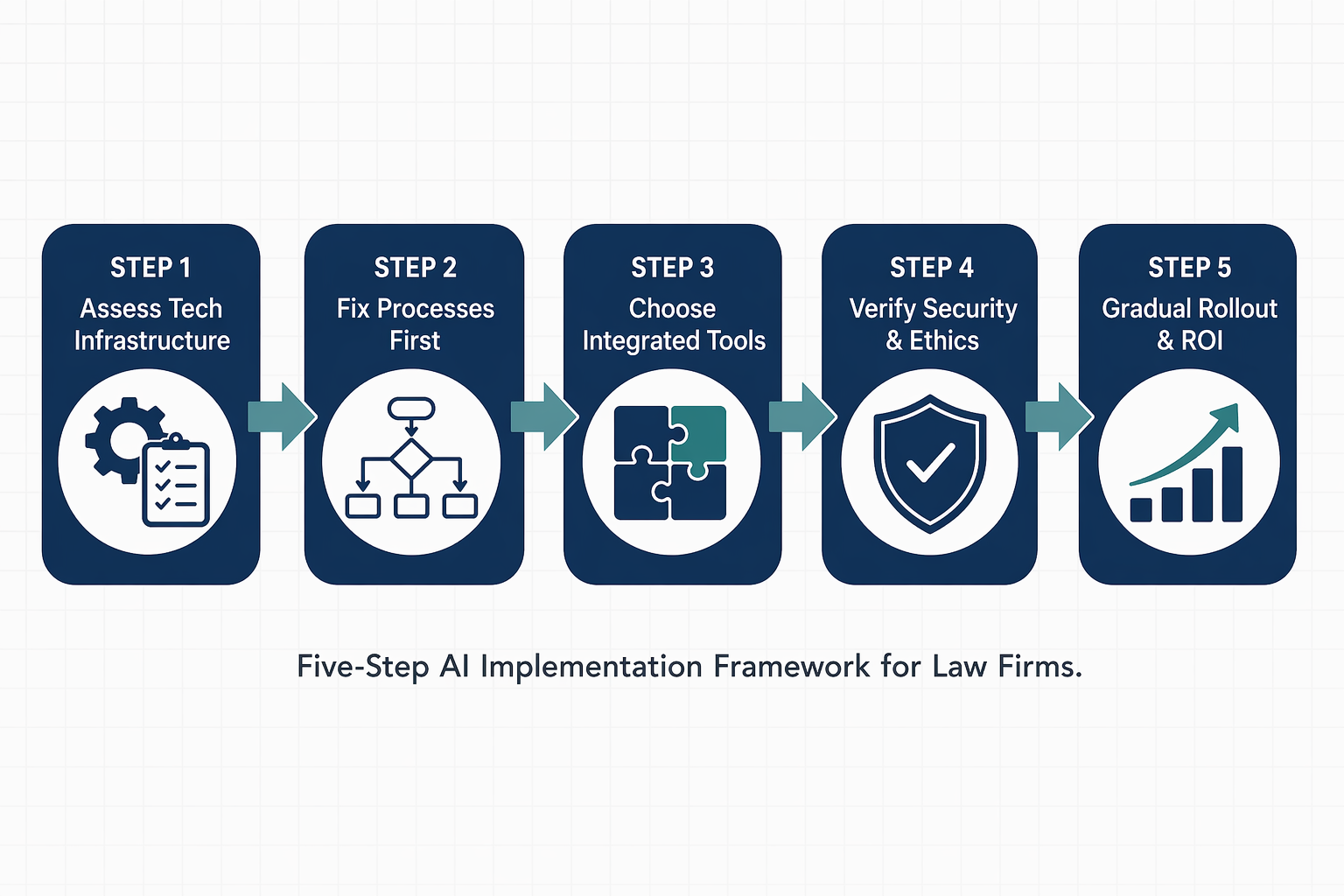
The five-step framework that follows is designed to reduce all three categories of risk while maximizing the productivity gains that the data shows are achievable. It draws on the implementation sequence recommended by Clio's workflow integration guide, the vendor due diligence requirements of ABA Formal Opinion 512, and the real-world adoption patterns documented across multiple industry surveys.
Step 1: Assess Your Firm's Tech Infrastructure Readiness
Before evaluating any AI tool, assess what your firm already has in place. AI tools are only as effective as the infrastructure they integrate with. A tool that promises automated time capture or document drafting will underperform if your practice management system is outdated, your data is siloed across incompatible platforms, or your hardware cannot handle the processing load.
Conduct an audit across four dimensions:
| Dimension | What to Evaluate | Red Flags |
|---|---|---|
| Hardware & Connectivity | Processor speed, RAM, internet bandwidth, VPN compatibility | Workstations older than 4 years; inconsistent internet speeds; no cloud access |
| Software Stack | Practice management system, document management system, billing platform, email client | Disconnected systems that require manual data transfer; no API access |
| Data Hygiene | File naming conventions, folder structure, metadata consistency, document versioning | No standardized naming; duplicate files; inconsistent metadata across matters |
| Security Posture | Encryption standards, access controls, backup protocols, incident response plan | No encryption at rest; shared passwords; no multi-factor authentication |
This step often reveals that the firm's foundational technology needs attention before AI can add value. A firm running on a legacy practice management system with no API integrations will struggle to connect AI tools to the data they need. Addressing these gaps first prevents the common failure mode of purchasing an AI tool that cannot access the firm's existing data.
Step 2: Fix Processes First, Then Layer AI
The most common mistake firms make is layering AI on top of broken workflows. If your client intake process requires manual data entry across three systems, adding an AI drafting tool will not fix the intake bottleneck — it will just generate documents faster from incomplete or inconsistent data.
Before introducing AI, automate and standardize these core workflows:
- Client intake and conflict checking: Implement automated intake forms that feed directly into your practice management system.
- Document automation: Create templates for routine documents (engagement letters, pleadings, discovery requests) so AI tools have clean, standardized inputs.
- Time tracking and billing: Move from manual time entry to automated capture where possible. Clio's research found that 59% of firms now use flat fees either exclusively or alongside hourly rates, and AI-powered billing insights can help identify where time is being spent.
- Calendar and deadline management: Ensure your docketing system is integrated with your practice management platform so AI tools can access accurate deadline data.
For readers who want a deeper dive on document-specific AI workflow integration, the site's AI Legal Document Workflow: A Step-by-Step Guide for Law Firms covers document-level automation in detail. This guide focuses on the broader firm-wide process readiness that must come first.
Step 3: Choose Tools That Integrate — Legal-Specific vs. General-Purpose AI
Once your infrastructure and processes are ready, the tool selection decision becomes clearer. The market now offers two distinct categories of AI tools for legal work, and the choice between them has direct implications for accuracy, confidentiality, and professional responsibility.
| Category | Examples | Key Advantage | Key Risk |
|---|---|---|---|
| Legal-Native AI Platforms | Westlaw AI/CoCounsel, Lexis+ AI, Bloomberg Law AI, Harvey, Spellbook, Kira Systems, Ironclad | Ground responses in verified legal databases; reduce hallucination risk; often include data retention protections; designed for legal workflows | Higher cost; may require integration with existing practice management systems; narrower scope of tasks |
| General-Purpose LLMs | ChatGPT, Claude, Google Gemini, Microsoft Copilot | Broad capability; lower upfront cost; familiar interface; useful for brainstorming and general research | Higher hallucination risk; may train on user inputs unless enterprise version with data protections is used; no legal-specific grounding |
The evidence increasingly favors legal-specific tools for client-facing work. The 8am report found that 43% of legal professionals report greater trust in legal-specific tool output compared to consumer AI. The ABA's 10-step AI content checklist explicitly states: "Legal-specific tools significantly reduce the risk of hallucinations by grounding responses in verified legal databases. But grounding is not supervision." The ABA's warning is critical: even the best legal AI tool requires human verification.
For firms on a tight budget, the site's Free AI Tools for Solo and Small-Firm Lawyers: A Budget-Conscious Assessment with Cost-Per-Task Analysis provides a practical starting point. For a deeper look at accuracy benchmarks, see Purpose-Built Legal AI vs. General Models: What the Accuracy Benchmarks Show.
The 8am report also found that 52% of firms using legal-specific AI chose tools integrated into software they already use. This integration preference is rational: a tool that connects to your existing practice management system, document management platform, and billing software will deliver more value than a standalone tool that requires manual data transfer.
Step 4: Security, Confidentiality, and Ethics Compliance Check
Before any AI tool touches client data, it must pass a compliance review grounded in ABA Formal Opinion 512 (2024), which requires vendor due diligence before deploying any AI tool in client matters. This is not optional best practice — it is an ethical obligation under Model Rule 1.1 (competence) and Model Rule 1.6 (confidentiality).
The due diligence checklist includes:
- Review vendor terms of service for data usage clauses. Confirm that the vendor does not train its models on your input data. Look for explicit "zero data retention" language.
- Verify security certifications. SOC 2 Type II certification is the minimum standard for cloud-based legal tools. Check for encryption at rest and in transit (AES-256 and TLS 1.3).
- Assess the vendor's data retention and deletion policies. Understand what happens to your data if you terminate the subscription.
- Confirm that the tool's output is not used to train or improve the underlying model without your explicit consent.
- Check whether the tool has been independently audited or benchmarked for accuracy in legal tasks.
State-level ethics guidance is also evolving rapidly. The California Bar issued substantially expanded generative AI practical guidance in May 2026, reframing competence obligations, addressing AI agents, expanding billing guidance, and reiterating the duty of candor. Other states are likely to follow. Always check your specific jurisdiction's current ethics guidance before deploying AI tools in client matters.
For a deeper understanding of the ethical obligations, see the site's AI Legal Ethics in 2026: What Every Lawyer Must Know About the New Duty of Technological Competence.
Step 5: Gradual Rollout and ROI Measurement
The final step is implementation — and the evidence strongly favors a phased approach. Clio's research shows that 82% of legal professionals expect to increase their use of AI over the next 12 months, but the firms that scale successfully do so gradually, measuring impact at each stage.
A phased rollout plan:
| Phase | Duration | Activities | Success Metrics |
|---|---|---|---|
| Pilot | 4-6 weeks | Select 2-3 attorneys from one practice area; deploy one AI tool for a specific task (e.g., legal research or document drafting); provide training; establish feedback loop | Time saved per task; user satisfaction score; number of errors caught during human review |
| Evaluate | 2 weeks | Analyze pilot data; identify workflow integration issues; adjust training and tool configuration; document lessons learned | ROI calculation (time saved × hourly rate vs. tool cost); error rate; attorney adoption rate |
| Expand | 8-12 weeks | Roll out to additional practice areas; add complementary AI tools; integrate with practice management system; update firm AI policy based on pilot findings | Firm-wide adoption rate; revenue impact; client feedback on responsiveness |
| Optimize | Ongoing | Monitor usage patterns; update training materials; review new tool features; reassess vendor compliance quarterly | Continuous improvement metrics; staff retention and satisfaction; competitive positioning |
The ROI data is compelling. The 8am report found that 38% of respondents save 1-5 hours per week from AI adoption, and 14% save 6-10 hours. Only 6% report no productivity gains, down from 17% in the prior year. Clio's research shows that wide adopters are nearly three times more likely to report revenue growth, and 65% report improved work quality, 63% report better client responsiveness, and 54% report increased work capacity.
A simple ROI tracking framework: for each AI tool, track (1) hours saved per week per attorney, (2) billable hours generated or recovered, (3) error rate before and after implementation, and (4) client satisfaction scores. Compare these against the tool's subscription cost and the time invested in training and oversight.
Common Pitfalls and Risk-Mitigation Strategies
Even with a structured framework, firms encounter predictable obstacles. The following table maps the most common pitfalls to specific mitigation strategies.
| Pitfall | Why It Happens | Mitigation Strategy |
|---|---|---|
| Skipping vendor due diligence | Pressure to adopt quickly; assumption that well-known tools are automatically compliant | Make vendor due diligence a mandatory step in procurement policy. Use ABA Formal Opinion 512 as the minimum standard. |
| Failing to train staff | Assumption that AI tools are intuitive; lack of budget or time for training | Allocate at least 4 hours of structured training per attorney before deployment. Include hands-on exercises with real (anonymized) case materials. |
| Using consumer AI for confidential work | Convenience; lower cost; lack of awareness about data retention policies | Prohibit use of free-tier consumer AI tools for any client work. Provide approved enterprise-grade alternatives. |
| Neglecting to update AI policies | Policy created once and forgotten; rapid tool evolution outpaces static policies | Schedule quarterly policy reviews. Assign a partner or legal ops lead to monitor regulatory and ethics updates. |
| Over-relying on AI output without verification | Trust in technology; time pressure; confirmation bias | Implement the ABA's 10-step AI content review checklist (see next section) as a mandatory workflow step. |
The AI Content Review Checklist (Adapted from ABA's 10-Step Checklist)
The ABA's 10-step AI-generated content checklist provides a rigorous framework for reviewing AI output before it reaches a client or court. The following condensed version is adapted for daily workflow use, preserving the core verification steps while making them practical for time-pressured practitioners.
| Step | Action | Why It Matters |
|---|---|---|
| 1 | Use only firm-approved AI tools | Unvetted tools may lack data protections or produce unreliable output |
| 2 | Confirm security and confidentiality | Verify zero data retention and SOC 2 Type II certification before inputting any client data |
| 3 | Check for factual accuracy | AI can generate plausible-sounding but incorrect statements. Verify every factual claim. |
| 4 | Cross-check sources against verified legal databases | AI may cite real-looking but fabricated cases. Use Westlaw, Lexis, or Fastcase to confirm each citation. |
| 5 | Analyze reasoning quality using IRAC/CRAC | AI-generated legal analysis may skip steps or misapply legal standards. Ensure the reasoning structure is sound. |
| 6 | Confirm correct jurisdiction | AI may apply the wrong state's law or cite out-of-jurisdiction precedent. Verify jurisdiction-specific rules. |
| 7 | Look for bias or mischaracterization | AI models can reflect training data biases. Review for subtle mischaracterizations of facts or law. |
| 8 | Verify formatting and procedural rules | Court filings have strict formatting and procedural requirements. AI may not comply with local rules. |
| 9 | Ensure ethical compliance | Confirm that the AI-generated content complies with ABA Model Rules and your state's ethics guidance. |
| 10 | Require final human sign-off | No AI-generated content should reach a client or court without review and approval by a licensed attorney. |
Next Steps: From Framework to Practice
The five-step framework presented here is designed to be actionable immediately. The sequence is deliberate: infrastructure assessment comes before process improvement, which comes before tool selection, which comes before compliance vetting, which comes before rollout. Skipping steps creates risk.
Start today with these immediate actions:
- Conduct the infrastructure readiness audit outlined in Step 1. Identify the top three gaps and create a remediation timeline.
- Map your firm's three most time-consuming manual workflows. Identify one that can be automated or standardized within 30 days.
- Review your firm's current AI usage. If no policy exists, draft a one-page interim policy that requires (a) use of firm-approved tools only, (b) mandatory human review of all AI-generated content, and (c) prohibition of client data input into unvetted consumer AI tools.
- Select one AI tool for a pilot program. Use the vendor due diligence checklist from Step 4 before signing any agreement.
- Schedule a 60-minute training session for the pilot group. Include hands-on practice with the ABA content review checklist.
For readers who want to understand the broader governance context, the site's Legal AI in 2026: The Governance Gap Between Individual Adoption and Institutional Readiness provides the diagnostic analysis that this guide addresses prescriptively. The two pieces together — understanding the gap and following the framework — give any firm a defensible, evidence-based path to responsible AI integration.
Grounded in
This procedure is grounded in the cited rule or opinion, independent of any single documented case. See the Regulation tracker for the governing text.
Cases this step would have prevented
No cases have been explicitly linked to this checklist yet. See Risk Digest for documented incidents generally.
← Back to WorkflowsReport a correction or tip
Spotted an outdated figure, a misstated fact, or a ruling this workflow checklist should reflect? Public comments are disabled for this content given the professional cost of a misreported case outcome, penalty amount, or rule text — use the structured correction channel instead.
Report a correction or tip for this record →