
How to Build an AI Legal Document Workflow: A Step-by-Step Guide for Law Firms
A practical, structured guide for attorneys and legal ops leaders on designing an AI document workflow that maps document types to AI capabilities, integrates with case management software, and embeds mandatory human review at the correct points — grounded in current adoption data and professional responsibility requirements.
Why AI Legal Document Workflows Are No Longer Experimental in 2026
The question for most law firms in mid-2026 is no longer whether to use AI for document work, but how to structure its use so it produces reliable, defensible output. The adoption numbers make the shift unmistakable: 79% of legal professionals now report using AI tools in some capacity, according to the Clio 2025 Legal Trends Report. The 8am 2026 Legal Industry Report pegs generative AI usage specifically at 69%, more than double the 31% recorded in 2025. Document review leads the use-case list at 77% among AI-using practitioners, followed by legal research at 74% and brief or memo drafting at 59%, per a Thomson Reuters 2025 study.
The global legal technology market, estimated at $20.81 billion in 2025, is projected to reach $65.51 billion by 2034 according to Precedence Research. That growth is being driven not by experimental curiosity but by measurable efficiency gains: Thomson Reuters reports that lawyers without automation tools spend up to 56% of their time drafting, and that document automation can produce first drafts 50–72% faster than manual creation.
Yet the gap between individual use and firm-level implementation — 69% individual versus 46% firm-wide for general-purpose tools — signals that the bottleneck has shifted. The technology works. What many firms lack is a repeatable, auditable workflow that maps document types to the right AI capabilities, integrates with existing case management software, and embeds mandatory human review at the correct points. This guide provides that structure.
The Four-Layer Architecture of Modern Legal Drafting AI
Not all AI drafting tools are built the same. The tools that produce reliable, firm-specific output share a four-layer architecture that separates them from general-purpose wrappers. Understanding this architecture is essential because it determines which document types a tool can handle and where its failure modes lie.
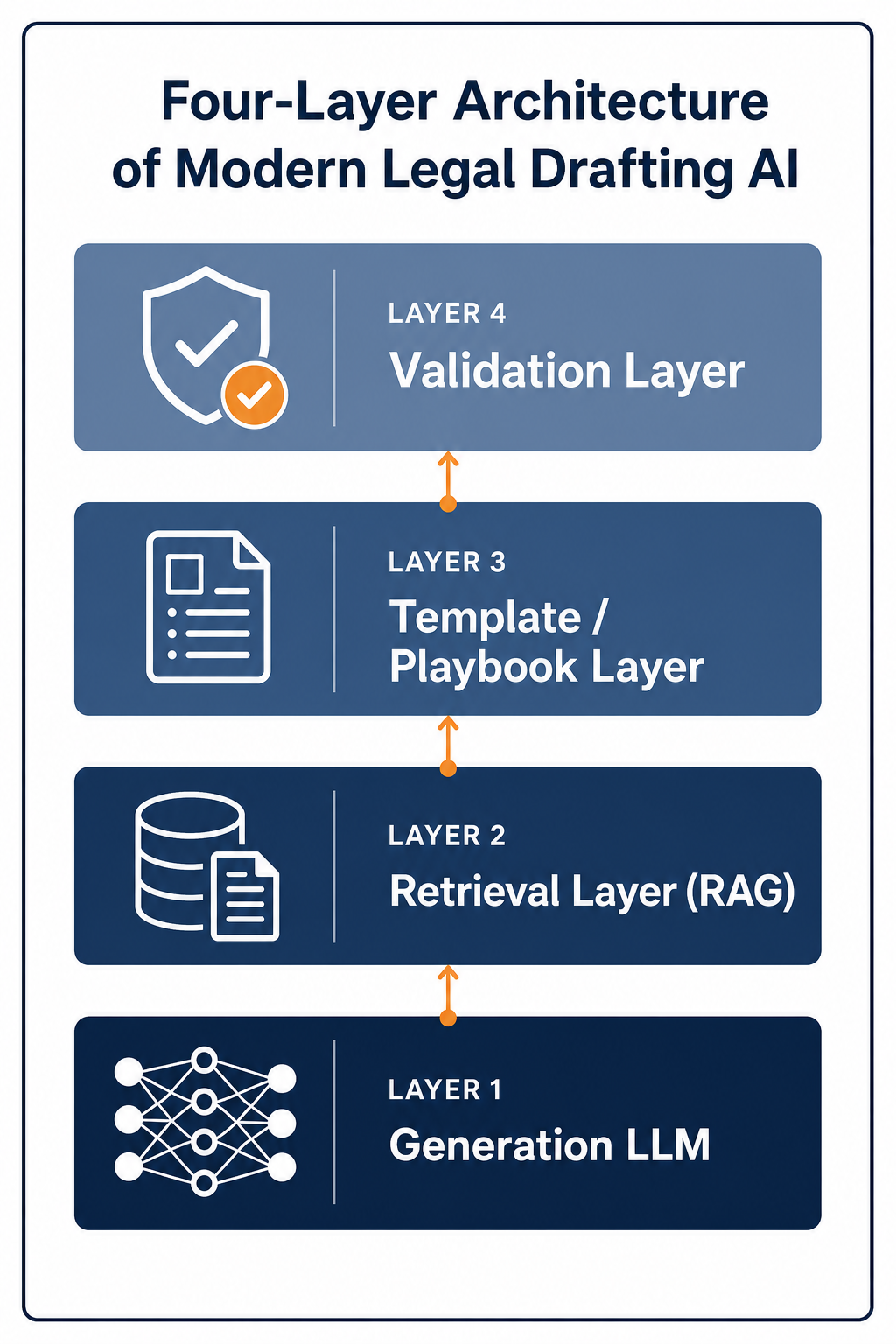
The framework, described by Edtek in a January 2026 guide and echoed in LegalFly's 2026 tool comparison, consists of:
- Generation layer (LLM): The underlying large language model that produces natural language output. This can be a general-purpose model (GPT-4o, Claude) or a legal fine-tune. The generation layer alone, without the other three, produces generic, jurisdiction-agnostic text that senior attorneys can spot immediately.
- Retrieval layer (RAG): Retrieval-augmented generation pulls from the firm's own precedent library, clause banks, and approved language. This is what makes output read like the firm wrote it rather than like a generic chatbot. Tools like CoCounsel and Lexis+ AI use RAG to ground output in vetted legal databases.
- Template/playbook layer: This layer encodes the firm's structured knowledge — approved clause libraries, jurisdiction-specific language preferences, deal playbooks, and formatting standards. LegalFly, for example, provides jurisdiction-aware drafting across 60+ jurisdictions and translates into 80+ languages.
- Validation layer: The validation layer checks output for citation accuracy, jurisdiction awareness, formatting compliance, and internal consistency. This is the layer that prevents the kind of hallucination that led to sanctions in Mata v. Avianca and similar cases.
When evaluating a tool, ask which of these layers it actually implements. A tool with only a generation layer and a thin retrieval layer — essentially a chatbot with a document upload — will produce output that requires substantially more attorney editing than a tool with all four layers. The accuracy benchmarks comparing purpose-built legal AI to general models make this distinction clear: tools with retrieval and validation layers consistently outperform general-purpose models on legal drafting tasks.
Which Document Types Work Best with AI — and Which Don't
A structured workflow begins with honest classification. Not every legal document benefits equally from AI drafting, and attempting to apply AI to the wrong document type creates more work than it saves. The taxonomy below, adapted from the Edtek framework and supported by practitioner reports, provides a starting point.
| Fit Category | Document Types | Why It Works or Fails | Example Tools |
|---|---|---|---|
| Strong fit | Transactional documents (NDAs, MSAs, SOWs), standardized regulatory filings, compliance reports, routine correspondence | High standardization, clear templates, repetitive language patterns, low ambiguity risk | LegalFly, Spellbook, MyCase IQ |
| Partial fit | Litigation memos, demand letters, advisory letters, discovery requests | Moderate structure but fact-specific; requires careful fact-checking and jurisdiction awareness | CoCounsel, Lexis+ AI, Clearbrief |
| Poor fit | Appellate briefs, bespoke transaction agreements, sensitive settlement agreements, pleadings with novel legal arguments | High strategic stakes, novel arguments, heavy reliance on court-specific procedural rules, risk of hallucinated citations | Not recommended without extensive human rewriting |
The key insight is that "strong fit" documents are those where the firm already has well-developed templates and playbooks. AI accelerates the assembly of known components. "Poor fit" documents are those where the value lies in novel argumentation or strategic judgment — precisely the areas where current AI tools are weakest and where hallucination risk is highest.
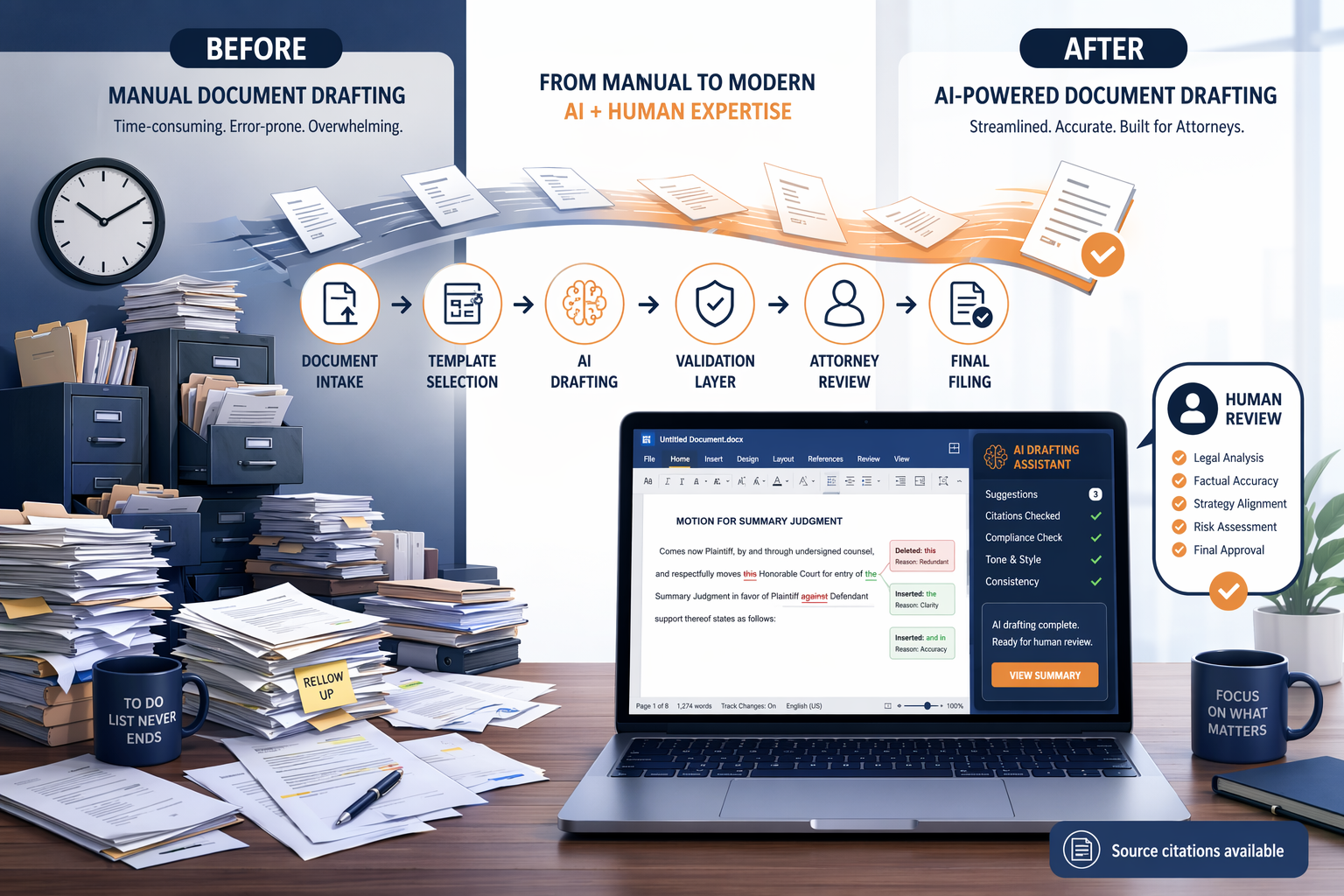
A Six-Stage AI Document Workflow: From Intake to Final Filing
The following six-stage workflow is designed to be tool-agnostic. It can be implemented with any AI drafting tool that provides the four-layer architecture described above, and it integrates with case management platforms such as Clio, MyCase, and Smokeball.
- Document intake and classification. The incoming document or request is classified by type (NDA, complaint, discovery response, etc.), jurisdiction, and complexity. Tools like Foundation AI can automate this routing by scanning incoming documents and assigning them to the correct matter file. The classification determines which template, playbook, and AI configuration to use.
- Template and playbook selection. The system selects the appropriate template from the firm's approved library and loads the relevant playbook — jurisdiction-specific language preferences, clause options, and formatting standards. This step is where the template/playbook layer of the architecture is engaged.
- AI drafting with retrieval augmentation. The AI generates a first draft using the selected template, pulling from the firm's precedent library via RAG. The attorney provides matter-specific facts and preferences. The output should be a complete draft, not fragments. LegalFly users at SAP, Lufthansa, and AXA report a 50% reduction in drafting time at this stage.
- Validation layer checks. Before the draft reaches the attorney, the validation layer runs automated checks: citation verification against the firm's database or legal research platforms, jurisdiction awareness (does this clause comply with the relevant state law?), formatting compliance, and internal consistency. This is the layer that catches the kind of hallucination that led to sanctions in Mata v. Avianca.
- Mandatory human attorney review. The attorney reviews the validated draft, makes substantive edits, verifies strategic decisions, and confirms that the document meets professional responsibility standards. This step is non-negotiable under ABA Formal Opinion 512 and state bar guidance. The attorney should treat the AI draft as a first draft from a junior associate — not as a final product.
- Finalization and filing. The final document is approved, filed with the court or delivered to the client, and the matter record is updated in the case management system. The AI-generated draft and the attorney's edits should be preserved in the matter file for audit purposes.
This workflow integrates naturally with case management platforms. For example, Clio Draft can auto-fill court forms and capture billable time from any document. Smokeball's Archie AI provides matter-specific support by pulling context from the firm's case management system. The key is that the workflow — not the tool — defines the handoffs and verification points.
Where Human Oversight Is Mandatory: ABA Formal Opinion 512 and State Bar Guidance
The professional responsibility framework for AI-assisted drafting is now well-established. ABA Formal Opinion 512, issued in July 2024, provides the foundational analysis, applying four Model Rules to generative AI use:
- Rule 1.1 (Competence): Lawyers must understand the benefits and risks of the AI tools they use. This includes understanding how the tool generates output, what data it retains, and its known failure modes.
- Rule 1.6 (Confidentiality): Disclosing confidential client information to an outside AI program without informed consent violates the duty of confidentiality. The NHBA Ethics Committee guidance (September 2024) explicitly states this requirement.
- Rules 5.1 and 5.3 (Supervision): Partners and supervising attorneys must ensure that all lawyers and nonlawyer assistants — including AI tools — in the firm comply with professional obligations. The 2012 amendment to Model Rule 5.3's title explicitly encompasses nonhuman assistance.
- Rule 1.4 (Communication): Lawyers must communicate with clients about the use of AI in their matters, including obtaining informed consent where client data is involved.
The practical implication for the six-stage workflow is clear: stage five (mandatory human attorney review) is not a best practice — it is an ethical obligation. The attorney must verify every citation, confirm that the document reflects the client's strategic objectives, and ensure that the AI-generated language does not contain errors that would constitute a failure of competence.
The sanctions trajectory for AI hallucinations provides a cautionary backdrop. The attorney in Mata v. Avianca was sanctioned for submitting fabricated case citations generated by ChatGPT. That case is not an outlier — it is the leading edge of a pattern that courts are increasingly addressing through standing orders and disclosure requirements.
Common Production Workflow Patterns Observed in Law Firms
Firms that have successfully integrated AI into document workflows tend to converge on one of four patterns, depending on their practice areas, document volume, and risk tolerance. These patterns are not mutually exclusive — a firm might use different patterns for different document types.
| Pattern | Best For | How It Works | Tool Capabilities Required |
|---|---|---|---|
| Draft-first-then-edit | Routine transactional documents, standard correspondence | AI generates a complete first draft; attorney edits and finalizes. Most common pattern, used by 54% of legal professionals for correspondence drafting (MyCase 2025). | Generation layer + retrieval layer; Word-native workflow |
| Clause-level assistance | Complex contracts, bespoke agreements | Attorney drafts the structure; AI suggests or generates specific clauses based on firm playbooks. Attorney retains full control of document architecture. | Template/playbook layer + retrieval layer; clause library integration |
| Review-and-flag | Document review, due diligence, compliance monitoring | AI reviews documents against defined criteria and flags issues (missing clauses, jurisdiction conflicts, regulatory non-compliance). Attorney reviews flagged items. | Validation layer + retrieval layer; strong pattern-matching |
| Structured drafting with validation | High-stakes filings, regulatory submissions | AI drafts within strict template constraints; validation layer runs automated checks before attorney review. Highest level of automation with strongest guardrails. | All four layers; jurisdiction-aware validation |
The draft-first-then-edit pattern is the most common entry point because it maps directly to how firms already work with junior associates or contract lawyers. The key difference is that AI drafts are produced in seconds rather than hours, and the validation layer can catch errors that a human reviewer might miss. The structured drafting with validation pattern is the most advanced and is typically adopted by firms handling high-volume, high-stakes regulatory work where error tolerance is near zero.
How to Evaluate AI Drafting Tools Against Your Workflow Needs
With the workflow structure defined, the next step is evaluating which tools can support it. The evaluation should focus on the capabilities that enable the workflow stages, not on feature checklists or vendor marketing claims.
- Retrieval quality from firm precedents: Does the tool use RAG to pull from your firm's own document library, or does it rely on a general legal corpus? Tools that retrieve from your own precedents produce output that matches your firm's style and jurisdictional preferences. This is the single most important differentiator.
- Template/playbook support: Can the tool encode your firm's approved clause libraries, deal playbooks, and formatting standards? Tools like LegalFly and Spellbook offer playbook-aware drafting; general-purpose tools do not.
- Validation layer capabilities: Does the tool check citations against a legal research database? Is it jurisdiction-aware? Can it flag internal inconsistencies? The validation layer is what separates a production tool from an experiment.
- Integration with existing case management software: Does the tool integrate with Clio, MyCase, Smokeball, or iManage? Integration determines whether the workflow is seamless or requires manual data transfer between systems.
- Data privacy posture: What is the vendor's stated data retention policy? Can client data be excluded from model training? Does the tool offer on-premises deployment or zero-data-retention options? These questions are directly relevant to Rule 1.6 compliance.
- Pricing: Entry-level legal drafting tools range from $100 to $500 per user per month; mid-market tools range from $300 to $1,000 per user per month; enterprise pricing is significantly higher and typically custom. For budget-conscious solo and small-firm readers, the free AI tools comparison guide provides a cost-per-task analysis.
Ethical Guardrails Embedded in the Workflow
The six-stage workflow described above is designed with ethical guardrails at every stage. These guardrails are not add-ons — they are structural requirements that make the workflow defensible in a professional responsibility context.
- Informed consent before AI use with client data: Before any client document is processed through an AI tool, the client must be informed and must consent to the use of their data. This is required by Rule 1.6 and reinforced by the NHBA Ethics Committee guidance.
- Data security and confidentiality protections: The tool must have a data privacy posture that prevents client data from being used for model training or retained beyond the matter. Zero-data-retention policies and on-premises deployment options are preferred for sensitive work.
- Mandatory citation verification: Every citation in an AI-generated draft must be independently verified by the reviewing attorney. The validation layer can flag potential issues, but the attorney bears final responsibility under Rule 1.1.
- Billing compliance: ABA Formal Opinion 512 states that if a lawyer uses generative AI to draft a pleading and spends 15 minutes inputting information, the lawyer may charge for that time and the time to review the draft, but generally cannot charge for learning to use the AI tool. Billing practices must reflect this distinction.
- Obligation to consider AI use: ABA Resolution 112 (2019) and the NHBA guidance both suggest that a lawyer's decision not to use AI may need to be communicated to the client if using AI would materially benefit the client or reduce costs. This is an evolving area of professional responsibility that firms should monitor.
For a deeper treatment of the ethics of using general-purpose AI tools like ChatGPT in legal practice, see the complete ethics and risk framework for attorneys. The broader governance challenges facing law firms — where individual adoption (69%) significantly outpaces firm-level implementation (46%) — are explored in the analysis of the legal AI trust and governance gap.
The firms that succeed with AI document workflows in 2026 will be those that treat the workflow — not the tool — as the primary design object. The technology is mature enough to deliver measurable efficiency gains: 50–72% faster first drafts, 54% of legal professionals already using AI for correspondence, and a market projected to triple in a decade. But those gains are contingent on a structure that maps document types to capabilities, integrates with existing systems, and — most importantly — preserves the attorney's role as the final, accountable decision-maker.
Grounded in
This procedure is grounded in the cited rule or opinion, independent of any single documented case. See the Regulation tracker for the governing text.
Cases this step would have prevented
No cases have been explicitly linked to this checklist yet. See Risk Digest for documented incidents generally.
← Back to WorkflowsReport a correction or tip
Spotted an outdated figure, a misstated fact, or a ruling this workflow checklist should reflect? Public comments are disabled for this content given the professional cost of a misreported case outcome, penalty amount, or rule text — use the structured correction channel instead.
Report a correction or tip for this record →